
Resources

Game Development with Rosebud AI

Feeling stuck in your game development journey? Whether it’s uncooperative code, a creativity slump, or life’s challenges, getting derailed is common in game dev. This guide answers key questions about overcoming obstacles, leveraging Rosebud AI to streamline your workflow, and reigniting your passion. With practical steps, stats, and insights tailored for indie devs and hobbyists, you’ll learn how to bounce back and create games efficiently.

What Causes Game Developers to Lose Momentum?

Game development blends creativity, technical skill, and persistence, but several hurdles can stall progress. Understanding these helps you address them effectively:

  • Burnout and Crunch Culture: Long hours and tight deadlines cause exhaustion, anxiety, and reduced productivity. Indie devs, lacking studio support, often feel this most.
  • Scope Creep and Overambition: Simple ideas can balloon into unmanageable projects, leading to frustration and incomplete games.
  • Technical Roadblocks: Debugging, learning new tools, or creating assets from scratch can drain energy, especially for solo developers. Some may consider hiring a professional, such as when you hire Unity developer to tackle complex coding challenges.
  • Motivation Dips and Market Pressures: The saturated indie market, where luck drives much of the success, can make projects feel like long shots, sapping motivation.

What Causes Game Developers to Lose Momentum

Insight: Indie games hold strong with ratings close to AAA titles, showing that quality and innovation can shine if you push past setbacks.

How Can You Regain Your Game Dev Momentum?

Restarting your creative engine starts with mindset shifts and small wins. Here’s how to get unstuck:

  • Take a Break: Step away for 1-2 days. Play games, walk, or journal small wins to refresh your perspective.
  • Reconnect with Your Passion: Reflect on what excited you about your project. Set micro-goals, like coding one mechanic, to rebuild momentum.
  • Tap into Communities: Join r/gamedev or Discord groups to share struggles and gain advice. Connecting with others can spark inspiration, and some communities even connect you with an Offshore Software Development Company for collaborative support.


Data Point: Indie games account for nearly half of Steam’s sales revenue, proving there’s room for fresh ideas if you persist and iterate.

How Does Rosebud AI Help Game Developers Get Back on Track?

Rosebud AI is a no-code platform that simplifies game creation, making it ideal for indie devs looking to overcome barriers. Here’s how it supercharges your comeback:

  • Instant Idea Prototyping: Prompt Rosebud with “Build a retro platformer with jumping mechanics and enemy AI” to get a playable prototype in minutes, bypassing weeks of setup.
  • Effortless Asset Creation: Integrate with tools like Meshy to generate 3D models by describing them, eliminating the need for complex software.
  • Code Generation and Debugging: Rosebud produces clean, functional code for Unity or other engines, serving as a solid foundation for complex features, though minor tweaks may be needed.
  • Fast Publishing: Go from prompt to playable game quickly, perfect for indie devs aiming to test and release efficiently, including those targeting platforms supported by an iOS mobile app development company.


Pro Tip: Use Rosebud for rapid prototyping and add human polish for professional results. It’s especially strong for mobile games and creative, vibes-based projects.


Game Development Experts

What’s a Step-by-Step Plan to Restart Your Game Dev Project?

Follow this roadmap, powered by Rosebud AI, to regain momentum:

  1. Assess and Prioritize (1-2 Days): Identify blockers. Prompt Rosebud for “ways to simplify game scope for a solo dev” to find actionable solutions.
  2. Build a Prototype (3-5 Days): Use Rosebud to create a minimal viable game focusing on core loops. Starting small increases completion chances.
  3. Gather Feedback and Iterate (Ongoing): Share your prototype on platforms like itch.io. Use Rosebud’s AI to implement feedback, such as adding features via prompts.
  4. Prevent Burnout: Work in 90-minute sprints and track progress with tools like Trello to stay motivated.
  5. Launch and Learn: Release a beta. Success often comes from multiple tries, and Rosebud’s speed lets you experiment without heavy time investment.


Stat: Small-team indie games now drive a significant portion of industry revenue, showing tools like Rosebud level the playing field.

Why Should You Use Rosebud AI for Game Development?

Rosebud AI stands out for its accessibility and efficiency. It’s beginner-friendly, with tutorials like those on their YouTube channel, and supports both mobile and web games. By reducing technical barriers, it lets you focus on creativity and iteration, crucial for indie success. The platform’s ability to generate code, assets, and prototypes from simple prompts makes it a must-have for devs looking to save time and stay motivated.

Frequently Asked Questions

How do I overcome game dev burnout?

Take short breaks, set small goals, and connect with communities for support. Use tools like Rosebud AI to reduce workload and reignite creativity.

Can Rosebud AI help beginners in game development?

Yes, its no-code platform and intuitive prompts make it ideal for beginners, with tutorials guiding you through the process.

What types of games can I make with Rosebud AI?

You can create mobile and web games, from retro platformers to puzzle games, using simple text prompts to generate prototypes and assets.

How do I simplify a game project that’s too big?

Prompt Rosebud AI for scope-reduction ideas, focus on core mechanics, and prototype a minimal viable game to test concepts quickly.

Where can I find Rosebud AI resources?

Visit rosebud.ai for the platform and check their YouTube channel for getting-started tutorials.

Ready to Level Up Your Game Dev Journey?

Getting back on track is about progress, not perfection. In a competitive indie market, Rosebud AI is your secret weapon, streamlining creation and letting you focus on what you love. Whether crafting a cozy puzzle game or an action-packed adventure, start small, leverage AI, and keep iterating. If you find yourself stuck, YES IT Labs can help with expert development support to push your project forward. Visit rosebud.ai to kickstart your project with a single prompt. What game will you create today?

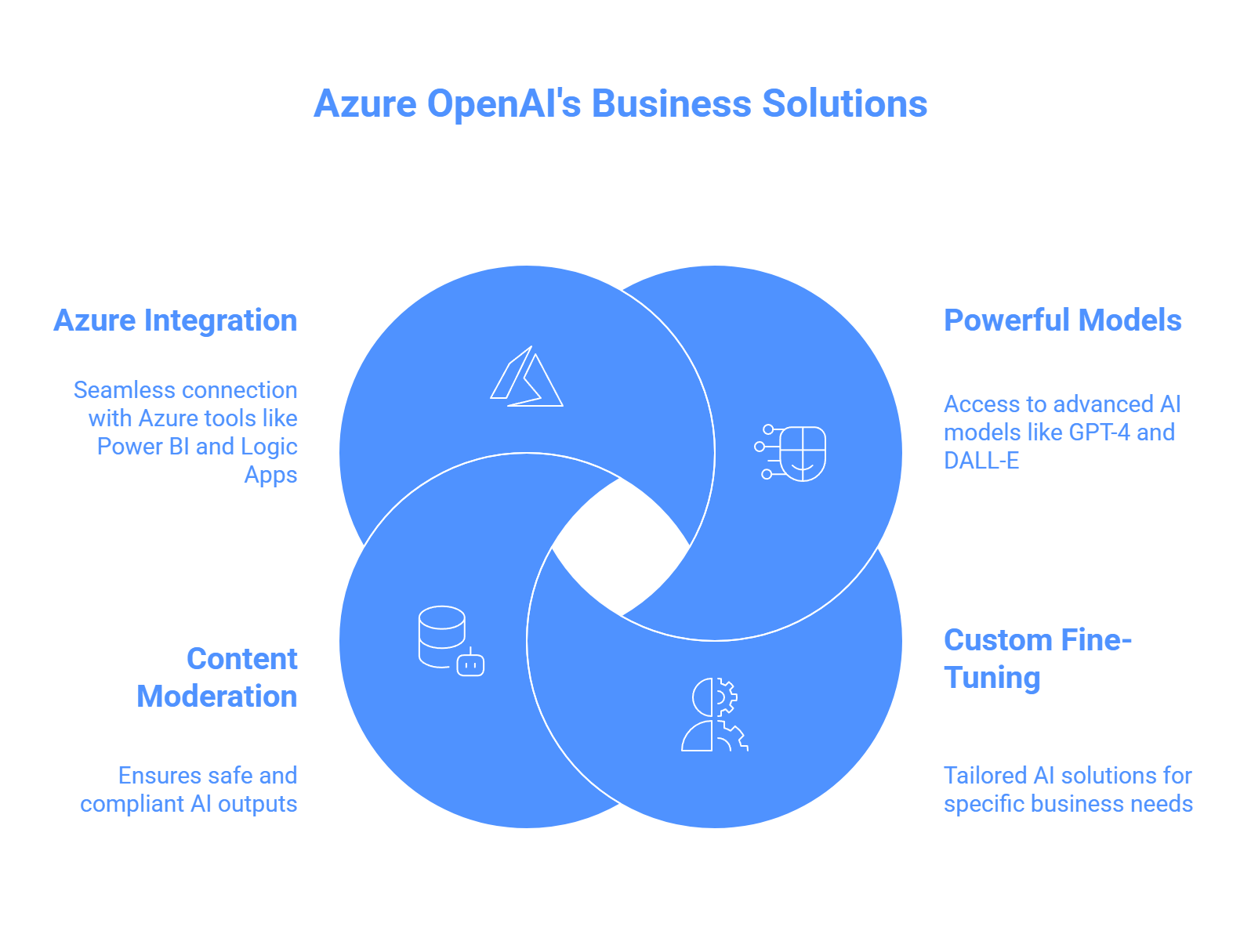
Azure OpenAI Reshapes Business

Created by Microsoft, Azure OpenAI skillfully merges OpenAI’s state-of-the-art AI technologies with the dependable Azure cloud framework. This dynamic system allows businesses to handle data with greater insight and optimize their processes, resulting in notable efficiency gains and improved output. By mid-2025, statistics show that approximately 68% of Fortune 500 firms have integrated Azure OpenAI to enhance various workflow elements, underscoring its broad influence. In this overview, we examine how Azure OpenAI is transforming business intelligence (BI) and automation, backed by practical examples, tangible benefits, and essential adoption strategies. With over 1,200 success narratives from Microsoft clients, it’s clear this technology is sparking creativity across multiple industries. Collaborating with a Microsoft Azure Development Company in USA can assist organizations in customizing these tools to fit their unique needs.

What Azure OpenAI Offers for Businesses

Azure OpenAI provides enterprise-grade AI tools optimized for security, scalability, and compliance. Key features include:

Azure OpenAI Offers for Businesses

  • Access to powerful models like GPT-4 and DALL-E.
  • Custom fine-tuning for tailored solutions.
  • Robust content moderation for safe outputs.
  • Seamless integration with Azure tools like Power BI and Logic Apps.


These capabilities make it ideal for transforming how businesses handle data and workflows.

How Azure OpenAI Enhances Business Intelligence

Business intelligence involves turning raw data into actionable insights. Azure OpenAI makes this faster and more intuitive.

Can You Query Data Easily with Azure OpenAI?

Yes, Azure OpenAI enables natural language querying. With tools like Power BI, users can ask questions like “What are our top products this year?” and get instant visualizations. This feature:

  • Empowers non-technical teams to access insights.
  • Automates report summaries and trend analysis.
  • Speeds up development with AI-generated code comments.


For example, companies use it to create narrative reports that highlight key trends and predictions from datasets. Businesses seeking custom interfaces to interact with these reports can collaborate with a custom web development company to build intuitive dashboards.


Azure OpenAI Experts in USA

Does It Improve Predictive Analytics?

Absolutely. Azure OpenAI analyzes historical data to forecast outcomes, supporting better decisions. Examples include:

  • Retail: Predicting inventory needs to reduce waste.
  • Education: Personalizing student learning plans based on performance data.
  • Automotive: Streamlining strategies with data-driven insights.


Paired with Azure’s machine learning, it enables “what-if” scenarios for strategic planning.

Key Benefits for BI

  • Speed: Cuts analysis time from hours to minutes.
  • Precision: Uncovers hidden patterns for deeper insights.
  • Scalability: Manages large datasets effortlessly.


Azure OpenAI turns BI into a proactive tool, helping businesses stay ahead of market trends.

How Azure OpenAI Powers Automation

Automation with Azure OpenAI goes beyond basic scripts, offering intelligent, adaptive systems.

What Can Azure OpenAI Automate?

Using Azure OpenAI Assistants, businesses build custom AI agents to handle complex tasks. These integrate with Azure Logic Apps or Power Automate for:

  • Automating email responses and approvals.
  • Creating chatbots for e-commerce orders and support.
  • Triggering serverless actions like generating code or summarizing documents.


For instance, HR teams use it to answer employee queries instantly, reducing support tickets. For businesses wanting to extend automation to mobile platforms, mobile application development services can create AI-powered apps that integrate Azure OpenAI for seamless task management.

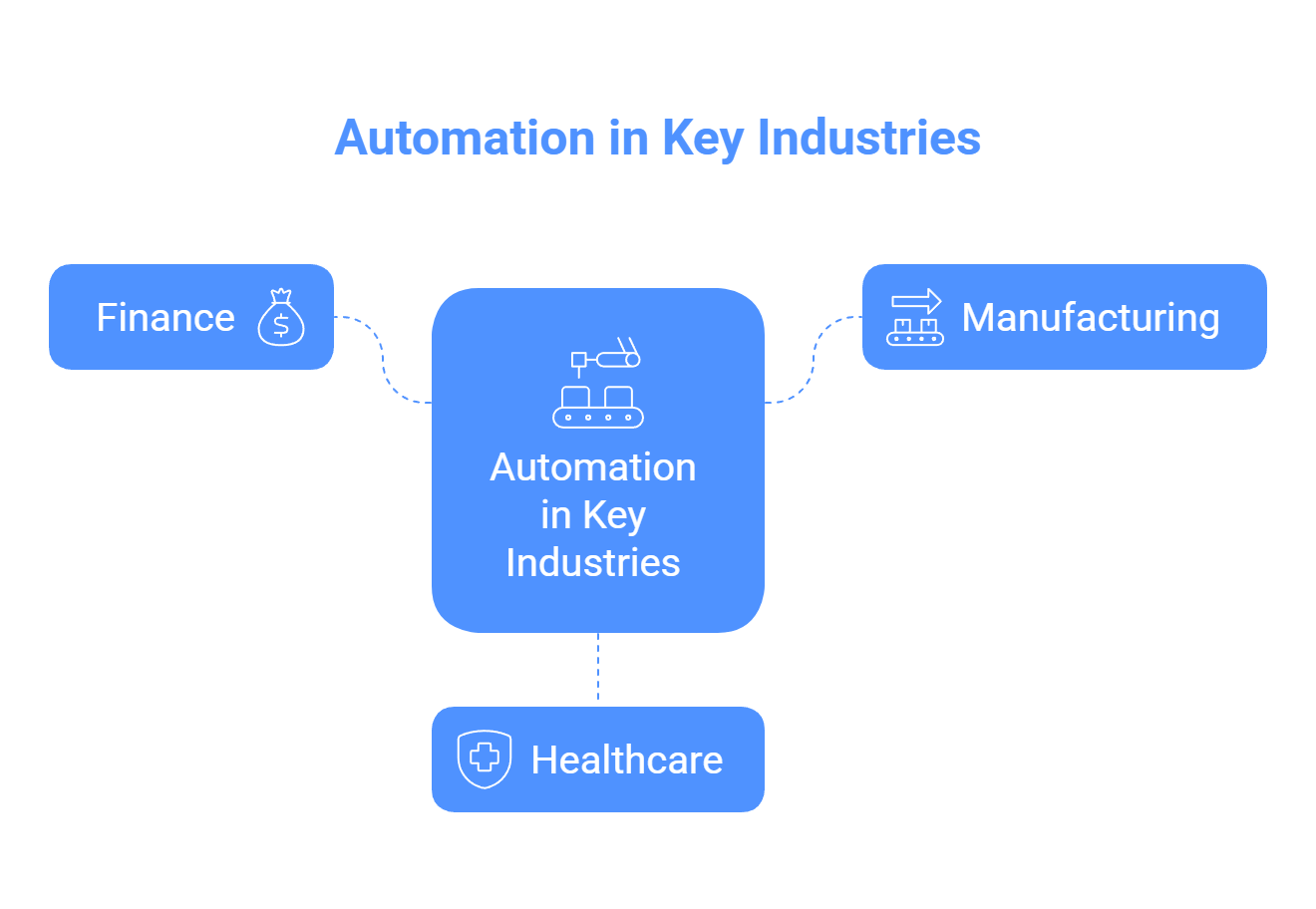
Industry-Specific Automation Examples

Industry-Specific Automation

  • Finance: Detects fraud by analyzing transactions in real-time.
  • Manufacturing: Predicts equipment maintenance to prevent downtime.
  • Healthcare: Automates patient intake and initial diagnostics.

Major corporations, like those in automotive, use it for intelligent vehicle insights, enhancing operational efficiency.

Key Benefits for Automation

  • Cost Efficiency: Reduces manual work significantly.
  • Flexibility: Adapts to new data and scenarios.
  • Customer Satisfaction: Delivers personalized, 24/7 support.

Azure OpenAI streamlines workflows, minimizing errors and scaling seamlessly.

What Challenges Should You Consider?

Adopting Azure OpenAI requires planning:

  • Data Privacy: Use Azure’s security features to comply with regulations like GDPR.
  • Ethical AI: Leverage content moderation to avoid biases.
  • Implementation Costs: Start with small pilots to manage expenses.
  • Training Needs: Invest in staff training for smooth integration.

Despite these challenges, the productivity gains often outweigh initial costs.

What’s Next for Azure OpenAI?

By 2025, Azure OpenAI will likely expand with:

  • Multimodal AI, combining text, images, and audio.
  • Deeper integration with tools like Copilot and Azure Machine Learning.
  • Autonomous agents that innovate, such as generating new business strategies.

Industries like tax preparation are already adopting it, signaling broader future use.

Why Choose Azure OpenAI?

Azure OpenAI is a game-changer, making data smarter and processes more efficient. It empowers businesses to thrive in an AI-driven world. Ready to start? Explore Microsoft’s resources or try Azure’s free trial to see how it can transform your organization.

NetSuite Module Trends

NetSuite, Oracle’s leading cloud ERP platform, empowers businesses to streamline operations with its modular design. From financial management to supply chain solutions, NetSuite module trends in 2025 focus on AI, automation, and seamless integrations. This article explores the latest updates, their benefits, and future directions for NetSuite users, administrators, and decision-makers. Discover what’s new, how it solves business challenges, and what’s next.

Why NetSuite Module Trends Matter

Businesses rely on NetSuite for flexibility and scalability. The 2025 updates address key needs: real-time insights, reduced manual tasks, and industry-specific solutions. By leveraging AI, automation, and enhanced connectivity, NetSuite helps users save time, improve accuracy, and scale efficiently. Whether you’re in finance, e-commerce, or manufacturing, these trends drive smarter decisions. For tailored implementations, partnering with an IT consulting company can ensure seamless adoption.

Key Trends Shaping NetSuite Modules in 2025

NetSuite’s evolution aligns with ERP demands for efficiency and innovation. Here are the top trends shaping its modules:

  • AI and Machine Learning: AI powers predictive analytics, anomaly detection, and natural language processing. Users can forecast trends and automate tasks without technical expertise.
  • Automation: Streamlined workflows in finance, supply chain, and HR reduce errors and speed up processes.
  • Industry-Specific Features: Tailored tools for healthcare, SaaS, D2C brands, and project-based firms include compliance and dashboards.
  • Third-Party Integrations: New APIs connect NetSuite with Shopify, Salesforce, and Square for seamless data flow.
  • Improved User Experience: Intuitive interfaces, mobile access, and role-based dashboards boost adoption.
  • Compliance and Security: Enhanced audit logs, e-invoicing, and encryption meet global regulations.

These trends answer common questions: How does NetSuite save time? How does it scale? Let’s explore the 2025 releases.

What’s New in NetSuite 2025 Releases

NetSuite delivers two annual releases, bringing automatic updates with minimal disruption. The 2025.1 release focused on usability, while 2025.2 emphasizes AI and efficiency. For businesses needing customized solutions, NetSuite development services can adapt these updates to specific workflows. Here’s what’s new.

NetSuite 2025.1 Updates

This release improved user experience and core functionality.

  • Faster Interface: Cleaner layouts, collapsible menus, and advanced global search. Role-based dashboards show real-time alerts, like cash flow for finance teams.
  • Enhanced Analytics: A search builder lets non-technical users create custom reports. Real-time dashboards cover billing, HR, and inventory.
  • Platform Upgrades: Faster REST APIs, improved sandbox syncing, and better tracking for custom scripts.

NetSuite 2025.2 Updates

This release builds on 2025.1 with AI-driven tools and operational improvements.

  • AI Advancements: Contextual Insights in Analytics Warehouse auto-compare data. Multivariate forecasting in Planning and Budgeting uses machine learning.
  • Supply Chain Tools: Planning Workbench reschedules orders. SuiteAnalytics integrates planning data for ad-hoc reports.
  • Finance Automation: Bulk bank reconciliations, direct revenue posting, and a SaaS Metrics Dashboard track recurring revenue.
  • Additional Features: Support for three user sessions, unified Customer 360 tabs, and a shift to NetSuite2.com data source by 2026.1.
Feature 2025.1 Focus 2025.2 Focus
UI/UX Faster loading, role-based dashboards Redwood theme, multilingual Text Enhance
AI/Analytics AI forecasting, search builder Contextual Insights, Job Analytics
Finance Bank sync automation Bulk reconciliation, SaaS metrics
Supply Chain Planning filters, bin blocking
Integration E-commerce APIs Square, Avalara e-invoicing connectors

These updates address slow processes and data silos, with instant access post-upgrade.

Deep Dive into Module-Specific Updates

NetSuite’s interconnected modules offer targeted enhancements. Here’s how they benefit users.

Finance Module

Finance updates speed up closes and ensure accuracy.

  • AI Forecasting: Predicts cash flows, revenues, and expenses with anomaly detection.
  • Bank Reconciliation: Bulk transaction actions and GL controls accelerate month-ends.
  • Revenue Management: Direct workflow posting and field mapping simplify processes.
  • SaaS Metrics: A dashboard tracks churn and lifetime value, linked to SuiteAnalytics.
  • E-Invoicing: US DBNA and Avalara SuiteApp reduce B2B admin costs.

Tip: SaaS users can enable the Metrics Dashboard for 20-30% faster revenue reporting.

Supply Chain and Inventory Management

New tools enhance visibility and control.

  • MRP Updates: Planning Workbench suggests order changes with subsidiary filters.
  • Warehouse Management: Auto-generated serial numbers and bin blocking with Smart Count.
  • Ship Central: Carrier pickup scheduling and return label generation.
  • Inventory Imports: CSV support for bin putaway data.
  • Analytics: SuiteAnalytics forecasts supply and demand.

D2C brands benefit from faster fulfillment and fewer stockouts. Pair with AI for predictive inventory.

Manufacturing Module

Targeted updates improve precision.

  • Lot/Serial Tracking: Mobile apps enable real-time visibility.
  • WIP Costing: Dashboards for capacity planning and production.
  • Auto Numbering: Built into WMS for seamless builds.

These support scalable manufacturing without custom code. A custom software development service can further tailor these features to complex production needs.

HR and SuitePeople Module

Mobile and AI features streamline talent management.

  • Self-Service Portal: Mobile access for time-off, pay stubs, and updates.
  • Talent Tools: Workflows for reviews and promotions.
  • Compliance: Supports 457(b) contributions and Secure Act 2.0 reporting.
  • Text Enhance: AI generates job descriptions.

These cut HR admin by up to 40%, ideal for remote teams.


NetSuite development company

Analytics and AI Modules

AI drives smarter insights.

  • Analytics Warehouse: Auto-generates data comparisons.
  • Planning and Budgeting: Machine learning for multivariate forecasts.
  • Close Management: Job Analytics summarizes logs.
  • Compliance 360: AI audit summaries and recommendations.
  • NetSuite Expert: Natural language search in SuiteAnswers.

Pro Tip: Customize Text Enhance for 22 languages to support global teams.

Ecommerce and SuiteCommerce Module

Connectivity powers online sales.

  • Faster Checkouts: Abandoned cart emails and headless commerce APIs.
  • Integrations: Sync with Instagram/TikTok Shops, Shopify B2B, and Salesforce.
  • Square Connector: Auto-syncs POS data.

These simplify omnichannel e-commerce.

What’s Next for NetSuite Modules

NetSuite’s roadmap includes deeper AI, sustainability tracking, and industry solutions. The SuiteWorld conference (October 2025, Las Vegas) may preview 2026 features like GenAI for manufacturing and enhanced EPM for budgeting. Expect more automation, quantum-resistant security, and IoT integrations for inventory.

Action Step: Review release notes and test updates in sandboxes. Upgrading to 2025 can yield 15-25% efficiency gains.

Conclusion:

NetSuite’s 2025 module trends make it a top choice for agile businesses. AI insights, automated workflows, and robust integrations address user needs for speed, accuracy, and scalability. Explore these updates in your account or consult a NetSuite partner. Ready to upgrade? Stay ahead with NetSuite’s smarter ERP solutions.

Framer vs Webflow

Startups need a website builder that scales with growth while being easy to use and cost-effective. Framer and Webflow are top no-code platforms, but which one scales better for startups? This article compares their scalability in technical performance, team collaboration, cost, features, and SEO, providing clear, actionable insights for founders.

What Does Scalability Mean for Startups?

What is scalability for a startup website?

Scalability for startups means a platform can handle:

  • Technical Scalability: Adding pages, CMS items, or integrations without slowdowns.
  • Team Scalability: Supporting collaboration and onboarding non-technical team members.
  • Cost Scalability: Affordable pricing with flexible upgrades.
  • Feature Scalability: Growing from an MVP to a complex site with e-commerce or analytics.
  • Performance Scalability: Maintaining fast load times and SEO under high traffic.

In 2025, Framer focuses on simplicity and speed, while Webflow emphasizes customization and depth. Let’s compare their scalability.

What is Framer?

What is Framer, and why do startups use it?

Framer is a no-code website builder with a design-first, Figma-like interface. It’s popular for startups needing fast, visually appealing MVPs. Key features include:

  • AI-powered site generation for quick prototyping.
  • Real-time collaboration for small teams.
  • Over 100 plugins for added functionality.

Startups in regions like California or New York often seek Framer Development Services in USA to leverage its design-focused tools for rapid prototyping. However, its CMS supports only 30 collections, which may limit content-heavy sites.

What is Webflow?

What is Webflow, and why is it popular for startups?

Webflow, launched in 2013, is a no-code platform for building responsive, code-exportable websites with advanced CMS and e-commerce. It’s favored for complex sites. Key features include:

  • Multi-reference CMS fields for robust content.
  • E-commerce plans starting at $29 per month.
  • Over 240 apps for integrations.

For startups needing custom solutions, Webflow Development Services provide robust support for building complex, scalable sites. However, its steeper learning curve can challenge early-stage teams without design expertise.

How Do Framer and Webflow Compare for Scalability?

Which platform scales better for startups?

Below, we compare Framer and Webflow across key scalability factors based on 2025 data.

1. Ease of Use

Which is easier for startups to learn?

Framer’s intuitive interface and AI tools enable non-technical founders to build sites in days. Webflow’s class-based system requires more time to master, though guided tutorials help.

Winner: Framer for quick onboarding and faster MVP launches.

2. Customization and Features

Which platform offers better customization for growing startups?

Framer excels in animations and visual storytelling, with AI styles and a growing plugin marketplace. It lacks native e-commerce and advanced CMS relationships. Webflow offers 16 CMS field types, JavaScript minification, and extensive apps for complex designs and backend logic.

Winner: Webflow for startups needing advanced features like e-commerce or SaaS dashboards.

3. Technical Scalability

How do Framer and Webflow handle technical growth?

Feature Framer (Scale Plan) Webflow (Business Plan)
Pages Limit 30,000 300 (custom on Enterprise)
CMS Items/Collections 30 collections (custom on Enterprise) Up to 20,000 items, 40 collections
Bandwidth/Traffic 500 GB Surge protection included
Team Editors 10 ($40 per additional) 10 legacy editors
Locales 20 ($40 per additional) Custom on higher plans

Webflow supports larger CMS volumes and high traffic with its premium CDN. Framer’s Enterprise options offer flexibility but may not match Webflow’s capacity.

Winner: Webflow for content-heavy or high-traffic sites.

4. Cost Scalability

Which platform is more cost-effective as startups grow?

Framer offers a free plan, Launch at $75 per month (15,000 pages), and Scale at $200 per month. It’s affordable for solo founders, but editor add-ons increase costs. Webflow’s plans include a free Starter, Basic at $14 per month, and Business at $39 per month. E-commerce plans range from $29 to $212 per month. Startups can hire Webflow developers to manage costs effectively during scaling.

Winner: Framer for bootstrapped startups, Webflow for scaling businesses.

5. Performance and SEO

Which platform is better for SEO and performance?

Framer supports responsive designs and basic SEO (meta tags, sitemaps) with AI-optimized speed. Webflow offers advanced schema markup, cleaner code, and integrated analytics, scoring 5 to 10 points higher on Google Lighthouse.

Winner: Webflow for startups relying on organic traffic and performance.

6. Integrations and Support

Which platform has better integrations and community support?

Framer provides over 100 plugins and a designer-focused community on Slack and Discord. Webflow offers over 240 apps and extensive resources like Webflow Academy, forums, and YouTube tutorials, supporting complex scaling challenges.

Winner: Webflow for long-term ecosystem support.


webflow development services usa

What Are the Pros and Cons of Each Platform?

Platform Pros Cons
Framer Fast prototyping with AI
Affordable for small teams
Designer-friendly
Limited CMS
No native e-commerce
May need migration for complexity
Webflow Robust CMS and e-commerce
Strong SEO and performance
Extensive integrations
Steeper learning curve
Higher team costs
Less agile for quick edits

When Should Startups Choose Framer or Webflow?

Which platform is best for my startup’s stage?

Choose Framer:

  • Early-stage startups needing quick MVPs or portfolios.
  • Sites under 10,000 pages with a focus on visuals.
  • Teams with limited budgets or design-heavy skills.

Choose Webflow:

  • Startups planning content growth, e-commerce, or high traffic.
  • Businesses needing advanced SEO or complex CMS.
  • Teams with design experience aiming for enterprise-level growth.

A hybrid approach (Framer for MVP, Webflow for scaling) may cost $5,000 to $10,000 for redesign.

Conclusion

Which platform scales better for startups in 2025?

Webflow is the better choice for long-term scalability due to its robust CMS, superior SEO, and high-traffic performance. It’s ideal for startups growing into content-rich or e-commerce sites. Framer excels for early-stage startups needing fast, affordable MVPs with strong visuals. Choose Framer for speed and simplicity, Webflow for depth and growth. Monitor platform updates to align with your startup’s evolving needs.

FAQs: Framer vs Webflow for Startups

1. Can Framer handle e-commerce for growing startups?

Answer: Framer lacks native e-commerce functionality, making it less suitable for startups planning online stores. You can integrate third-party tools like Shopify via plugins, but this may require Framer Development Services in USA for custom setups. For native e-commerce, Webflow is a better choice with built-in features starting at $29 per month.

2. Is Webflow’s learning curve too steep for small startup teams?

Answer: Webflow has a steeper learning curve due to its class-based system, which can challenge small teams without design experience. However, startups can hire Webflow developers to streamline the process, reducing onboarding time and enabling faster scaling for complex sites.

3. How do Framer and Webflow compare for SEO scalability?

Answer: Webflow offers superior SEO scalability with advanced schema markup, cleaner code, and integrated analytics, scoring higher on Google Lighthouse. Framer supports basic SEO but is less robust for organic traffic growth. Webflow Development Services can further optimize SEO for startups aiming for high search rankings.

4. Which platform is more cost-effective for a bootstrapped startup?

Answer: Framer is more cost-effective for bootstrapped startups, with a free plan and Launch at $75 per month for 15,000 pages. Webflow’s plans start at $14 per month but can escalate with e-commerce or team add-ons. Framer’s affordability suits early MVPs, while Webflow supports long-term growth.

5. Can both platforms support team collaboration as startups grow?

Answer: Both Framer and Webflow support team collaboration, with Framer offering real-time editing for up to 10 editors and Webflow providing similar access. Webflow’s larger community and resources make it better for scaling teams, while Framer’s intuitive interface suits smaller, design-focused teams.

LLM in Finance

If you’re in the world of finance, whether you’re a trader crunching numbers, a banker navigating regulations, or simply curious about how AI is shaking things up, this question keeps popping up:

Are Large Language Models (LLMs) all hype, or are they truly transforming the industry?

As of August 2025, I’ve sifted through the latest reports, stats, and real-world deployments to give you a straight-shooting analysis. Drawing from fresh insights like McKinsey’s 2025 updates and ongoing regulatory shifts, I’ll break it down with a human touch. No fluff, just facts, examples, and practical takeaways.

Short Answer: They’re Already Changing the Game, But With Discipline

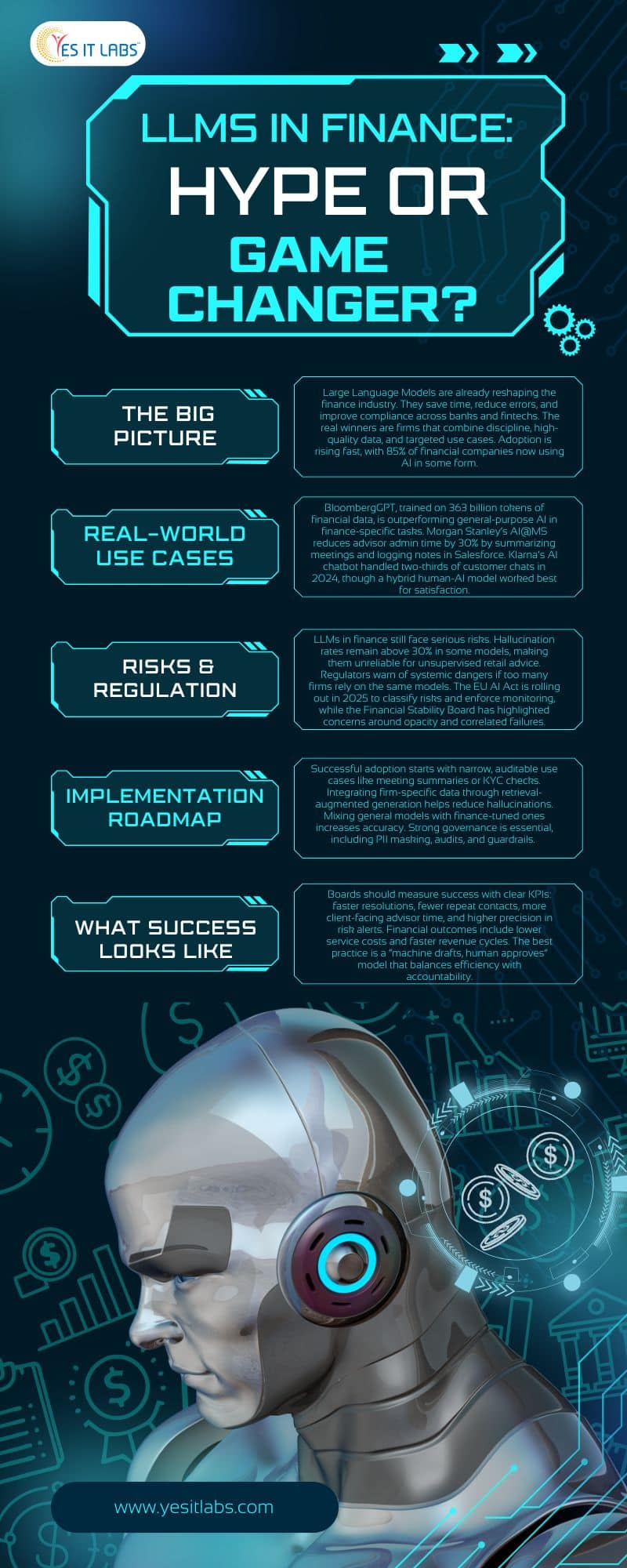
  • LLMs are quietly revolutionizing how banks and fintechs operate behind the scenes.
  • The winners are those pairing LLMs with robust controls, high-quality data, and focused, high-value applications.
  • We’re past the demo stage. These models are saving hours, cutting errors, and boosting client service while staying compliant.
  • But without discipline, yes, LLM adoption can veer into hype territory.

The State of Play: Why This Time Feels Different

Gone are the days of generic AI hype. Domain-specific LLMs are proving their worth, and many financial institutions now collaborate with an LLM development company to build industry-tuned solutions.

  • BloombergGPT: A 50-billion-parameter model trained on over 363 billion tokens of financial data. It outperforms general models on finance tasks like sentiment analysis and entity recognition.
    A 2025 SSRN paper confirms it beats open models like GPT-NeoX by wide margins in jargon-heavy financial NLP.
  • Morgan Stanley’s AI@MS Debrief: Powered by GPT-4, this tool summarizes wealth management meetings, drafts follow-ups, and logs notes into Salesforce. This reduces advisor admin time and strengthens client ties.
    In 2025, it earned Celent’s Model Wealth Manager Award for Emerging Technologies.
  • The Value Stack: McKinsey estimates generative AI could add $200–340 billion annually to banking alone, driven by boosts in sales, service, and coding productivity.
    Across industries, that’s part of a $2.6–4.4 trillion pie, with banking taking a hefty slice.

The Regulatory Landscape

Regulators are watching closely:

  • Financial Stability Board (FSB): Warns of model opacity, correlated failures, and poor data quality, risks that could amplify market shocks.
  • EU AI Act: Rolling out in phases through 2025, setting a global benchmark for risk classification and monitoring.
  • India’s RBI: Proposed a finance-specific Responsible AI framework in early 2025.


Bottom line: LLMs are already moving real money by streamlining workflows inside the firewall. McKinsey’s 2025 State of AI survey shows 85% of financial firms are adopting AI, up sharply from prior years.

Where LLMs Pay Off Today

1. Front-Office Productivity

  • Advisor co-pilots search notes, summarize calls, and generate compliant emails.
  • Morgan Stanley’s tool reduces post-meeting admin by up to 30%, keeping CRMs updated and advisors client-focused.

2. Customer Service at Scale

  • AI assistants handle routine queries.
  • Klarna’s bot managed two-thirds of chats in its 2024 debut, equivalent to 700 FTEs, with resolution times under 2 minutes.
  • By mid-2025, they reintroduced human agents after a 22% satisfaction dip, proving hybrid models work best.

3. Credit & Risk Workflows

  • Auto-drafting memos, extracting covenant terms, and triaging AML alerts speed up reviews.
  • McKinsey notes banks are seeing 20–40% efficiency gains in credit processes.

4. Research & Market Intelligence

  • Finance-tuned LLMs classify events and summarize filings.
  • BloombergGPT’s accuracy cuts manual parsing hours by half in some cases.

Many of these tools are built by a custom software development company in USA, ensuring compliance and scalability for global financial operations.

What’s Not Ready for Prime Time

  • Unsupervised Retail Advice: JPMorgan’s IndexGPT remains internal due to hallucination risks.
  • One-Model Dominance: Regulators warn of systemic risk if everyone relies on the same LLMs.
  • Hallucination Rates: Still above 30% in some new models, which is dangerous for high-stakes finance.

Compliance and Risk: What Regulators Demand

For LLM deployments in finance, governance is non-negotiable:

  • Risk Classification & Documentation (EU AI Act)
  • Data Lineage & Drift Monitoring
  • Human Oversight for critical decisions
  • Integration with Model Risk Management (MRM) frameworks

If you already have MRM, you’re 70% there, just extend it to LLMs.

This aligns closely with the standards applied in Financial Software Development Services, where rigorous testing, monitoring, and compliance frameworks are built into every stage of the product lifecycle.

Implementation Playbook: Battle-Tested Steps

  1. Start Narrow
    Focus on auditable, low-risk tasks like meeting summaries or KYC reviews.
  2. Integrate Your Data
    Use Retrieval-Augmented Generation (RAG) to reduce hallucinations.
  3. Mix Models
    Combine general LLMs for language fluency with finance-tuned models for accuracy.
  4. Add Controls
    PII masking, guardrails, and regular audits.
  5. Iterate & Scale
    A/B test against human workflows and measure KPIs before full rollout.

What “Good” Looks Like: KPIs for the Board

  • Service: Higher first-contact resolution, lower handle times (Klarna: 25% fewer repeats)
  • Advisor Time: Reduced admin work, improved CRM completeness
  • Risk/Ops: Increased alert precision, faster cycle times
  • Finance: Lower cost-to-serve, revenue gains from faster touchpoints

Human + Machine: Building Trust

The winning formula is simple: machine drafts, human approves.

This keeps hallucinations in check, maintains accountability, and passes audits without losing the human touch clients expect.

A Quick Roadmap: Quarter by Quarter

Q1: Inventory data, review security, choose 2–3 use cases, define KPIs

Q2: Pilot with small groups, gather feedback, test for bias

Q3: Harden integrations, train teams, expand coverage

Q4: Deploy multi-model strategies, continuously evaluate, involve risk teams

Final Verdict: Hype or Game-Changer?

Definitely a game-changer if scoped narrowly, powered by high-quality data, and governed like a core banking feature.

Otherwise, it risks becoming hype.

With 85% adoption and hundreds of billions in potential value, the opportunity is real.

As one X post put it: “mRNA vaccines may have been the biggest disruptor in health, but in finance, LLMs are quietly winning.

FAQs

1. What are LLMs in Finance?

LLMs in Finance refer to Large Language Models designed or adapted for financial applications, capable of processing, analyzing, and generating human-like text from financial data, reports, and market news.

2. How can LLMs improve decision-making in financial institutions?

LLMs can analyze large volumes of unstructured financial data, summarize trends, detect anomalies, and generate actionable insights, helping professionals make data-driven decisions faster and with greater accuracy.

3. Are LLMs in Finance secure and compliant with regulations?

Yes, when implemented correctly, LLMs can comply with data privacy and industry regulations like GDPR, SEC guidelines, and FINRA rules. However, firms must ensure proper data governance, model auditing, and compliance monitoring.

4. What are the main use cases of LLMs in Finance?

Common applications include automated financial reporting, market sentiment analysis, fraud detection, regulatory compliance monitoring, personalized investment recommendations, and customer service automation.

5. Can LLMs replace human financial analysts?

While LLMs can enhance efficiency and automate repetitive tasks, they are best used as decision-support tools rather than replacements. Human expertise remains essential for strategic decision-making and contextual judgment in complex financial scenarios.

What are AI Agents

In an era where artificial intelligence is weaving itself into the fabric of daily life, AI agents emerge as a groundbreaking innovation. Picture a smart digital companion that not only responds to your commands but anticipates your needs, devises plans, and carries out actions independently. By mid-2025, these agents are transforming how we work, play, and interact, spanning fields from personalized healthcare to dynamic financial trading. This article explores the essence of AI agents, their inner workings, diverse forms, practical uses, and the profound reasons they hold such significance today.

What Are AI Agents?

AI agents are self-directed software entities engineered to observe their surroundings, analyze situations, and perform tasks to fulfill designated objectives with minimal human input. Unlike conventional AI systems that merely generate responses to queries, agents take initiative. They function as versatile aides equipped with reasoning abilities, often leveraging sophisticated language models to interpret and act on complex instructions.

Consider an AI agent as a proactive virtual aide: it scans for relevant information, formulates a strategy, and implements it step by step. For example, tasked with organizing a trip, it might evaluate your schedule, scout for affordable options, and finalize bookings, all while adapting to any changes like flight delays. This level of independence comes from their integration of advanced processing, external interfaces, and adaptive learning, setting them apart as true collaborators in an increasingly automated world.

Key Components of AI Agents

To grasp how AI agents operate, let’s dissect their fundamental elements:

  • Core Reasoning Engine: This acts as the intellectual hub, processing language, breaking down problems, and simulating thought processes to arrive at logical conclusions.
  • Sensory Input System: It collects data from various sources, such as text inputs, visual scans, or real-time feeds, using techniques like pattern recognition to understand the context.
  • Execution Layer: Here, the agent interacts with the outside world through interfaces like application connectors or scripting tools, choosing and applying the appropriate methods to complete actions.
  • Storage and Recall Mechanism: Agents maintain records of ongoing activities and historical data, categorized into immediate context, factual knowledge, and skill-based insights, enabling them to build on past experiences.
  • Improvement Cycle: Through ongoing evaluation and adjustments, agents refine their approaches, incorporating lessons from successes and setbacks to enhance future performance.


These parts work in harmony within a repeating cycle of observation, planning, action, and reflection, allowing agents to navigate unpredictable scenarios effectively.

Types of AI Agents

AI agents come in various configurations, each suited to different levels of sophistication and application. Below is an overview of primary categories, including their strengths, limitations, and ideal scenarios:

Type Description Pros Cons Use Cases
Basic Reaction Agents Respond immediately to inputs based on fixed guidelines, without considering prior events. Quick and efficient for straightforward duties Lacks flexibility; can’t learn from experience Simple automated notifications, entry-level virtual helpers
Environment-Aware Agents Build a mental map of their setting to predict and react to incomplete data. Effective in variable conditions Dependent on the accuracy of their internal map Climate control devices, introductory pathfinding tools
Objective-Driven Agents Develop sequences of steps to reach defined targets, adjusting routes as needed. Strong in strategic planning Demands significant processing power Logistics drones, task coordination software
Value-Optimizing Agents Assess choices by weighing potential benefits, selecting the most advantageous path. Excels at balancing competing priorities Requires precise value assessments Advanced vehicle navigation, resource distribution systems
Adaptive Learning Agents Evolve their behavior through data and responses over time. Highly versatile and improving Needs substantial initial information Customized user interfaces, anomaly detection in security
Layered Agents Structured in tiers, with overseers managing subordinates for intricate operations. Scales well for multifaceted challenges Involves overhead in synchronization Industrial robotics, large-scale business processes
Collaborative Agent Networks Assemblies of agents that team up, divide roles, or negotiate to solve problems. Boosts efficiency through specialization Potential issues in inter-agent communication Market simulation tools, coordinated machine fleets

Many contemporary agents combine these traits, such as routing simple queries to specialized subunits or forming teams where one gathers info and another interprets it.

How AI Agents Work: A Step-by-Step Process

The operation of an AI agent unfolds in a logical sequence designed to mimic intelligent decision-making:

  1. Data Gathering: The agent pulls in information from its environment. In a financial context, this could mean monitoring market fluctuations via live feeds.
  2. Strategy Formulation: It employs analytical methods to outline actions, exploring alternatives and subdividing goals for manageability.
  3. Implementation: Using connected resources, the agent performs the planned steps, such as executing trades or generating reports.
  4. Review and Adaptation: After acting, it assesses the results, updating its knowledge base to better handle similar situations ahead.


This iterative approach equips agents to manage ambiguity and scale operations, far surpassing traditional automation.

Real-World Applications of AI Agents

AI agents are actively revolutionizing multiple domains:

  • Healthcare: In healthcare software development, they sift through patient histories, forecast health trends, and suggest tailored interventions, enabling continuous monitoring and proactive care.
  • Finance: In traditional and digital markets, agents automate trades, spot irregularities, and simulate scenarios, enhancing decision speed and accuracy.
  • Customer Support: Managing conversations across platforms, they resolve issues by accessing records, providing solutions, and following up seamlessly.
  • Development and Coding: A website development company can leverage agents to assist in creating, refining, and debugging software, accelerating innovation for programmers.
  • Mobility and Logistics: Driving autonomous vehicles or optimizing delivery routes, they ensure safety and efficiency in real-time.
  • Innovative Frontiers: In interactive entertainment or blockchain ecosystems, agents facilitate dynamic engagements, like managing virtual assets or community events.


These examples illustrate how agents convert raw data into meaningful outcomes, streamlining processes across the board.

Why AI Agents Matter in 2026

The importance of AI agents lies in their capacity to elevate AI from a passive helper to an active ally, magnifying human potential. Projections indicate that by the end of the decade, a significant portion of organizational tools will incorporate agents, automating decisions and boosting productivity. They tackle pressing issues like workforce gaps and information overload, fostering breakthroughs in areas such as scientific research and sustainable operations.

Moreover, agents promote a symbiotic relationship between technology and people, where machines handle routine complexities, freeing humans for creative pursuits. Yet, this evolution calls for careful consideration of reliability, privacy, and ethical integration to maximize benefits.


AI Agents expert in USA

Challenges and Future Outlook

While promising, AI agents encounter obstacles:

  • Dependability and Protection: Vulnerabilities like erroneous inputs or inconsistent outputs can undermine trust.
  • Resource Demands: Their operations often require substantial computing power, posing scalability issues.
  • Moral Implications: Addressing biases, data security, and the role of human supervision is critical.
  • Seamless Adoption: Incorporating them into current infrastructures demands skill and planning.


Moving forward, expect refinements in agent architectures and deeper synergies with emerging tech like connected devices and secure networks. Collaborative frameworks will likely prevail, enabling self-sustaining systems in smart environments or virtual economies. As these developments unfold, AI agents will not supplant human ingenuity but amplify it, heralding a more capable and interconnected society.

Conclusion

AI agents embody a leap forward in intelligent systems, merging self-reliance with sophisticated cognition to address challenges that demand nuanced handling. From their foundational elements to expansive roles, they deliver substantial advantages in our rapidly advancing world. Embracing this shift with foresight will unlock unprecedented opportunities, and this can serve as your ultimate guide to AI tools in navigating that landscape. What aspect of AI agents intrigues you the most? Let’s discuss in the comments!

Ai Software Development Services

Artificial Intelligence (AI) has become an essential element in the modern developer’s toolkit, transforming the way software is built, optimized, and scaled. No longer a concept of the future, AI is now a powerful, present-day force driving innovation and productivity across development environments. From intelligent code suggestions to smarter infrastructure management, AI tools are reshaping workflows, reducing friction, and accelerating time to market.

According to GitHub’s 2023 Developer Report, developers using AI tools like Copilot experienced a 55% increase in productivity, and 88% reported feeling more satisfied with their work. These numbers highlight the profound impact AI has on enhancing developer workflows and morale.

This comprehensive guide explores a wide spectrum of AI tools that are helping developers automate mundane tasks, enhance the quality of their code, build intelligent user experiences, and streamline deployment. By diving into categories and professional-grade solutions, developers can discover how to effectively leverage AI in daily practice.

Why AI Tools Matter for Developers

AI isn’t simply about replacing manual work; it’s about augmenting human capabilities to deliver better results with less effort. In software development, this can translate to several tangible benefits:

  • Boosting Efficiency: Developers spend a significant portion of time debugging, documenting, or writing boilerplate code. AI can automate many of these repetitive tasks, freeing up time for creative problem-solving. A McKinsey report found that software teams adopting AI-driven development saw up to a 30% reduction in time-to-market.
  • Improving Code Quality: By using pattern recognition and semantic analysis, AI tools can suggest code improvements, highlight potential vulnerabilities, and encourage best practices in real-time. Tools like DeepCode have demonstrated a 60% improvement in identifying hidden bugs versus traditional static analysis tools.
  • Accelerating Prototyping: Tools powered by natural language processing and generative models can create user interfaces, data models, and business logic prototypes in a matter of minutes. This enables developers to test ideas faster and iterate with stakeholders more efficiently.
  • Enabling Smarter Applications: AI allows developers to embed intelligent capabilities like recommendation engines, predictive analytics, and conversational interfaces directly into applications, creating better end-user experiences. Gartner predicts that by 2026, 80% of customer service applications will incorporate generative AI in some form.


Also Read: Stuck with AI App Builders Like Replit? Get Expert Help to Finish Your App

Core Categories of AI Tools in Development

To help developers navigate this growing ecosystem, AI tools can be grouped into key categories based on their functional focus:

  • Code Generation: Tools that automatically suggest or write code, helping reduce boilerplate and guide new development.
  • Testing & Debugging: AI that analyzes code for bugs, inefficiencies, and vulnerabilities, often with real-time feedback.
  • Documentation & Search: Tools that generate or enhance documentation and assist in navigating large codebases.
  • UI/UX Design Assistance: AI-driven platforms that accelerate frontend development or help convert design input into usable code.
  • DevOps & Monitoring: Intelligent systems for managing, monitoring, and optimizing infrastructure and CI/CD pipelines.
  • NLP & Chatbot Development: Frameworks and platforms for building natural language applications and conversational agents.
  • Machine Learning Development: End-to-end platforms for building, training, and deploying machine learning models.
  • API-Based AI Services: Easily integrable APIs that provide access to AI capabilities like language processing, image recognition, or speech analysis.
  • Model Evaluation & Governance: Tools used for experiment tracking, fairness auditing, and responsible AI development.
  • Vector Search & RAG (Retrieval-Augmented Generation): Platforms that support scalable embedding search, vital for LLMs and memory-based architectures.

Highlighted AI Tools for Professional Use

Code Generation Tools

  1. GitHub Copilot
    Powered by OpenAI’s Codex, GitHub Copilot offers intelligent code suggestions directly in your IDE. It supports multiple programming languages and helps reduce boilerplate, making it ideal for rapid prototyping and enhancing developer productivity.
  2. Tabnine
    An AI code assistant trained on open-source code, Tabnine focuses on secure and private code generation. It allows team-based customization and integrates with popular editors like VS Code and IntelliJ.

AI for Testing and Debugging

  1. DeepCode by Snyk
    This tool leverages machine learning to scan codebases for security vulnerabilities and performance issues. Its semantic understanding of code makes it more accurate than traditional linters.

Documentation & Code Search

  1. Sourcegraph
    A powerful tool for code search and navigation, Sourcegraph enables developers to search semantically across multiple repositories, understand large codebases, and collaborate more effectively.
  2. Mintlify
    Automates the generation of readable and maintainable documentation. Especially useful for internal tools and growing teams where consistent documentation is often overlooked.


Talk to AI Software Development experts

AI in UI/UX Design

  1. Uizard
    Ideal for UI/UX designers and developers, Uizard turns wireframes and design inputs into functional code, helping teams rapidly prototype interfaces. It’s increasingly adopted by companies offering AI Software Development Services as part of their frontend acceleration strategies.
  2. Framer AI
    Allows developers and designers to create responsive layouts using natural language. Particularly helpful in cross-functional teams looking to speed up interface development.

DevOps & Monitoring Tools

  1. Dynatrace
    An advanced monitoring tool using AI to predict system failures and suggest optimizations. With seamless integration into major cloud providers, it’s a key player in enterprise DevOps.
  2. Harness AI
    Automates CI/CD processes with features like intelligent rollbacks, canary deployments, and performance-based promotion strategies, ensuring stable and efficient software delivery pipelines.

NLP & Chatbot Frameworks

  1. Dialogflow
    Backed by Google, this tool allows developers to build conversational applications that understand natural language and integrate seamlessly into popular platforms. It is frequently used in custom chatbot solutions offered by modern application development service providers.
  2. Rasa
    An open-source framework that gives developers full control over their chatbot’s behavior, allowing enterprise-grade NLP applications with robust customization.

Machine Learning Development

  1. TensorFlow
    A comprehensive ML platform offering tools for building, training, and deploying deep learning models. Backed by Google, it has extensive documentation and community support.
  2. PyTorch
    Preferred by the research community, PyTorch is known for its flexibility, ease of use, and growing adoption in production environments.
  3. Hugging Face
    Offers access to thousands of pre-trained NLP models through its Transformers library. Suitable for tasks like sentiment analysis, translation, and summarization. As a leading Machine Learning Development Company, Hugging Face sets the benchmark for model accessibility and deployment ease.

AI APIs for Integration

  1. OpenAI API
    Allows developers to leverage state-of-the-art language models for text generation, summarization, and more, with support for fine-tuning and prompt engineering.
  2. Cohere
    Specializes in natural language processing, offering enterprise-grade APIs for tasks like classification, text embedding, and generation—all designed with robust multilingual capabilities.
  3. AssemblyAI
    Specializes in audio intelligence with features like speech-to-text, summarization, and content moderation, useful in media and transcription-based applications.

MLOps & Experiment Tracking Tools

  1. Weights & Biases
    A top-tier tool for tracking machine learning experiments, managing datasets, and visualizing model performance. Crucial for teams working on scalable and reproducible ML workflows.


Also Read: Building in Bubble but Feeling Stuck? Time for a Smarter Move

Choosing the Right AI Tool for Your Project

Selecting the right tool depends heavily on the specific needs of your project. Consider these key criteria:

  • Project Scope: Are you building a prototype, a full-scale product, or conducting research?
  • Compatibility Check: Is the tool adaptable to your current tech stack and development processes?
  • Data Privacy: For regulated industries, tools offering on-premise or private deployment options are crucial.
  • Learning Curve: Ensure your team can adopt the tool without significant delays.
  • Cost and Licensing: Open-source or tiered pricing models may be better suited for startups and individual developers.
  • Community and Support: Active communities and rich documentation can be invaluable for troubleshooting and growth.

The Future of AI in Software Development

As AI capabilities continue to evolve, developers can expect even more immersive and intelligent experiences, including:

  • Autonomous Agents: AI agents capable of multi-step reasoning and decision-making across tools and platforms. IDC predicts that by 2027, 25% of enterprise applications will rely on autonomous AI agents for at least one core business function.
  • Natural Language Interfaces: Development via conversations rather than code, bridging the gap between technical and non-technical users.
  • Ethical AI and Governance: Tools and practices focused on ensuring fairness, explainability, and transparency in AI systems. Research from Capgemini reveals that 62% of organizations are investing in responsible AI frameworks to build trust and reduce regulatory risk.
  • Edge AI: On-device inference powered by lightweight models, improving privacy and reducing latency. With the rise of consumer AI, on-device models are expected to power 50% of mobile AI apps by 2026.

Final Thoughts

AI tools are swiftly transforming the software development landscape. They are not here to replace engineers, but to elevate them, augmenting expertise with intelligent automation, real-time insights, and predictive capabilities. As these tools become more sophisticated, developers can focus more on strategic thinking, problem-solving, and innovation rather than spending time on repetitive or mundane tasks. The future of software engineering lies in this collaborative synergy between human creativity and machine intelligence, where AI enhances, not replaces, the craft of development.

WooCommerce to Shopify Migration Experts

Migrating your eCommerce store from WooCommerce to Shopify can transform your business, offering simplicity, scalability, and a seamless user experience. While WooCommerce provides unmatched flexibility as a WordPress plugin, Shopify’s hosted platform reduces technical overhead and supports rapid growth. For businesses in the USA, partnering with WooCommerce to Shopify migration experts ensures a smooth transition while preserving your store’s data, design, and SEO performance.

Why Migrate from WooCommerce to Shopify?

WooCommerce powers over 6 million websites globally, making it the leading eCommerce platform, according to a 2024 BuiltWith report. Its open-source nature allows for extensive customization, but managing hosting, updates, and plugins can be time-consuming and technically demanding. In contrast, Shopify is a fully hosted, all-in-one platform built for simplicity and scalable growth. A 2024 Statista report highlights that Shopify supports over 4.4 million online stores worldwide, with a strong presence in the USA, thanks to its intuitive interface and ecosystem of over 8,000 apps.

Businesses often switch to Shopify for its fast setup, mobile responsiveness, and advanced features like headless commerce and seamless integrations. For instance, Shopify’s optimized checkout process can reduce cart abandonment by up to 35%, per a 2023 Baymard Institute study. Migration experts in the USA specialize in streamlining this transition, ensuring minimal downtime while maximizing Shopify’s benefits for your business.

Also Read: WooCommerce vs. Shopify: Which Platform Suits Your Business?

What Do Migration Experts Do?

Migrating from WooCommerce to Shopify involves transferring products, customer data, orders, and content while maintaining functionality, design, and SEO rankings. USA-based migration experts bring technical expertise and strategic planning to make this process efficient. Here’s what they handle:

1. Pre-Migration Planning and Assessment

Experts start by analyzing your WooCommerce store’s structure, including product catalogs, plugins, integrations, and business goals. They identify which elements can be directly migrated and which require custom solutions on Shopify. A 2023 BuiltWith study found that 68% of WooCommerce stores rely on third-party plugins for features like payment gateways or shipping. Experts map these to Shopify’s app ecosystem, recommending tools like ShipStation or Stripe for seamless integration.

2. Data Migration

The core of migration is transferring data securely and accurately, including:

  • Products: Titles, descriptions, images, variants, and pricing.
  • Customers: Profiles, account details, and order histories.
  • Orders: Past transactions and related data.
  • Content: Blog posts, landing pages, and static content.

Experts use tools like Shopify’s Store Importer or custom scripts to automate data transfer, ensuring no loss of information. Shopify reports that its Store Importer tool can handle WooCommerce migrations with zero data loss when executed correctly, minimizing downtime for your store.

3. Design and Theme Customization

Your store’s design is vital for brand consistency. WooCommerce stores often use custom themes or page builders like Elementor, which may not have direct Shopify equivalents. Experts adapt your design using Shopify’s Liquid framework or recommend one of Shopify’s 70+ professional themes. They prioritize mobile responsiveness and fast load times, as 75% of eCommerce traffic in the USA comes from mobile devices, per a 2024 eMarketer report.

4. SEO and URL Preservation

Maintaining SEO rankings is critical to avoid losing organic traffic. Experts map WooCommerce URLs to Shopify’s structure, set up 301 redirects, and optimize metadata. A 2023 Tekglide study noted that a 1-second delay in page load time can reduce conversions by 7%, so experts also optimize Shopify stores for speed and performance to boost SEO and user experience.

5. App and Integration Setup

Shopify’s ecosystem offers thousands of apps to replicate or enhance WooCommerce functionalities. Experts integrate CRMs, payment gateways, shipping solutions, and marketing tools tailored to your needs, such as Klaviyo for email marketing or Oberlo for dropshipping.

6. Testing and Launch

Before launching, experts conduct rigorous testing to verify functionality, performance, and security, including checkout processes and payment gateways. Post-launch, they provide support to address bugs and ensure your store adapts to market demands.

Benefits of Hiring Migration Experts

Partnering with professionals for your WooCommerce to Shopify migration offers several advantages:

  • Specialized Expertise: Shopify Partner-certified experts understand both platforms, ensuring a seamless transition. For tailored solutions, a Website Development Company with eCommerce experience can deliver scalable results.
  • Time Savings: Experts streamline the process, reducing downtime and allowing you to focus on business operations.
  • Scalability: Professionals set up your Shopify store for growth, leveraging features like Shopify Plus for high-volume businesses.
  • Cost-Effectiveness: While upfront costs apply, experts prevent errors like data loss or SEO drops. A 2024 PageFly report notes that Shopify agencies in the USA charge $20–$100 per hour, depending on expertise.


Woocommerce to Shopify migration expert

Choosing the Right Migration Experts in USA

Selecting the right professionals is key to a successful migration. Here’s what to consider:

1. Certification and Experience

Choose Shopify Partner-certified professionals with proven expertise in WooCommerce to Shopify migrations. Companies like YES IT Labs specialize in delivering seamless, SEO-friendly, and scalable migration solutions tailored for USA-based businesses. With a track record of successfully transitioning eCommerce stores, they ensure data integrity, optimized performance, and enhanced user experience throughout the migration process.

2. Client Reviews and Testimonials

Customer feedback provides insight into reliability. Platforms like Upwork and Fiverr allow you to evaluate freelance Shopify developers, ensuring they align with your needs. A 2024 Fiverr report noted that top-rated freelancers often complete projects faster and offer flexible revisions.

3. Comprehensive Services

Opt for experts who provide end-to-end migration services, including data transfer, theme customization, third-party app integration, and post-launch support. A full-service approach ensures a smooth transition and minimizes downtime.

4. Transparency and Communication

Clear communication and transparent pricing are crucial for a successful migration. Look for professionals who prioritize regular updates, collaborative planning, and feedback cycles to ensure the final result aligns with your business goals.

5. Scalability and Support

Choose migration experts who not only complete the transfer but also offer long-term support. Scalable solutions, ongoing maintenance, and performance monitoring help your Shopify store grow securely and efficiently over time.

Addressing Migration Challenges

Migration can involve challenges like data compatibility, design discrepancies, or plugin-to-app transitions. Experts address these by:

  • Using automated tools and manual checks for data accuracy.
  • Custom-coding solutions when Shopify apps don’t fully replicate WooCommerce plugins.
  • Conducting thorough testing to resolve issues before launch.

For complex WooCommerce setups, hire WooCommerce developers to ensure platform-specific nuances are addressed, complementing Shopify expertise for a seamless transition.

What to Expect Post-Migration

Once your Shopify store is live, expect:

  • Enhanced User Experience: Shopify’s intuitive interface improves navigation and checkout, with 65% of shoppers preferring personalized experiences, per a 2023 Tekglide study.
  • Improved Performance: Shopify’s hosted platform reduces load times, boosting conversions.
  • Ongoing Support: Experts provide maintenance packages to address app compatibility, theme updates, and security.

Conclusion

Migrating from WooCommerce to Shopify is more than just a platform switch—it’s a strategic business decision aimed at optimizing efficiency, enhancing scalability, and elevating the overall customer experience. WooCommerce, while powerful and flexible, often requires significant hands-on management, hosting arrangements, and plugin maintenance. In contrast, Shopify offers a more streamlined, fully-hosted solution designed for modern businesses looking to grow without being bogged down by technical complexities.

In USA, migration experts play a crucial role in making this transition smooth and successful. These professionals bring a wealth of technical know-how, real-world eCommerce experience, and a deep understanding of both platforms. Their client-focused approach ensures that each migration project is tailored to the unique needs of the business, whether it’s a small online boutique or a large multi-channel enterprise.

These specialists begin by analyzing your existing WooCommerce store—catalog structure, custom functionalities, payment gateways, SEO settings, and third-party integrations—to develop a comprehensive migration roadmap. Their goal is not just to move your data but to enhance it during the process, making the most of Shopify’s features like its powerful app ecosystem, intuitive backend, and mobile-responsive themes.

By choosing certified professionals with a strong track record, businesses benefit from minimized downtime, reduced risk of data loss, and preserved search engine rankings. Migration services often include custom theme development, Shopify app integration, URL redirects, customer and order data transfer, and even post-launch support.

FAQs

Q: How long does a WooCommerce to Shopify migration take?

A: Migration typically takes 2–8 weeks, depending on store complexity, product volume, and customization needs. Experts streamline the process to minimize downtime.

Q: Will my SEO rankings be affected by the migration?

A: With proper URL mapping and 301 redirects, SEO rankings can be preserved. Experts optimize metadata and site speed to maintain or improve visibility.

Q: Can I migrate all my WooCommerce data to Shopify?

A: Yes, products, customers, orders, and content can be migrated using tools like Shopify’s Store Importer or custom scripts, ensuring no data loss.

Q: How much does hiring migration experts cost in USA?

A: Costs range from $20–$100 per hour, per a 2024 PageFly report, depending on expertise and project scope. Request quotes for accurate estimates.

Q: What happens to my WooCommerce plugins after migration?

A: Experts identify Shopify apps or custom solutions to replicate plugin functionality, such as Klaviyo for email marketing or ShipStation for shipping.

Q: Is Shopify better than WooCommerce for scaling my business?

A: Shopify’s hosted platform and app ecosystem make it ideal for scaling, offering features like Shopify Plus for high-volume stores, while WooCommerce requires more technical management.

React js vs Vue js

In today’s digital-first era, selecting the right front-end framework is one of the most crucial decisions when planning a web application. For many businesses and developers, the debate often boils down to two popular JavaScript frameworks: React JS and Vue JS. Both are powerful tools that can shape the functionality, scalability, and performance of a web application—but how do you choose the one that best fits your vision?

This article takes a deep dive into the strengths, use cases, and performance metrics of React JS and Vue JS to help you make an informed decision tailored to your business goals and technical needs.

A Quick Introduction to React and Vue

React JS is a JavaScript library developed by Facebook in 2013. It quickly gained popularity for its component-based architecture, virtual DOM, and flexibility. It is widely used by tech giants like Facebook, Instagram, Airbnb, and Netflix.

On the other hand, Vue JS was created by ex-Google engineer Evan You and released in 2014. Vue is also a progressive JavaScript framework with a gentle learning curve, designed to be incrementally adaptable. It is used by Alibaba, Xiaomi, and GitLab, among others.

Popularity and Community Support

When it comes to popularity, React leads the way. According to the 2024 Stack Overflow Developer Survey, React ranked second in the “most loved web frameworks” category and had a usage rate of nearly 40% among professional developers. Vue followed closely with about 18%.

React boasts a larger community, more third-party integrations, and abundant resources for developers. GitHub stats reinforce this—React has over 220k stars, while Vue trails slightly with around 210k. Still, Vue’s community is incredibly passionate and active, providing ample plugins, tools, and tutorials.

Learning Curve and Developer Experience

If you’re new to front-end development or have a small dev team, Vue is often considered easier to learn. Its templating syntax is similar to HTML and its documentation is clear and concise. Vue allows faster onboarding and prototyping for newcomers.

React, in contrast, has a steeper learning curve due to JSX (a syntax extension that mixes JavaScript with HTML), state management libraries like Redux, and the need to grasp component lifecycle methods early on. However, once mastered, React provides greater control and flexibility in building complex applications.

Performance Benchmarks

When it comes to rendering speed and memory usage, both React and Vue deliver high-performance results. Yet, there are subtle differences worth noting:

  • Initial Rendering: Vue has a slight edge in smaller applications due to its lightweight structure and optimized reactivity system.
  • Updates & Re-rendering: React’s Virtual DOM excels in efficiently updating UI components, especially in larger apps where frequent DOM updates are common.
  • Bundle Size: Vue is slightly more compact. Vue’s default build is around 20KB gzipped, while React’s core library is approximately 42KB gzipped, excluding additional packages.

So, Vue may perform better in lightweight apps, while React can shine in more data-intensive, interactive environments.

Ecosystem and Tooling

React has an expansive ecosystem. It doesn’t dictate project structure or architecture, giving developers the freedom to use additional tools like Next.js for SSR (server-side rendering), Redux for state management, and React Native for mobile apps. This versatility makes React a robust choice for large-scale enterprise applications.

Vue, while opinionated, comes with an integrated ecosystem that includes:

  • Vue Router (for routing),
  • Vuex (for state management), and
  • Vue CLI (for project scaffolding).

This makes Vue an excellent option for rapid development without the need for third-party configuration. Vue also supports SSR through Nuxt.js, which is Vue’s answer to Next.js.

Scalability and Maintainability

When thinking long-term, React is often favored for large-scale applications. Its unopinionated nature means teams can customize project structures and select libraries that best suit their architecture, promoting modular and scalable development practices.

Vue, however, enforces a more structured way of doing things, which is great for consistency but might feel restrictive in massive applications with evolving requirements. Nevertheless, many large-scale projects have been successfully built with Vue by adhering to best practices.

Real-World Use Cases

To better illustrate their strengths, here’s how each framework performs in actual use:

  • React JS is ideal for:
    • Large enterprise web apps
    • Apps requiring mobile versions (React Native)
    • Projects needing deep customization and third-party integrations
  • Vue JS is ideal for:
    • Quick MVPs or prototypes
    • Content-heavy websites
    • Smaller teams or individual developers

A React JS development company typically prefers React for its versatility in building dynamic, scalable solutions tailored for enterprise-level projects with high complexity.

Integration and Compatibility

One advantage of Vue is its seamless integration with existing projects. You can easily drop Vue into a section of your web app without needing to re-architect the entire codebase. This makes Vue a great choice for gradually modernizing legacy systems.

React, being a full library, often requires a more significant commitment, although it can still integrate well with existing code if planned properly.

SEO and Server-Side Rendering

Both React and Vue support SSR for SEO optimization, but their implementation differs slightly:

  • React: Paired with Next.js, React provides excellent SSR, dynamic routing, and static site generation. It’s the go-to choice for SEO-heavy apps.
  • Vue: Uses Nuxt.js for SSR, which is simpler to configure and use. Nuxt abstracts much of the complexity, making Vue projects faster to deploy with SEO in mind.

Developer Availability and Hiring Considerations

Finding the right talent can influence your decision significantly. The popularity of React means a broader pool of developers, but also more competition when hiring. If you want to hire React JS developers, you’ll likely have access to a wide range of skilled professionals with varying levels of experience.

Vue developers are growing in number but are still less common than their React counterparts. However, many developers appreciate Vue’s simplicity and flexibility, making it a strong contender when you’re planning to hire Vue JS developers for small to medium projects.

Security Considerations

React and Vue both follow modern security best practices, but as with any front-end tool, the final responsibility lies in the implementation. Both support protection against common vulnerabilities like XSS (Cross-Site Scripting) and CSRF (Cross-Site Request Forgery) through built-in mechanisms.

Vue’s structured approach minimizes the risk of poor implementations, while React provides granular control, which requires more developer diligence.

Final Thoughts: Which One Is Right for You?

There’s no one-size-fits-all answer in the React vs. Vue debate. Your choice depends heavily on:

  • Project size and complexity
  • Team experience and preference
  • Time-to-market expectations
  • Integration needs with existing systems
  • Long-term scalability and performance requirements

If you are building a highly interactive, complex application with long-term scaling in mind, React JS might be your ideal choice. Conversely, if your goal is rapid development, easy onboarding, and smooth integration, Vue JS offers an elegant solution.

Whether you work with a React JS development company for enterprise-level projects or lean toward a lean, agile team to handle Vue-based development, the key is aligning the framework with your specific business goals.

At the end of the day, both React and Vue are capable, modern frameworks with rich ecosystems and strong community support. The right fit comes down to your vision, resources, and roadmap.

Axios for React Development

In the ever-evolving world of web development, efficiency, performance, and maintainability are key to staying ahead. For developers working with React, one tool that has gained immense popularity for handling HTTP requests is Axios. From small startups to enterprise-grade platforms, Axios has become a staple in React applications.

So why exactly are leading software companies choosing Axios over other data-fetching options for React development? This blog dives deep into the benefits, use cases, performance metrics, and real-world insights into why Axios is a go-to solution in the React ecosystem.

What is Axios?

Axios is a promise-based HTTP client for the browser and Node.js, designed to make sending asynchronous HTTP requests simple. It allows developers to interact with APIs, send and receive data, and manage asynchronous operations smoothly, all crucial elements in modern web applications.

Although the Fetch API is built into most modern browsers and offers similar functionality, Axios provides additional capabilities out of the box, such as request/response interception, request cancellation, automatic JSON data transformation, and better error handling, which make it more developer-friendly.

Why Axios Stands Out in React Development

1. Simplified Syntax

React projects are typically component-driven, and Axios’s clean, promise-based syntax fits perfectly into this architecture. Axios allows developers to write concise code that is easy to read and debug, especially when dealing with large-scale applications where data is fetched frequently from multiple endpoints.

javascript

axios.get(‘/api/data’)

  .then(response => {

    setData(response.data);

  })

  .catch(error => {

    console.error(error);

  });

Compared to native fetch(), Axios automatically transforms response data to JSON, saving developers from repetitive parsing operations.

2. Advanced Features for Enterprise Needs

Axios isn’t just about sending GET and POST requests. It includes features that are indispensable for large-scale projects, such as:

  • Request Interceptors: Modify or log requests before they are sent.
  • Response Interceptors: Centralize error handling or response manipulation.
  • Automatic Transformation: Automatically converts data to JSON or form-encoded formats.
  • Global Configuration: Set base URLs, headers, and timeouts application-wide.

This flexibility is a major reason why a React JS development company would incorporate Axios as part of its core stack.

3. Excellent Error Handling

Axios offers clear, hierarchical error objects, making it easy to handle client-side, server-side, and network errors distinctly. This clarity becomes critical in applications where user experience relies on real-time feedback and robustness.

For example:

javascript

axios.get(‘/api/data’)

  .catch(error => {

    if (error.response) {

      // Server responded with status outside 2xx

    } else if (error.request) {

      // No response received

    } else {

      // Something went wrong setting up the request

    }

  });

4. Built-in Request Cancellation

In React apps, it’s common for users to navigate away or change views before a network request completes. Without cancellation, data might update an unmounted component, causing memory leaks or unwanted UI behavior.

Axios supports token-based request cancellation, helping developers prevent these common pitfalls and maintain application performance.

Axios vs. Fetch: A Performance Perspective

Feature Axios Fetch
Automatic JSON Data Handling
Request/Response Interceptors
Timeout Configuration
Cancel Requests ✅ (manual)
Node.js Support
Cross-browser Compatibility

While Fetch is a great low-level tool, Axios adds the developer experience layer that makes working with APIs seamless. According to a 2024 survey by Stack Overflow, Axios ranked among the top 5 most-used JavaScript libraries in professional web development.

Real-World Use Cases of Axios in React

E-Commerce Platforms

React-based eCommerce apps depend heavily on real-time product updates, cart management, and dynamic filters. Axios handles rapid, complex API calls efficiently, often involving authentication tokens and conditionally triggered requests.

SaaS Dashboards

Admin dashboards built in React often need to visualize data via charts, graphs, and user metrics. Axios helps by simplifying data fetching from multiple endpoints and structuring API integration cleanly.

Content Management Systems

Modern CMS solutions built on React need rich editor interfaces and dynamic content loading. Axios provides the backbone for stable communication with headless CMS APIs, ensuring low latency and error resilience.

Axios and Scalable Architecture

Axios can be configured globally using axios.create() method, helping development teams maintain scalability and reusability. This becomes especially valuable in enterprise-grade apps where maintaining a consistent request structure across hundreds of components is crucial.

javascript

const apiClient = axios.create({

  baseURL: ‘https://api.example.com’,

  timeout: 10000,

  headers: { ‘Authorization’: ‘Bearer token’ }

});

By using such configurations, a software development company in USA can ensure high-quality code standards, maintain efficiency across multiple projects, and reduce development time significantly.

Axios and State Management

Axios works well with state management libraries like Redux and Zustand. Middleware like redux-thunk or redux-saga often uses Axios under the hood to handle asynchronous operations such as login, fetching lists, or form submission. This smooth integration enables developers to keep business logic and UI rendering separate, which is crucial for scalability.

Community Support and Ecosystem

Axios boasts a robust and active developer community. It has over 100K stars on GitHub, and its ecosystem includes plugins and wrappers that integrate with modern frameworks like React, Vue, and Next.js.

Moreover, Axios is well-documented, making onboarding new developers faster — a major advantage when you hire React JS developers for mission-critical projects.

Security and Axios

Axios enables setting custom headers such as authorization tokens and cookies, which is critical for secure React applications. It also supports CSRF token integration and can be easily configured to handle secure HTTPS calls, enforce SSL pinning, and validate certificates when working in sensitive environments.

Why Axios Is the Smart Choice

For any React application that requires robust data handling, better error management, security, and scalability, Axios is a powerful ally. Its simplicity combined with advanced features like interceptors, global configs, and cancellation support make it far more than a simple HTTP client — it becomes part of your architecture.

While there are alternatives like Fetch or Superagent, Axios consistently delivers the right mix of power and flexibility, which is why it’s widely adopted by leading software companies globally.

For teams looking to build scalable React applications, Axios provides a mature, stable, and well-supported toolset that reduces boilerplate and enhances maintainability — key ingredients for long-term success.