Resources

Telemedicine Software Development

The healthcare industry is undergoing a digital revolution, and telemedicine is at the forefront of this transformation. With the global telemedicine market projected to reach $559.52 billion by 2027, growing at a CAGR of 25.8% from 2020 to 2027 (Allied Market Research), the demand for robust telemedicine software is skyrocketing. But how does a telemedicine platform go from a mere concept to a fully functional application saving lives and improving access to care? This guide takes you through the journey of Healthcare Software Development, offering insights, stats, and practical steps to create a user-friendly, secure, and impactful solution.

What is Telemedicine Software?

Telemedicine software enables healthcare providers to deliver medical services remotely via digital platforms. It facilitates virtual consultations, remote patient monitoring, e-prescriptions, and more, bridging the gap between patients and providers. In 2023 alone, 80% of U.S. adults reported having used telemedicine services at least once, underscoring its growing adoption (Pew Research Center).

From video conferencing tools to AI-driven diagnostic modules, telemedicine software is a complex ecosystem designed to enhance accessibility, efficiency, and patient outcomes. Let’s dive into the process of building one from scratch.

Step 1: Ideation and Market Research

Every great telemedicine platform starts with a clear vision. Ask yourself: What problem are you solving? Are you targeting rural areas with limited healthcare access, or are you creating a specialized platform for mental health? Understanding your niche is critical, and partnering with a custom software development company can help refine your idea into a viable product.

Key Considerations:

  • Target Audience: Identify whether your platform serves patients, doctors, hospitals, or all three.
  • Competitor Analysis: Study platforms like Teladoc, Amwell, or Doxy.me to identify gaps. For instance, 70% of telemedicine users cite long wait times as a pain point (Statista, 2024). Could your platform offer faster consultations?
  • Regulatory Compliance: Ensure your software adheres to laws like HIPAA (U.S.), GDPR (Europe), or PIPEDA (Canada) to protect patient data.

Step 2: Defining Features and Functionality

The feature set defines your telemedicine software’s value. Core functionalities include:

  • Video Conferencing: High-quality, encrypted video calls are non-negotiable. 85% of patients prefer platforms with seamless video (Healthcare IT News, 2024).
  • Appointment Scheduling: Integrated calendars for patients and providers to book, reschedule, or cancel appointments.
  • Electronic Health Records (EHR) Integration: Sync with systems like Epic or Cerner for seamless data access.
  • E-Prescriptions: Allow doctors to send prescriptions directly to pharmacies.
  • Payment Gateway: Secure billing for consultations, supporting multiple payment methods.
  • AI-Powered Tools: Chatbots for triage or AI diagnostics can enhance efficiency. For example, AI-driven symptom checkers improved diagnostic accuracy by 20% in a 2023 study (Journal of Medical Internet Research).

Advanced Features to Stand Out:

  • Remote Patient Monitoring: Integrate with wearables like Fitbit or Apple Watch to track vitals.
  • Multi-Language Support: Cater to diverse populations, especially since 30% of U.S. telemedicine users prefer non-English options (Kaiser Family Foundation, 2024).
  • Mental Health Modules: Include tools like mood trackers or therapy session logs, given that telepsychiatry accounts for 40% of telemedicine visits (American Psychiatric Association, 2024).

Step 3: Choosing the Right Technology Stack

The tech stack determines your platform’s performance, scalability, and security. Collaborating with a software development company in USA can ensure you select the best tools for your needs. Here’s a suggested stack for telemedicine software:

Frontend:

  • React.js or Vue.js: For a responsive, user-friendly interface.
  • Flutter or React Native: For cross-platform mobile apps.

Backend:

  • Node.js with Express: For real-time communication and scalability.
  • Python (Django/Flask): For rapid development and AI integration.

Database:

  • PostgreSQL or MongoDB: For secure, scalable storage of patient data.

Video Communication:

  • WebRTC: For low-latency, encrypted video calls.
  • Twilio or Agora: Pre-built APIs for video and chat.

Cloud Infrastructure:

  • AWS or Google Cloud: For HIPAA-compliant hosting and scalability.

Security:

  • End-to-End Encryption: Protect video calls and data transfers.
  • OAuth 2.0: For secure user authentication.

Stat to Note:

60% of telemedicine breaches in 2023 were due to inadequate encryption (HHS Office for Civil Rights). Prioritize security from day one.

Step 4: Design and User Experience (UX)

A telemedicine platform must be intuitive for both tech-savvy millennials and elderly patients. Poor UX is a dealbreaker—50% of users abandon apps with confusing interfaces (Forbes, 2024).

UX Best Practices:

  • Simple Navigation: Use clear menus and minimal clicks to access features.
  • Accessibility: Include high-contrast modes, screen reader support, and large fonts for visually impaired users.
  • Patient-Centric Design: Allow patients to upload medical history, view lab results, or message providers easily.
  • Provider Dashboard: Offer doctors a single view of appointments, patient records, and analytics.

Example:

Teladoc’s clean interface, with a one-tap “Start Visit” button, is a benchmark. Test your prototype with real users to refine the experience.

Step 5: Development and Testing

This is where your concept becomes code. Adopt an Agile methodology for iterative development, allowing you to release features in phases.

Development Phases:

  • MVP (Minimum Viable Product): Launch with core features like video calls and scheduling to test the market.
  • Iterative Enhancements: Add advanced features based on user feedback.
  • Integration: Connect with EHRs, payment systems, and wearables.

Testing:

  • Functional Testing: Ensure all features work as intended.
  • Security Testing: Conduct penetration testing to identify vulnerabilities.
  • Usability Testing: Verify the platform is intuitive for diverse users.
  • Load Testing: Simulate thousands of simultaneous users to ensure scalability.

Stat to Highlight:

40% of telemedicine apps fail post-launch due to bugs or poor performance (AppDynamics, 2024). Rigorous testing is critical.

Step 6: Regulatory Compliance and Security

Compliance isn’t optional—it’s a legal and ethical necessity. Non-compliance can lead to fines up to $1.5 million per violation under HIPAA (HHS, 2024).

Key Regulations:

  • HIPAA: Encrypt data, secure access controls, and maintain audit logs.
  • GDPR: Obtain explicit user consent for data processing in Europe.
  • FDA: If your platform includes AI diagnostics, it may be classified as a medical device.

Security Measures:

  • Data Encryption: Use AES-256 for data at rest and TLS 1.3 for data in transit.
  • Regular Audits: Conduct quarterly security assessments.
  • Disaster Recovery: Implement backups to prevent data loss.

Step 7: Launch and Marketing

Once your platform is ready, it’s time to go live. But a great product won’t succeed without strategic marketing.

Launch Strategy:

  • Soft Launch: Release to a small group (e.g., a single clinic) to gather feedback.
  • App Store Optimization (ASO): Optimize your app’s title, description, and keywords for visibility.
  • Partnerships: Collaborate with hospitals or insurance providers to expand reach.

Marketing Tactics:

  • Content Marketing: Publish blogs on telemedicine benefits, like “How Telemedicine Saves Rural Patients 3 Hours Per Visit.
  • Social Media: Use X to engage with healthcare communities and share success stories.
  • Paid Ads: Target Google Ads to keywords like “online doctor consultation.”

Stat to Leverage:

65% of patients discover telemedicine apps through online ads or referrals (Health Affairs, 2024). Invest in targeted campaigns.

Step 8: Post-Launch Support and Scaling

Your work doesn’t end at launch. Continuous improvement keeps your platform competitive.

Support:

  • 24/7 Customer Service: Offer live chat or email support for technical issues.
  • User Feedback: Monitor reviews on Google Play, App Store, or X to identify bugs or feature requests.
  • Analytics: Use tools like Mixpanel to track usage patterns and improve conversions based on insights.

Scaling:

  • Global Expansion: Adapt for new markets by adding regional compliance and languages.
  • Feature Upgrades: Introduce AI tools or blockchain for data security based on trends.
  • Performance Optimization: Ensure low latency as user numbers grow.

Example:

Amwell scaled from 1 million to 5 million users by integrating with insurers and adding mental health features (Business Wire, 2023).

Challenges in Telemedicine Software Development

  • Interoperability: Integrating with legacy EHR systems can be complex.
  • User Adoption: Convincing older providers to embrace digital tools is a challenge—35% of doctors over 50 resist telemedicine (AMA, 2024).
  • Cost: Development costs range from $100,000 to $1 million, depending on features (Clutch, 2024).
  • Data Privacy Concerns: 60% of patients worry about data breaches (Health Affairs, 2024).

The Road Ahead

Telehealth is reshaping healthcare, with 90% of providers planning to continue using it post-2025 (McKinsey, 2024). Building a telemedicine platform is a chance to improve lives while tapping into a booming market. By following this guide, you can navigate the complexities of regulatory compliance, technology choices, and user needs to create a solution that stands out.

Ready to turn your telemedicine concept into code? Start small, prioritize security, and keep the patient at the center of every decision. The future of healthcare is digital—and your platform could be its cornerstone.

Replit AI App Builders

Building an app with AI-powered platforms like Replit can feel like a dream come true—until you hit a wall. Maybe your code’s throwing errors you can’t decipher, your UI isn’t behaving, or you’re struggling to integrate that shiny new AI model. You’re not alone. Thousands of developers, from beginners to seasoned coders, face roadblocks when using platforms like Replit to bring their app ideas to life. The good news? With the right expert help, you can break through those barriers and launch your app with confidence. Let’s explore why you might be stuck, how expert guidance can make a difference, and actionable steps to get your project back on track.

Why Do Developers Get Stuck with AI App Builders?

Stuck with AI app builder

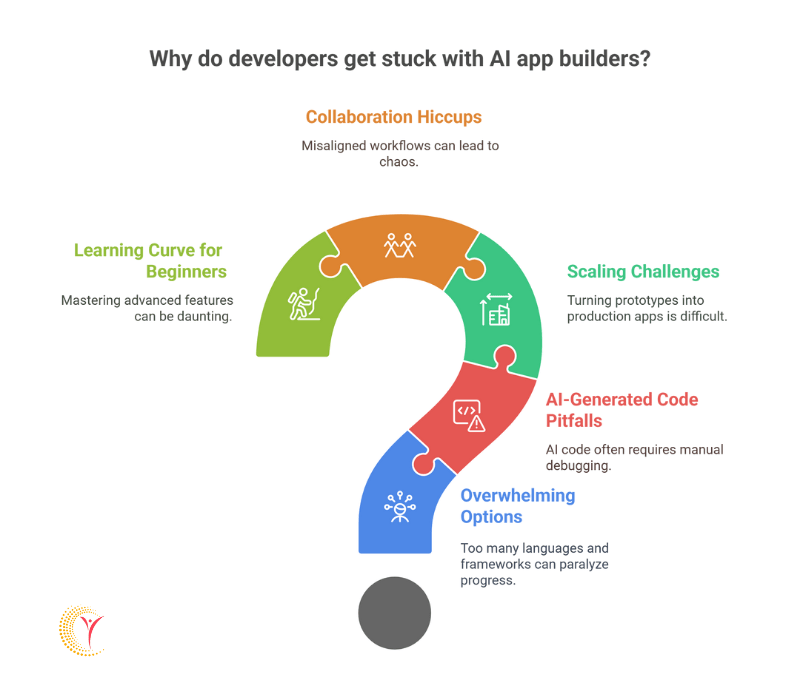
AI app builders like Replit, Bubble, or AppGyver promise to simplify development with drag-and-drop interfaces, AI-assisted coding, and collaborative environments. Replit, for instance, boasts over 20 million users and supports 50+ programming languages, making it a go-to for rapid prototyping. Yet, despite these powerful tools, developers often hit snags. Here’s why:

  • Overwhelming Options: Replit’s flexibility can be a double-edged sword. With so many languages, frameworks, and integrations, choosing the right stack can paralyze progress. A 2023 survey by Stack Overflow found that 62% of developers feel overwhelmed by the number of tools available.
  • AI-Generated Code Pitfalls: AI tools like Replit’s Ghostwriter can churn out code snippets, but they’re not perfect. A 2024 study by GitHub revealed that 41% of AI-generated code requires manual debugging due to errors or inefficiencies.
  • Scaling Challenges: Prototyping is easy, but turning a Replit project into a production-ready app with robust backend, database, and security features often stumps developers. Only 15% of hobbyist projects on Replit make it to deployment, according to internal platform data.
  • Collaboration Hiccups: Replit’s real-time collaboration is great, but misaligned team workflows or unclear version control can lead to chaos. A 2022 report by Atlassian noted that 29% of development teams struggle with effective collaboration on coding platforms.
  • Learning Curve for Beginners: While Replit is beginner-friendly, mastering its advanced features—like hosting, environment configuration, or integrating APIs—can be daunting. A 2024 Replit community poll showed that 53% of new users abandon projects due to technical complexity.


If any of these sound familiar, don’t worry—expert help, like hire mobile application developer, can turn your frustration into progress.


Schedule a Free Call Now

The Power of Expert Guidance

Hiring an expert or consulting a mentor can be the game-changer you need to finish your app. Here’s how professionals can help you overcome common hurdles:

  • Debugging with Precision: Experts can spot issues in your code that AI tools miss. For example, a senior developer can optimize an AI-generated algorithm that’s slowing your app, potentially cutting load times by 30-50%, as seen in case studies from CodeMentor.
  • Tailored Tech Stack Advice: Not sure if Node.js or Python is right for your Replit project? A web developer freelancer can analyze your app’s goals and recommend the best tools, saving you hours of trial and error.
  • Streamlined Collaboration: Professionals can set up proper Git workflows on Replit, ensuring your team’s contributions are seamless. This can reduce merge conflicts by up to 70%, per a 2023 GitLab study.
  • Deployment Know-How: Experts can guide you through hosting your app on Replit’s servers or external platforms like AWS or Heroku, ensuring scalability and security. They can also help integrate APIs, like xAI’s Grok API, to add advanced AI features.
  • Motivation and Accountability: A mentor keeps you on track, helping you avoid the 53% abandonment rate plaguing Replit users. They can break your project into manageable milestones, making the finish line feel achievable.

Real Stories, Real Impact

Consider Sarah, a self-taught developer who started building a fitness tracking app on Replit. She loved the platform’s collaborative features but struggled with integrating a third-party API for workout data. After weeks of frustration, she hired a freelance expert through Upwork. In just two sessions, the expert helped her debug the API calls, optimize her database, and deploy the app. Sarah’s app now has 1,000 active users and a 4.8-star rating.

Or take Mike, a startup founder using Replit to prototype an AI-powered chatbot. The AI code worked locally but crashed when scaled. A mentor from an IT consulting company guided him to refactor the backend, reducing server costs by 40% and enabling a successful beta launch.

These stories show that expert help isn’t just about fixing code—it’s about unlocking your app’s full potential.

Where to Find Expert Help

Ready to get unstuck? Here are some top platforms to find expert guidance:

  • Freelance Marketplaces:
    • Upwork: Hire developers with Replit expertise for as low as $20/hour.
    • Fiverr: Find quick fixes or full project support starting at $5/gig.
    • Codementor: Offers 1:1 mentoring with senior developers, with 80% of sessions rated 5 stars.
  • Replit’s Community:
    • Join Replit’s Discord or forums, where 10,000+ active members share tips. Some experienced users offer paid consultations.
  • Online Courses with Mentorship:
    • Platforms like Udemy or Coursera offer Replit-specific courses with instructor Q&A. For example, “Build Apps with Replit” on Udemy has helped 5,000+ students complete projects.
  • Local Coding Bootcamps:
    • Many bootcamps, like General Assembly, offer project-based coaching. In 2024, 65% of bootcamp graduates reported finishing their apps with mentor support.

Actionable Steps to Finish Your App

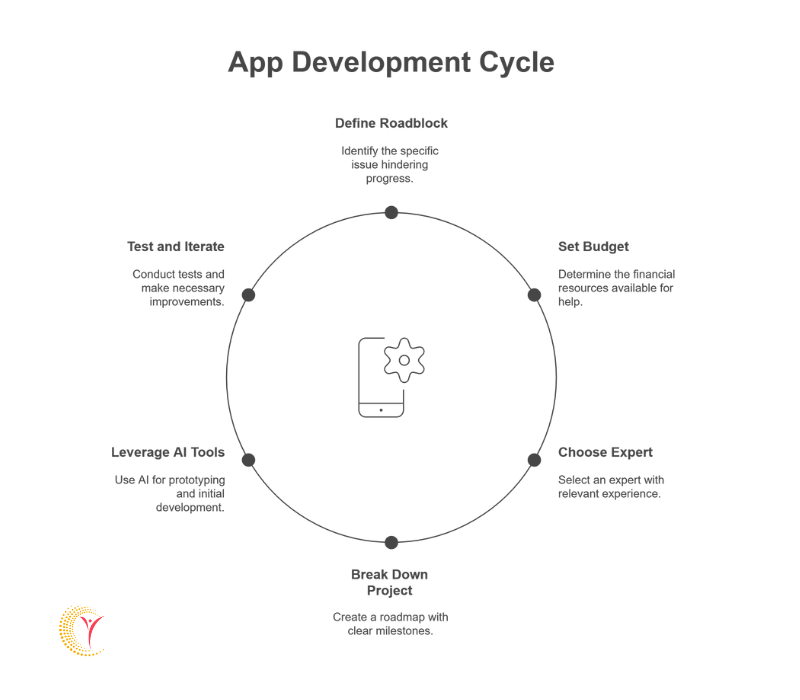
App Development Cycle

  • Define Your Roadblock: Is it code errors, UI design, or deployment? Pinpointing the issue helps you seek targeted help.
  • Set a Budget: Decide how much you can invest in expert help. Even a single $50 session can resolve major issues.
  • Choose the Right Expert: Look for someone with Replit experience and reviews showing success with similar projects.
  • Break Down Your Project: Work with your expert to create a roadmap with clear milestones, like “fix API integration by next week.
  • Leverage AI Tools Wisely: Use Replit’s AI features for prototyping, but rely on human expertise for optimization and deployment.
  • Test and Iterate: With expert guidance, run tests to ensure your app is user-ready. A 2023 study by Google found that apps with thorough testing have 25% higher user retention.

Don’t Let Your App Stay Stuck

Building an app on Replit is exciting, but hitting roadblocks is part of the journey. With over 20 million developers on the platform, you’re in good company—and expert help is just a click away. Whether it’s debugging AI-generated code, scaling your backend, or deploying your app, a mentor can save your time, money, and frustration. Don’t let your app become another statistic in the 53% abandonment rate. Take action today: hire an expert, join a community, or enroll in a mentored course. Your app deserves to shine, and with the right support, it will.

In 2025, iOS App Development has reached new heights of complexity and capability. With Apple’s latest mobile OS release, iOS 18.4.1, and the arrival of Xcode 15, developers are presented with a powerful suite of performance tuning tools that can dramatically enhance app efficiency, responsiveness, and battery optimization. Knowing how to use Xcode 15 tools effectively has become not just a developer’s advantage—it’s a necessity for businesses seeking scalability and user satisfaction.

Whether you’re an indie developer, part of a startup team, or work in app development for companies, understanding performance tuning can set your app apart in an increasingly competitive App Store environment. This blog dives deep into how to use Xcode 15 tools for performance tuning, referencing Apple’s latest OS update and providing advanced insights tailored for 2025 and beyond.

Introduction to Xcode 15’s Performance Tuning Toolkit

To fully leverage the capabilities of iOS 18.4.1, developers must understand how to use Xcode 15 tools not just as utilities, but as essential components of a high-performance development strategy. This latest release of Apple’s IDE brings a more refined and powerful toolkit designed specifically to meet the evolving demands of modern iOS App Development.

With improved integration with Instruments, Xcode 15 enables seamless profiling and debugging, allowing developers to pinpoint performance bottlenecks in real-time on Apple Silicon devices. The inclusion of smarter error navigation provides contextual insights and resolution guidance, significantly accelerating bug fixing and code optimization workflows.

Additionally, the introduction of Swift Data inspection allows for real-time visibility into data object behavior, which is crucial for maintaining UI responsiveness and functional integrity in SwiftUI-based architectures. Enhanced memory diagnostics—through LLDB and the Memory Graph Debugger—deliver deeper visibility into leaks, retain cycles, and memory usage patterns, helping teams reduce app bloat and improve overall runtime efficiency.

For organizations involved in app development for companies, or those looking to hire iOS developers to deliver world-class mobile solutions, these tools offer a decisive edge in maintaining performance standards and shortening release cycles.

Why Performance Matters More in iOS 18.4.1

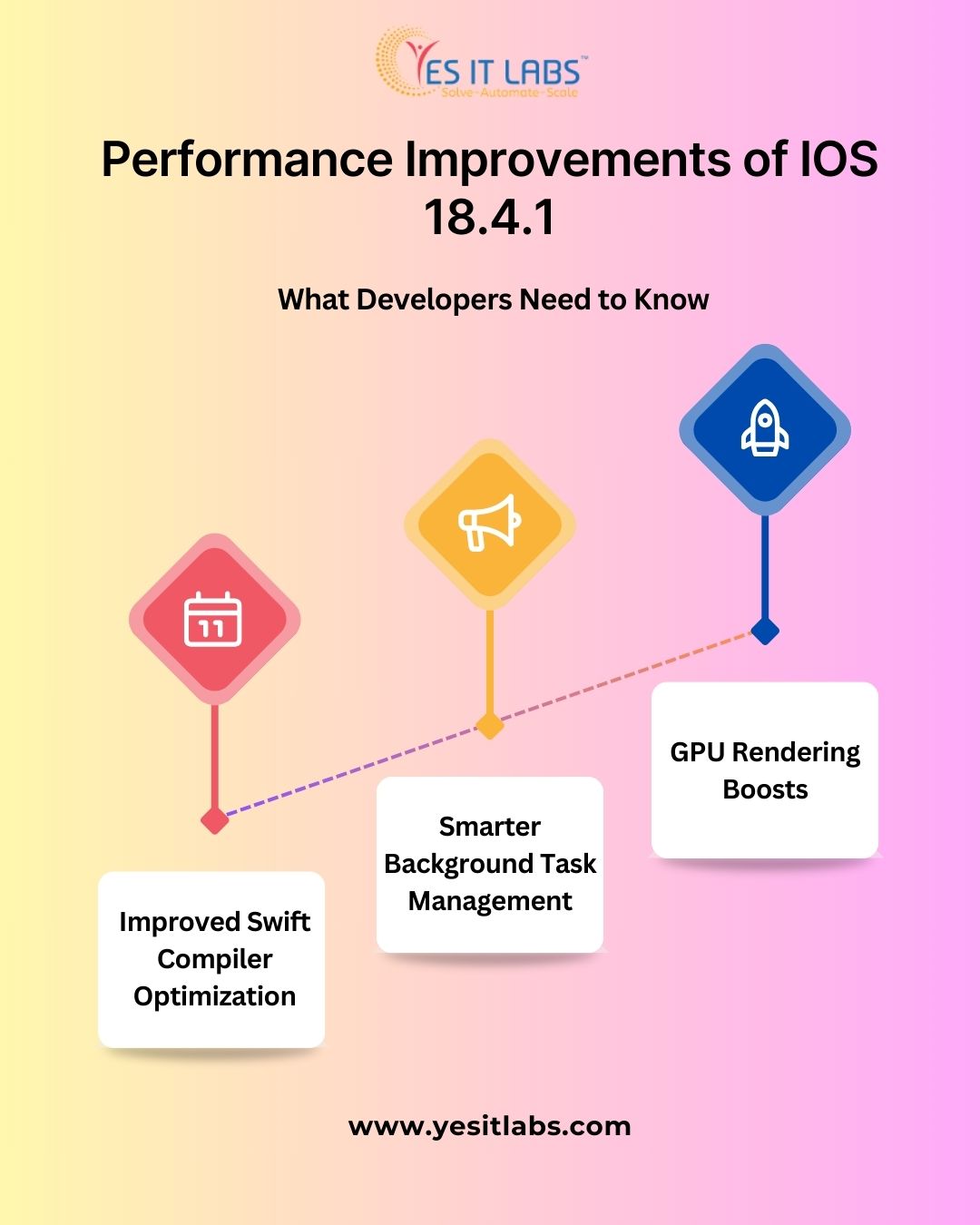
Apple’s iOS 18.4.1 introduces important system-level updates that significantly improve app performance and efficiency. Key highlights include:

  • Enhanced Swift compiler optimizations that reduce runtime delays and improve execution on Apple Silicon devices.
  • AI-driven background task scheduling that prioritizes active processes while conserving battery and CPU for less urgent tasks.
  • Real-time threat detection APIs that allow apps to identify suspicious activity directly on the device, strengthening security.

These changes require developers to rethink their app architecture by focusing on:

  • Efficient memory management to avoid leaks and slowdowns.
  • Streamlining features to reduce lag and power usage.
  • Creating smooth, responsive user interfaces that meet modern expectations.

Ignoring these improvements can lead to frustrated users, lower app ratings, and reduced retention. Staying aligned with iOS 18.4.1’s advancements is critical for teams aiming to deliver fast, reliable, and secure applications that keep pace with Apple’s evolving ecosystem.

Know more about this section from our blog at How IOS 18.4.1 Impacts Performance and Security in Application Development for iPhone in 2025.

Xcode 15 Instruments: The Heart of Tuning

The Instruments toolset is a cornerstone for developers learning how to use Xcode 15 tools effectively, offering deep insights into app behavior by profiling your application as it runs on either a real device or a simulator. This powerful suite of performance analysis instruments enables developers to identify bottlenecks, resource inefficiencies, and unexpected behaviors that can degrade user experience.

Key features of Instruments include:

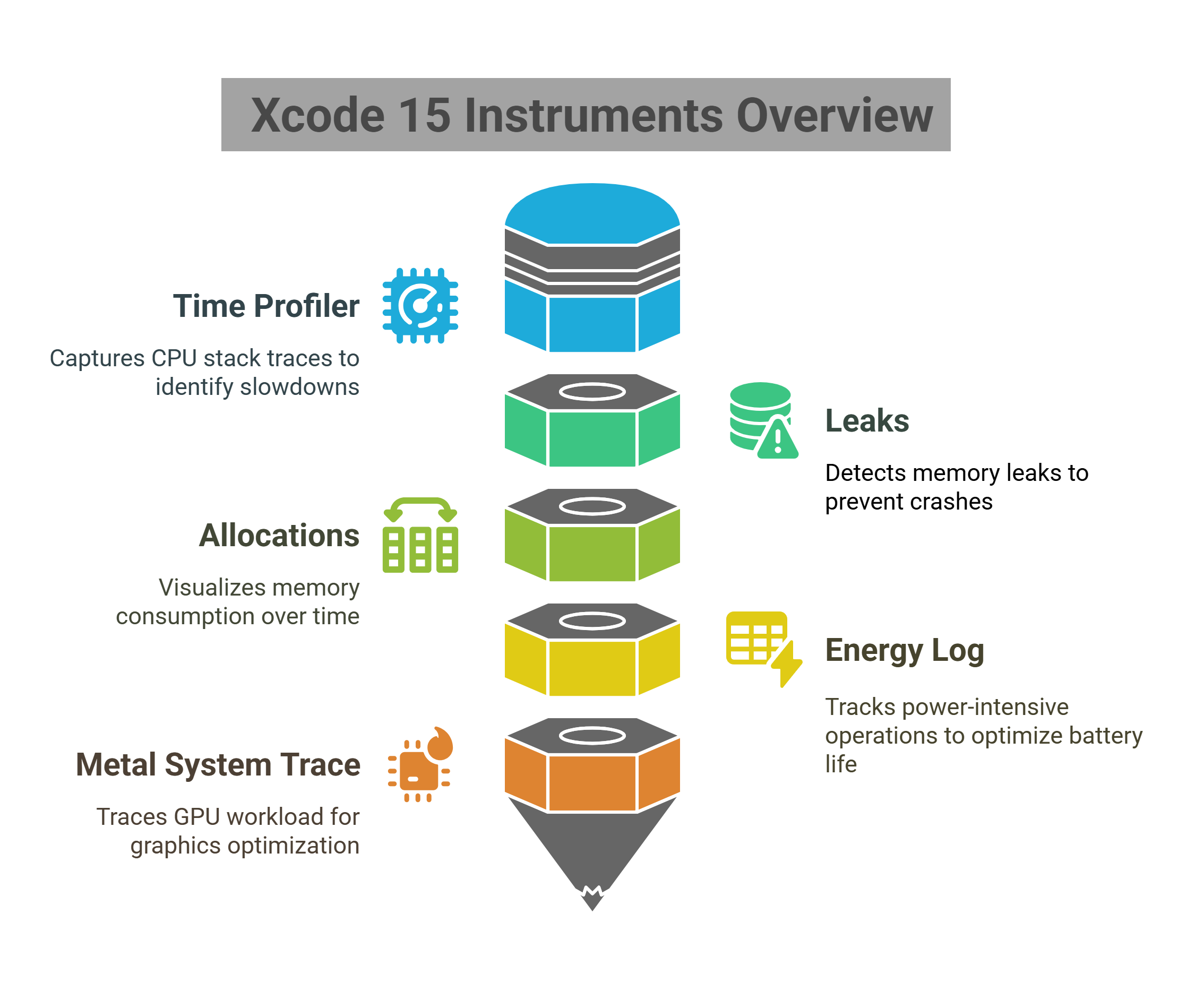
  • Time Profiler: This tool captures detailed CPU stack traces, allowing you to pinpoint exactly which functions or methods are causing slowdowns or excessive CPU usage. By analyzing these traces, developers can focus optimization efforts on the most performance-critical parts of the app, reducing lag and improving responsiveness.
  • Leaks: Memory leaks are a common source of crashes and degraded performance. The Leaks instrument automatically detects memory that your app allocates but never releases, helping you track down sources of retained memory that lead to bloated usage and eventual app instability.
  • Allocations: This visualizes memory consumption over time, giving developers a timeline of when and how much memory is allocated. With this insight, it’s possible to identify sudden spikes or sustained memory growth, enabling fine-tuning of resource management and reducing the likelihood of app termination due to memory pressure.
  • Energy Log: Battery life is critical for mobile applications. The Energy Log tracks power-intensive operations such as network usage, CPU activity, and GPU rendering, allowing developers to identify and minimize battery-draining tasks. This helps ensure your app remains efficient without compromising performance.
  • Metal System Trace: For GPU-heavy apps, especially those using Apple’s Metal API for graphics rendering or computational tasks, this instrument is invaluable. It traces GPU workload, shader execution, and frame rendering times, helping developers optimize graphics performance and maintain smooth frame rates even during complex animations or 3D rendering.

Each of these tools is highly customizable, allowing developers to tailor profiling to specific app behaviors and performance goals. For professionals focused on iOS App Development, mastering the Instruments toolset within Xcode 15 is essential to building efficient, responsive, and reliable applications that meet the high standards of modern users.

Xcode 15 Instruments Overview

Key Profiling Tools Explained

A. Time Profiler

The Time Profiler is an invaluable tool within Xcode 15’s Instruments suite designed to help developers pinpoint which threads and functions are consuming the most CPU time during app execution. It operates by sampling the call stack at regular intervals, providing a statistical view of where processing power is being spent. This approach helps highlight performance bottlenecks without significant overhead.

Developers can leverage the Time Profiler to:

  • Optimize Heavy Functions: Identify functions or methods that consume excessive CPU cycles, enabling targeted optimization of these hotspots for faster execution.
  • Track UI Thread Blocking Issues: Detect operations running on the main thread that block UI updates or user interactions, helping maintain smooth, responsive interfaces.
  • Spot Slow Startup Times: Analyze app launch performance by pinpointing early functions causing delays, allowing developers to streamline initialization and reduce time-to-interactive.

By focusing on these areas, developers ensure their apps remain snappy and efficient, improving overall user satisfaction and retention.

B. Allocations & Leaks

Memory management is critical in mobile environments, where resources are limited and inefficient usage can lead to app crashes or system-imposed terminations. The Allocations and Leaks instruments work hand in hand to provide developers with detailed insights into how memory is allocated, used, and freed throughout an app’s lifecycle.

Key uses include:

  • Detect Retain Cycles: Retain cycles occur when two or more objects hold strong references to each other, preventing deallocation. The Leaks tool helps identify these cycles early, allowing developers to break them and free memory properly.
  • Analyze Memory Spikes: Allocations instrument visualizes memory usage over time, helping detect sudden spikes or leaks that can cause sluggish performance or app crashes.
  • Reduce Memory Usage to Avoid iOS Memory Pressure Terminations: iOS actively monitors app memory usage and may terminate apps that exceed safe limits. By identifying inefficient memory allocations and leaks, developers can optimize their apps to run smoothly even under constrained conditions.

Mastering these instruments ensures apps are both performant and stable, which is especially important for companies focused on delivering quality user experiences in their iOS app development.

C. Energy Log

Battery life is a top concern for users and a critical factor for companies developing apps that must run efficiently on mobile devices. The Energy Log instrument tracks the power consumption of your app in real-time, revealing areas that may unnecessarily drain battery life.

Developers can use Energy Log to identify:

  • Background Activity: Continuous or excessive background processing, such as frequent background fetches or syncs, can drain battery life. The Energy Log helps pinpoint these issues for better task scheduling or deferral.
  • GPS or Sensor Overuse: Location services and sensors like the accelerometer can be battery-intensive if used inefficiently. This tool highlights periods of excessive sensor use, prompting developers to optimize usage or implement adaptive behaviors.
  • Network Wakeups: Frequent network activity, especially wakeups triggered by push notifications or background data transfers, can spike energy consumption. By analyzing network patterns, developers can optimize synchronization strategies to balance functionality and battery efficiency.

For companies invested in iOS app development, leveraging the Energy Log is essential to building battery-conscious apps that meet user expectations and reduce negative reviews related to power drain.

Case Study: Optimizing SwiftUI Animations with Instruments

A travel app developed using SwiftUI was facing noticeable janky transitions during view navigation, which negatively impacted the overall user experience. To diagnose the problem, the development team leveraged Xcode 15’s Time Profiler and Allocations tools.

The Time Profiler revealed excessive CPU consumption caused by inefficient view updates, while the Allocations instrument uncovered frequent view reinitializations that led to memory spikes. The root cause was identified as improper use of SwiftUI’s @State and @ObservedObject properties, which triggered unnecessary view redraws and excessive resource usage.

By carefully restructuring the view logic and optimizing state management to minimize redundant redraws, the team was able to boost animation smoothness by 40%. This optimization not only reduced CPU and memory overhead but also significantly enhanced the app’s responsiveness and fluidity.

This example demonstrates how to use Xcode 15 tools effectively to identify and resolve performance bottlenecks in modern declarative UI frameworks like SwiftUI, resulting in a smoother and more polished user experience.

Real-Time Diagnostics for Swift Concurrency

Swift’s concurrency model (async/await) is now tightly integrated into Xcode 15’s Instruments, giving developers powerful ways to analyze and debug asynchronous operations. With this, you can trace task hierarchies to understand how async workflows are structured, analyze lifecycles to see when tasks start, suspend, and complete, and detect problems like thread explosion or starvation that can hinder performance.

These features are particularly valuable for iOS app development where apps frequently rely on:

  • Network requests for data fetching
  • Media processing that runs in parallel to UI rendering
  • Background syncing for user data or notifications

By using Instruments to fine-tune concurrency, developers can significantly improve responsiveness and battery efficiency—key factors in delivering smooth, high-quality user experiences in iOS 18.4.1.

How to Use Xcode 15 Tools- Key Tools Uses Explained

Using Energy Log to Reduce Battery Drain

Apple’s intelligent background scheduler in iOS 18.4.1 takes a much stricter stance on energy efficiency, actively penalizing apps that drain power through inefficient background activity. This shift means that developers must now pay closer attention to how and when their apps perform background tasks. Xcode 15’s Energy Log becomes a crucial ally here, enabling developers to pinpoint and address battery-intensive operations.

With tools like the Energy Log, teams can avoid unnecessary polling that keeps the CPU awake, defer non-essential background work when the device is in low-power mode, and batch network operations to reduce wake cycles. These optimizations aren’t just technical improvements—they directly affect user retention and device health.

For companies that hire iOS developers to build always-on services—such as email clients, cloud backup utilities, or fitness trackers—maintaining optimal energy profiles is critical. Not only does this ensure better user experience and compliance with App Store guidelines, but it also makes these apps more competitive in today’s performance-driven mobile landscape.

Leveraging the New Memory Graph Debugger

Xcode 15’s updated Memory Graph offers developers a dynamic way to visualize and analyze memory usage in real time. Rather than sifting through logs or relying solely on manual inspection, developers can now:

  • View object graphs live as the app runs, offering immediate feedback.
  • Identify strong reference cycles that lead to memory leaks.
  • Navigate ownership hierarchies, making it easier to trace how objects persist in memory.

These capabilities are especially critical in large-scale iOS App Development projects where memory mismanagement can severely impact performance. Memory leaks don’t just slow down your app—they can lead to unpredictable crashes, especially under high memory pressure. By incorporating memory graph analysis into every development sprint, teams can:

  • Catch problematic object references early in the lifecycle.
  • Reduce the risk of app crashes before public release.
  • Maintain long-term app health across updates.

This proactive approach ensures smoother app behavior, happier users, and fewer surprises during QA or App Store reviews.

How Metal Debugger Helps Graphics-Heavy Apps

For gaming, AR, or media-rich applications, the Metal Debugger in Xcode 15 is an essential tool for achieving top-tier visual performance. As iOS 18.4.1 introduces GPU rendering enhancements—such as adaptive resolution, real-time ray tracing, and tighter Metal API integrations—developers now have a greater responsibility to ensure their apps not only look great but run efficiently.

The Metal Debugger enables teams to:

  • Capture and inspect GPU frames, revealing bottlenecks in the rendering pipeline.
  • Optimize shader performance, helping reduce overhead on critical visual effects.
  • Analyze draw calls and memory use, which is crucial in avoiding overdraw or wasted GPU cycles.

By using these insights, developers can fine-tune visuals with precision, maintaining high frame rates even during complex scenes. This is especially critical for app development for companies in entertainment, immersive learning, or mobile gaming—where user experience hinges on smooth, responsive graphics.

Leveraging the Metal Debugger empowers teams to balance fidelity and performance, delivering experiences that stand out on modern Apple devices.

Automation and CI/CD: Performance Tuning at Scale

Continuous Integration (CI) is no longer just about compiling code and running unit tests—it’s a powerful ally in ongoing performance optimization. In modern iOS workflows, integrating performance tuning directly into your CI/CD pipeline ensures that regressions are caught early and quality remains consistent across releases.

To incorporate this effectively, teams can:

  • Integrate Instruments-based performance tests into systems like Xcode Cloud, Jenkins, or GitHub Actions, allowing real-world profiling to become a part of every build.
  • Automatically flag regressions in launch time, memory consumption, or CPU usage by setting performance thresholds in test suites.
  • Track performance metrics over time, providing visibility into whether tuning strategies—such as memory optimizations or GPU adjustments—are delivering real results.

This is especially crucial for teams focused on app development for companies, where user expectations are high and QA timelines are often compressed. Automating these performance checks reduces manual effort while ensuring that each deployment maintains (or improves upon) the app’s efficiency and responsiveness. Ultimately, it turns performance into a measurable, testable, and enforceable quality metric—right inside your development pipeline.

When to Refactor: Insights from Performance Traces

Tracing tools in Xcode 15 don’t just diagnose surface-level performance issues—they reveal deep architectural inefficiencies. If your traces consistently show signs like:

  • Monolithic classes with bloated, hard-to-test functions,
  • Poor separation of concerns, where business logic, UI rendering, and data access are all entangled,
  • Excessive computation on the main thread, leading to dropped frames and UI lag,
  • —then it’s a clear sign that refactoring is overdue.

To address this, developers should adopt modular architecture using Swift Packages, breaking the app into smaller, maintainable components. This improves code readability, reduces compile times, and enables teams to test and deploy features independently.

For enterprise-level projects—especially those that hire iOS developers across distributed teams—this architectural discipline becomes critical. It enables scalable collaboration and ensures that performance tuning efforts aren’t constantly being undone by poor code structure.

Xcode 15 & iOS 18.4.1: A Match Made for Optimization

Together, Xcode 15 and iOS 18.4.1 provide developers with unprecedented visibility into runtime behavior, enabling far more precise performance tuning than in previous iterations. Apple’s push for tighter system efficiency is evident through several key upgrades: battery-aware background scheduling now intelligently defers non-critical tasks, Swift compiler enhancements generate faster and more optimized code paths, and Metal performance improvements unlock better GPU utilization for graphics-intensive applications.

These advancements significantly raise the bar for what’s considered acceptable performance in the iOS ecosystem. As a result, only teams that fully embrace Xcode 15’s advanced diagnostic and profiling tools will be equipped to meet—and exceed—modern user expectations for speed, efficiency, and responsiveness.

Apple’s Real-Time Threat Detection API: Privacy, Security, and Performance

Apple’s Real-Time Threat Detection API in iOS 18.4.1 introduces a new layer where security and performance intersect. Developers tuning apps with Xcode 15 must now ensure that instrumentation respects strict system-level privacy rules. This means avoiding any tracking or profiling that exceeds app boundaries, handling logs and diagnostics securely, and ensuring no sensitive user data is exposed.

To meet Apple’s evolving standards and maintain App Store compliance, performance tuning must go hand-in-hand with ethical development practices. Apps that ignore these security implications risk not just poor reviews or user distrust, but potential rejection from the App Store entirely.

Final Tips for Teams and Enterprises

Ensuring consistent app performance requires more than just initial optimization—it demands ongoing education, clear standards, and regular review. For teams involved in iOS app development, especially those that hire iOS developers frequently or work with large codebases, establishing a strong culture around performance monitoring is critical. By building this foundation early, teams can avoid common pitfalls and ensure smooth, efficient user experiences over time.

To implement this effectively, consider the following best practices:

  • Educate new hires on Instruments and debugging tools from day one to ensure every developer understands how to monitor CPU, memory, and energy usage effectively.
  • Create performance budgets for critical metrics such as launch time, frame rate, and memory consumption to prevent regressions and maintain app responsiveness.
  • Conduct quarterly performance audits using archived Instruments sessions to track long-term performance trends and validate tuning efforts.
  • Document best practices internally in a shared knowledge base to streamline onboarding and maintain consistent performance standards, especially when frequently hiring iOS developers externally

By institutionalizing these processes, companies not only improve app quality but also empower their development teams to work proactively. This reduces firefighting last-minute performance bugs and helps maintain a competitive edge in today’s demanding app market.

Conclusion

Knowing how to use Xcode 15 tools for performance tuning in iOS 18.4.1 is not just about debugging—it’s about delivering exceptional user experiences. As mobile platforms mature, so must our development practices.

From memory management and animation fluidity to energy efficiency and security awareness, performance tuning is the new frontier for excellence in iOS App Development. By using Xcode 15’s powerful profiling and debugging tools, developers and teams can future-proof their apps for whatever innovations Apple brings next.

How Open AI Codex Is Revolutionizing Software Development in 2025

In 2025, artificial intelligence has evolved from a novelty into an essential toolkit for developers, and at the center of this transformation is Open AI Codex. As the engine behind GitHub Copilot and other intelligent coding assistants, Open AI Codex is radically changing how software is written, tested, and maintained.

Developers today are no longer limited to manual code composition; instead, they collaborate with AI systems that understand natural language and produce functional code almost instantly.

This blend of machine learning and human creativity is ushering in a new era of efficiency, accessibility, and innovation in software engineering.

What Is Open AI Codex?

Open AI Codex is an advanced artificial intelligence model developed by Open AI, designed to bridge the gap between human language and computer programming. Trained on billions of lines of code and vast datasets from natural language sources, Codex can interpret plain English prompts and transform them into functional code across multiple programming languages—including Python, JavaScript, TypeScript, Go, Ruby, PHP, Swift, and more.

Unlike traditional code editors or basic auto-complete tools, Open AI Codex functions as a highly intelligent collaborative partner. It assists developers in real time by understanding context, tracking dependencies, and generating code that is efficient, secure, and aligned with best practices. It is the underlying engine behind tools like GitHub Copilot and is redefining how software is created in 2025.


Open AI Codex in Enterprise Software Development

Enterprises are embracing Open AI Codex to accelerate their development cycles and reduce human error. Large-scale projects that once required months of coding can now be fast-tracked with AI-assisted development. Teams use Codex to generate boilerplate code, write documentation, and automate repetitive tasks such as API integration, testing, and deployment scripts.

By minimizing manual labor, developers can focus on strategic problem-solving and architecture design. This is particularly valuable for companies involved in mvp software development, where speed and flexibility determine market success. Codex allows these teams to iterate on ideas, get real-time feedback, and release functional prototypes rapidly.

Open AI Codex- Enhancing Accessibility and Learning

One of the most revolutionary aspects of Open AI Codex is its impact on accessibility. It lowers the barrier for entry into the world of programming, enabling non-technical users to participate in software development. By converting natural language instructions into usable code, Codex allows designers, product managers, and domain experts to contribute directly to building features and solving bugs.

Educational institutions and bootcamps are also integrating Codex into their curricula to enhance learning. Students can experiment with syntax and logic without getting bogged down by boilerplate code, making the learning curve less steep. With Codex as a guide, learners gain confidence and a deeper understanding of software engineering principles.

Key Features of Open AI Codex:

Natural Language to Code

Open AI Codex can transform plain English (or other human languages) into functional code. This means developers—and even non-developers—can describe what they want in natural language, and Codex will generate the corresponding code. This feature eliminates the need to memorize syntax or structure, making development faster and more accessible.

Contextual Code Understanding

Codex doesn’t just respond to a single line—it understands the full context of your codebase. It can track variables, functions, and project architecture, ensuring that suggestions are consistent and logical across the application. This deep contextual awareness makes it feel like working with a knowledgeable coding partner.

Multi-Language Support

Codex supports over a dozen programming languages, including Python, JavaScript, Java, Ruby, Go, and more. Whether you’re switching between frontend and backend or working across multiple stacks, Codex seamlessly adapts and offers relevant, syntax-accurate suggestions in your chosen language.

Debugging and Error Fixing

Codex can identify and fix common bugs on the fly. If there’s a syntax error, logic flaw, or inefficient pattern, Codex flags it and proposes a corrected version. This significantly cuts down debugging time and reduces the likelihood of pushing flawed code into production.

Automated Test Generation

Writing test cases is often a tedious task, but Codex can generate unit tests based on your function definitions or code snippets. It understands expected input and output behaviors and creates test cases that help ensure your application works as intended—saving time and increasing confidence in code quality.


Streamlining iOS App Development

In 2025, the mobile app ecosystem continues to thrive, and iOS App Development is one area where Open AI Codex truly shines. From creating sleek user interfaces to managing complex Swift codebases, Codex assists iOS developers by suggesting efficient solutions, spotting bugs early, and even writing unit tests. It understands Apple’s frameworks and Xcode conventions, helping streamline the app development lifecycle.

For startups and companies looking to hire iOS app developer talent, Codex acts as a force multiplier. It enables smaller teams to achieve more with fewer resources, reducing development timelines and increasing output quality. The AI-powered guidance allows iOS developers to stay focused on delivering polished, user-friendly apps without getting overwhelmed by coding minutiae.

hire ios app developer

Open AI Codex in Testing and Debugging

Testing has traditionally been one of the most time-consuming and detail-intensive stages of software development. It demands not only thoroughness but also creativity to uncover hidden bugs and edge cases. Open AI Codex is reshaping this phase by automating many of its most challenging aspects.

Codex can generate unit tests automatically by interpreting your code logic and structure. This helps developers validate functionality without manually writing extensive test scripts. Furthermore, it analyzes logic patterns to detect potential errors, inefficiencies, or vulnerabilities before the code is executed.

By integrating Codex into the QA process, both development and testing teams can streamline workflows, enhance accuracy, and deliver more robust applications with faster turnaround times.

Key Advantages of Open AI Codex in testing and debugging are:

  • Auto-Generated Unit Tests- Codex generates test cases from function descriptions and usage patterns, saving time and ensuring functional coverage.
  • Error Detection & Suggestion- Codex can spot logical flaws, inefficient loops, or misuse of data structures and suggest optimized alternatives.
  • Edge Case Identification- Codex considers unusual or rare inputs that could break your app, helping improve reliability and reduce post-release bugs.
  • Regression Awareness- When legacy code is updated, Codex helps ensure new changes don’t introduce regressions by flagging inconsistencies or missing test coverage.
  • Faster QA Cycles- With automation handling much of the repetitive validation, teams can shift focus to exploratory testing and complex scenarios.


By leveraging Open AI Codex, teams can reduce the manual burden of test creation, improve overall code quality, and accelerate the release cycle without compromising stability or performance.

Security and Compliance in Codex-Driven Development

Security remains a top priority in 2025’s software development landscape, and Open AI Codex supports best practices by suggesting secure coding patterns and flagging vulnerabilities. It can recommend parameterized queries to prevent SQL injection, enforce authentication protocols, and even check for hardcoded secrets.

Additionally, Codex assists in regulatory compliance by generating privacy policy templates and ensuring data-handling procedures align with industry standards like GDPR and CCPA. This is invaluable for companies delivering custom software development service, where clients demand robust, secure, and compliant applications.

Ethical Considerations and Limitations

Despite its capabilities, Open AI Codex isn’t without limitations. It can generate incorrect or inefficient code, especially when fed vague or misleading prompts. Developers must review AI-generated code carefully and maintain accountability for final outputs.

There are also ethical questions about intellectual property. Since Codex is trained on publicly available code, some argue it could inadvertently replicate copyrighted material. Open AI continues to refine Codex’s training and usage policies to ensure ethical standards are upheld.

The Future of Software Teams and AI Collaboration

Open AI Codex is not replacing developers; it’s empowering them. The future points toward hybrid teams where AI and human programmers collaborate seamlessly. Junior developers gain mentorship through Codex’s real-time suggestions, while senior engineers can offload mundane tasks and concentrate on innovation.

As the tool evolves, we can expect deeper integrations with development environments, version control systems, and deployment pipelines. Teams will increasingly treat Codex as an AI teammate—one that never tires, scales effortlessly, and keeps improving with use.

Conclusion

In 2025, Open AI Codex stands as a transformative force in the software industry. By automating code generation, enhancing learning, and improving app development workflows, it is redefining what’s possible in programming. Whether you’re involved in mvp software development, leading an iOS App Development team, or working in a custom software development service, the impact of Codex is impossible to ignore. As AI continues to advance, the synergy between developers and intelligent systems like Codex will drive the next wave of digital innovation.

Open AI Codex is more than a tool—it’s a revolution, and the future of software development has already begun.

Developing Apps for iOS 18.5

As Apple continues to refine its ecosystem, developing apps for iOS 18.5 has become both an exciting opportunity and a technical challenge for developers worldwide. With new APIs, enhanced machine learning capabilities, and tighter privacy controls, iOS 18.5 introduces significant changes that directly affect how apps are built, tested, and distributed.

In this guide, we explore everything you need to know to stay ahead of the curve, meet Apple’s expectations, and deliver exceptional user experiences in 2025.

What’s New in iOS 18.5?

Apple’s iOS 18.5 introduces powerful updates that redefine how developers approach mobile app creation. These changes go beyond surface-level tweaks, requiring developers to rethink performance, user experience, and compliance to stay competitive.

A major highlight is the enhanced SwiftUI integration, which delivers faster rendering, reduced boilerplate code, and smoother design-to-deploy workflows. Developers can now build more dynamic UIs with greater efficiency. The update also boosts on-device AI capabilities via the improved Apple Neural Engine (ANE), enabling advanced machine learning features that work offline and prioritize user privacy. Apps can now personalize experiences and process data in real time without cloud dependency.

Privacy is also more tightly controlled with an enhanced privacy sandbox, enforcing stricter rules for data access, permissions, and sensor usage. This pushes developers to focus more on transparency and data minimalism.

For spatial app developers, the Vision Pro API updates improve AR and 3D experiences, offering better integration across iOS devices and Vision Pro headsets.

Key iOS 18.5 Enhancements:

  • SwiftUI Upgrades: Faster, leaner UI development.
  • On-Device AI: Smarter apps powered by ANE.
  • Privacy Sandbox: Stricter data access rules.
  • Vision Pro API: Seamless AR and spatial computing.

Whether you’re working solo or within a custom software development service, adapting to iOS 18.5 means more than updates—it requires reimagining app strategy. From performance to privacy and immersive design, the future of iOS development is here.

Getting Started with Xcode and iOS 18.5 SDK

Apple’s latest release of Xcode includes the full iOS 18.5 SDK, equipping developers with the necessary tools to build, test, and deploy next-generation apps across Apple’s expanding ecosystem. To make the most of this update, it’s essential to follow a few key steps:

  • Update to the latest version of Xcode by downloading it directly from the Apple Developer site. The new version comes preloaded with the iOS 18.5 SDK, support for Swift 6, updated simulators, and enhanced debugging tools.
  • Enable device compatibility mode during development. This ensures your app functions seamlessly not only on iPhones and iPads but also on the Apple Vision Pro. With the growing adoption of spatial computing, testing your app across device classes is now more critical than ever.
  • Use the iOS 18.5 Simulator to emulate a wide range of screen sizes, aspect ratios, and gesture inputs. This is particularly useful for testing layout responsiveness, dynamic island behavior, and new gesture navigation patterns introduced in iOS 18.5.

Notably, this SDK version is deeply integrated with Swift 6, allowing developers to benefit from improved type inference, memory safety, and concurrency enhancements. Swift 6 introduces new language features that boost both performance and developer productivity, aligning perfectly with Apple’s vision for cleaner, safer, and more scalable code.

Key Considerations When Developing Apps for iOS 18.5

1. SwiftUI vs UIKit

With the evolution of iOS, SwiftUI has become Apple’s preferred framework for building user interfaces, especially for modern apps targeting iOS 18.5. It allows developers to create declarative, concise UI code with live previews and seamless integration with Swift. SwiftUI also supports new features introduced in iOS 18.5 more quickly than UIKit, making it ideal for future-forward development.

However, UIKit still has a role—particularly for complex, animation-rich interfaces or legacy apps requiring backward compatibility. Developers working on enterprise apps or hybrid architectures may still opt for UIKit where needed.

2. Machine Learning with CoreML

Machine learning continues to be a major focus in iOS 18.5, and CoreML—Apple’s native framework for machine learning—has received important performance upgrades. Developers can now deploy AI models directly to the device with improved model loading times and significantly reduced inference latency.

This enables a wide range of real-time capabilities, from image recognition to personalized content delivery, all processed on-device.

3. Spatial Computing Support

The release of Vision Pro has accelerated the shift toward spatial computing. iOS 18.5 introduces updates to RealityKit 3 and ARKit, enabling developers to build 3D interfaces and augmented reality experiences that integrate with mobile and spatial devices.

From interior design tools to immersive training apps, the possibilities are expanding rapidly, and Apple’s updated frameworks make it easier to build these experiences seamlessly across iPhone, iPad, and Vision Pro.

4. Security and Privacy

Apple has doubled down on user privacy in iOS 18.5 by making permissions more granular and transparent. Now, apps must provide precise justifications for accessing sensitive hardware features like the camera, microphone, and motion sensors.

These justifications must be included in the app’s Info.plist file, and developers must also build workflows to handle permission denial gracefully. This ensures that apps remain functional and respectful even when access is restricted.

Meeting Evolving User Expectations in iOS 18.5

As technology advances, so do user expectations. With iOS 18.5, Apple has introduced new interface standards and interaction models that reflect modern user behavior and accessibility needs. Here are some of the most important UX/UI trends to integrate:

1. Dynamic Color Themes

Users now expect seamless visual transitions between light and dark modes, not just for comfort but for consistency across apps and devices. iOS 18.5 expands the system’s adaptive theming capabilities, allowing apps to automatically respond to system-wide appearance changes. This goes beyond just flipping background colors—developers should ensure that icons, UI elements, and text contrast remain visually optimal in both modes. Using SwiftUI’s color assets and system colors helps maintain consistency and accessibility with minimal effort.

2. Adaptive Gestures & Haptics

Apple has enhanced the gesture system and haptic feedback in iOS 18.5 by introducing multi-layered haptics and context-sensitive gestures. This allows apps to feel more tactile and responsive, giving users physical feedback for specific actions. For example, a long press on a button might deliver a subtle haptic tap, while swiping a card might trigger a layered vibration pattern. Developers should integrate these features using UIKit’s and SwiftUI’s updated APIs, making interactions more engaging and intuitive.

3. Simplified Navigation Patterns

Navigation in iOS 18.5 is becoming cleaner and more efficient. Smart tab bars now adapt contextually, offering greater support for accessibility and customization. Instead of cluttered side menus or complex navigation stacks, developers are encouraged to use tab-based navigation that’s both visually minimal and functionally powerful. When properly structured, this helps users access core features with fewer taps, improving usability for all, including those relying on assistive technologies.

4. Live Activities and Enhanced Widgets

With the evolution of the Lock Screen and Home Screen, Apple continues to promote Live Activities and interactive widgets as primary engagement tools. These components now support real-time updates, deep linking, and richer UI interactions directly from the Lock Screen. Whether you’re showing delivery progress, fitness stats, or time-sensitive alerts, these widgets can dramatically improve retention and utility by keeping users informed—without needing to launch the full app.

Testing and Debugging Enhancements

Apple has introduced smarter testing tools that can help developers ensure their app is stable and responsive. If you’re not familiar with the latest Xcode features or debugging tools, consider hiring a team of mobile applications developers who can effectively leverage these enhancements and deliver a seamless experience for users. Apple has introduced smarter testing tools:

  • Automated Performance Tests: Check power usage, heat, and frame drops.
  • Xcode Previews: Real-time UI feedback as you write SwiftUI code.
  • Crash and Log Analytics: Integrated with App Store Connect.

These tools help ensure stability and responsiveness, particularly critical if you’re part of a custom software development service team delivering enterprise-level apps.

Optimizing Performance for iOS 18.5: Best Practices Developers Should Follow

Developers now have to be more strategic in how they manage system resources—especially as devices handle increasingly complex apps with AI, AR, and spatial computing. Here’s how to optimize your app to align with iOS 18.5’s performance expectations:

1. Use Background Tasks Wisely

Apple has tightened restrictions on how frequently background tasks can execute in iOS 18.5. This means apps can no longer rely on frequent, passive background execution to perform updates or data syncing. Instead, developers should leverage the BGTaskScheduler framework thoughtfully. Schedule tasks based on realistic needs—such as fetching content during system idle time or syncing only when a user is on Wi-Fi and charging.

2. Reduce Memory Footprint

Performance isn’t just about speed—memory efficiency is just as critical. iOS 18.5 introduces enhanced debugging and profiling tools in Xcode that help developers detect memory leaks, retain cycles, and inefficient memory allocation more easily. These tools offer real-time visual insights into memory usage and let you pinpoint which parts of your app are consuming unnecessary resources.

Moreover, Apple is pushing developers to adopt lightweight asset packaging. This involves using on-demand resources, optimized image formats (like HEIF), and compressing non-essential assets to reduce download sizes and runtime memory usage.

3. Leverage Metal 3 for Graphics

Apple’s Metal 3 graphics API, introduced with iOS 18.5, provides low-overhead, high-performance access to the GPU—making it a game-changer for developers building graphically intense applications. Whether you’re working on 3D games, real-time rendering, or data visualization tools, Metal 3 delivers smoother frame rates, faster load times, and richer visual effects with lower power consumption.

New enhancements in Metal 3 include mesh shading, variable rate shading, and GPU-driven pipelines, which are particularly useful for games and AR apps on devices like the iPhone 15 Pro and Vision Pro.

Prioritizing Accessibility in iOS 18.5: Designing for All Users

With every iteration of iOS, Apple reinforces its commitment to inclusivity and accessibility, and iOS 18.5 is no exception. Creating accessible apps is no longer just a best practice—it’s a necessity.

Here are key areas developers should focus on to ensure their apps are inclusive and aligned with iOS 18.5’s accessibility standards:

1. Support VoiceOver and Dynamic Text Sizes

VoiceOver remains one of the most critical tools for visually impaired users. It allows users to interact with an app by hearing descriptions of UI elements and content. Developers should:

  • Ensure all elements are properly labeled with meaningful accessibility labels.
  • Avoid using icons without textual descriptions.
  • Group related UI elements using accessibility containers.

Additionally, support for dynamic text sizes means your app should adapt to the user’s preferred text settings. Use scalable text styles provided by SwiftUI or UIKit so users can enlarge or shrink text without breaking layouts.

2. Provide Haptic Feedback Alternatives

While haptic feedback enhances user interactions, it’s not always usable or comfortable for all users, particularly those with sensory sensitivities or devices that don’t support it. iOS 18.5 encourages developers to offer non-haptic alternatives—such as sound cues or visual changes—so interactions remain meaningful even without tactile feedback.

SwiftUI and UIKit make it easier to check whether haptics are available and conditionally present feedback. This ensures your app is adaptive and responsive to the widest range of user preferences.

3. Use Semantic Colors and Adaptive Layouts

Color plays a crucial role in both branding and usability. However, using fixed or non-semantic colors can make an app unusable for users with color vision deficiencies. By using semantic colors (e.g., labelColor, systemBackground, separatorColor), your app automatically adjusts to light/dark modes and accessibility settings like increased contrast.

Meanwhile, adaptive layouts—those that reflow gracefully when text sizes change or screen dimensions vary—help ensure your interface remains usable on all devices, including iPads, smaller iPhones, and the Apple Vision Pro.

Hiring the Right Talent for iOS 18.5 Projects

With the launch of iOS 18.5, building apps now requires deeper technical know-how. Whether you’re scaling an existing product or starting fresh, it’s crucial to hire iOS app developer professionals who are up to date with the latest Apple technologies.

1. Swift 6 and SwiftUI Expertise

Developers must be fluent in Swift 6 and SwiftUI to take full advantage of performance boosts and modern UI design. SwiftUI is now the go-to for adaptive, responsive interfaces.

2. Knowledge of Apple’s HIG

Following Apple’s Human Interface Guidelines ensures better user experience and smoother App Store approvals.

3. Vision Pro, ARKit, and CoreML Skills

As spatial computing and on-device AI become mainstream, developers with experience in Vision Pro, ARKit, and CoreML are essential for innovation.

4. Scalable Support

Whether hiring in-house or freelance, the right iOS developer brings efficiency, quality, and future-readiness to your project.

In today’s highly competitive app landscape, working with qualified experts isn’t just helpful—it’s essential. Investing in top-tier talent ensures your app is robust, future-ready, and delivers the premium experience Apple users expect.

iphone apps development services

Common Challenges in Developing Apps for iOS 18.5

While iOS 18.5 brings powerful tools and innovative features, it also introduces a set of challenges. To address these efficiently, businesses often turn to an iOS application development service to manage device fragmentation, new permission models, and migration challenges, ensuring that all the complexities of iOS 18.5 are handled effectively.

1. Device Fragmentation: Vision Pro vs iPhones vs iPads

Apple’s growing device ecosystem now includes traditional platforms like iPhones and iPads, alongside emerging spatial devices like the Apple Vision Pro. Each device offers unique screen sizes, input methods (touch vs gesture vs gaze), and performance capabilities. Developing a consistent experience across this fragmented device landscape requires:

  • Responsive UI frameworks (like SwiftUI)
  • Conditional logic for device-specific features
  • Separate UX testing on VisionOS, iOS, and iPadOS simulators or physical devices

Neglecting this can lead to awkward user experiences and lower retention rates.

2. New Permission Models

With iOS 18.5, Apple has tightened privacy controls further. Apps must now:

  • Request more granular permissions for sensors like camera, microphone, and motion tracking
  • Clearly explain data usage in the Info.plist file
  • Offer fallback workflows if permission is denied

Failure to implement these correctly can result in App Store rejections, delayed launches, or poor user trust.

3. Code Migration from Objective-C or Older Swift Versions

Many legacy apps still rely on Objective-C or early Swift versions. Migrating to Swift 6 and modern APIs is not always straightforward:

  • Syntax changes can break existing modules
  • Refactoring UIKit-based UIs to SwiftUI requires careful design review
  • Some older libraries or SDKs may not support iOS 18.5 at all

This migration is often time-consuming and should be planned in stages, with proper QA checkpoints in place.

4. Longer Quality Assurance (QA) Cycles

With the integration of AR features, CoreML, and accessibility tools, testing has become more complex and multi-layered. QA teams must now validate:

  • AR interactions across different lighting and environments
  • On-device AI predictions using CoreML models for accuracy and bias
  • Accessibility support, including VoiceOver, haptics, and text scaling

This increase in complexity naturally extends the development and testing timelines, demanding better automation, device farms, and early user feedback loops.

Future-Proofing Your App for iOS 18.5 and Beyond

To future-proof your app for iOS 18.5 and beyond, it’s crucial to adopt a strategic approach. Begin by implementing a modular architecture, such as MVVM or Clean Architecture, to ensure your codebase is scalable, maintainable, and easy to extend. This modular design allows your app to evolve without major overhauls, making it adaptable to new features and platforms.

Additionally, feature flags should be used to dynamically manage and test new features through A/B testing, enabling quicker iterations and safer rollouts. When it comes to data storage, it’s essential to minimize the amount of information stored locally on users’ devices. Offload dynamic content to secure APIs, and utilize encryption technologies like Keychain to protect sensitive data, aligning with Apple’s increasingly strict privacy standards.

Accessibility must also be a top priority—incorporate features like VoiceOver, dynamic text sizes, and semantic colors to ensure your app is usable by everyone, including those with disabilities. On the performance side, utilize tools like Xcode’s Instruments to regularly optimize app speed and resource usage, ensuring a seamless, responsive experience.

By focusing on modular design, security, accessibility, and performance, your app will be ready for iOS 18.5 and future updates, providing a flexible, scalable, and user-friendly solution for years to come.

Conclusion

The landscape of iOS development continues to evolve with every update. Developing apps for iOS 18.5 in 2025 demands a deep understanding of new tools, compliance guidelines, and user expectations. Whether you’re an indie dev or part of a custom software development service, staying updated is non-negotiable. And if you’re looking to expand your team, don’t hesitate to hire iOS app developer experts who understand Apple’s latest vision. With the right strategy, tools, and team, your app can thrive in the iOS 18.5 ecosystem and beyond.

Cloud Gaming Software

The evolution of gaming has always been driven by technological innovation, but few advancements have been as transformative as cloud gaming software development. As mobile usage continues to eclipse traditional computing in many markets, the fusion of cloud technology and mobile platforms is setting the stage for the next major disruption in the gaming industry.

With the increasing reliance on cloud gaming services and the continuous enhancement of cloud gaming server software, developers and studios are now empowered to deliver console-quality gaming experiences straight to mobile devices.

The Emergence of Cloud Gaming Software Development

Cloud gaming software development refers to the design and creation of platforms that allow video games to be streamed from remote servers to a player’s device in real time. Instead of relying on local hardware, the processing power is centralized in powerful cloud data centers. This model has grown rapidly due to the widespread availability of high-speed internet and 5G networks, making it a viable solution not only for PCs and consoles but for mobile gamers as well.

The potential for custom software development services in this space is massive, especially for businesses looking to create specialized cloud gaming platforms tailored to unique user needs. Moreover, the MVP software development approach allows gaming startups to test cloud-based mobile experiences with minimal risk before scaling.

Cloud gaming services enable companies to bypass traditional hardware limitations and provide users with real-time access to rich, high-fidelity gaming content. Through effective cloud gaming software, developers can create scalable solutions that handle massive player bases across various devices.

Why Mobile Gaming Needs Cloud Gaming Software Development

Mobile devices are inherently limited by size, battery life, and processing power. These limitations have traditionally constrained the types of games that could be enjoyed on the go.

However, with cloud gaming software development, these barriers are being systematically dismantled:

Hardware Independence:

With intensive processing and rendering tasks shifted to remote cloud servers, mobile devices only need to support video decoding and user inputs—dramatically lowering the hardware barrier to entry.

Content Accessibility:

Gamers now have access to AAA titles and graphically rich experiences directly on their smartphones, breaking down the wall between casual mobile play and console-quality gaming.

Cross-Platform Play:

Cloud gaming fosters a seamless ecosystem where mobile users can compete or collaborate in real-time with players on PCs and consoles, bridging previously isolated user communities.

The implications of this are enormous. As more users adopt cloud gaming services on mobile, the demand for robust, scalable, and secure platforms grows exponentially. For a mobile software development company, this represents both a challenge and an unprecedented opportunity.

Cloud Gaming Software Development for Xbox, PC, and PS5

While mobile gaming is experiencing a renaissance through cloud technology, cloud gaming software development is also redefining the experience on established platforms like Xbox, PC, and PS5:

1) Xbox: Microsoft’s Xbox Cloud Gaming (formerly xCloud) integrates tightly with its Game Pass service, allowing users to stream console titles to mobile devices, tablets, and even web browsers. The backend relies heavily on advanced cloud gaming server software to manage real-time processing and latency. For mobile software development companies collaborating with console developers, adapting Xbox content to a cloud-native mobile experience presents a compelling growth avenue.

2) PC: Services like NVIDIA GeForce Now and Shadow bring the flexibility of cloud gaming services to PC users who may not have access to powerful hardware. Developers targeting the PC audience need to understand both the performance expectations and the infrastructure needs that cloud platforms demand. This is also where MVP software development plays a critical role—allowing developers to validate PC-to-mobile streaming capabilities before making significant investments.

3) PS5: Sony is gradually expanding its PlayStation Now offerings, which have recently begun to pivot toward mobile accessibility. Cloud gaming software development for the PS5 ecosystem is increasingly focusing on minimizing latency and maximizing resolution fidelity. Collaboration between mobile software development companies and console giants can help extend the reach of PS5-exclusive titles to a broader mobile audience.

Each of these platforms shares a common goal: delivering top-tier gaming experiences without the traditional hardware constraints. For developers and mobile software development companies, integrating compatibility across these ecosystems can unlock a much wider audience.

Technical Foundations: Building Cloud Gaming Software

Creating a functional and scalable cloud gaming platform is a technical feat. Core components include:

Cloud Gaming Server Software:

Cloud gaming server software is the backbone of any cloud gaming platform. It is responsible for executing the game logic, handling player interactions, rendering high-definition graphics in real time, and streaming the output to end-users over the internet. These servers are often hosted in high-performance data centers with powerful GPUs, low-latency networking, and robust virtualization. They must support scalable session management and often include game state synchronization, user authentication, load balancing, and fault tolerance to deliver consistent performance across thousands of concurrent users.

Client Applications:

Client applications are lightweight interfaces that receive streamed video and audio from the cloud server and relay user input back to the server. These apps must be highly optimized for different platforms—including iOS, Android, Windows, macOS, and Smart TVs—ensuring seamless performance across varying screen resolutions, hardware capabilities, and input methods (touch, keyboard, controller, etc.). They typically include features like automatic bandwidth detection, low-latency input capture, dynamic resolution scaling, and support for codecs such as H.264, H.265, or AV1 for efficient video delivery.

Latency Management:

Minimizing latency is crucial for delivering a console-like experience in cloud gaming. Even minor delays can impact gameplay responsiveness, particularly in fast-paced genres. Effective latency management employs several techniques:

  • Predictive Input: Anticipates player actions to mask network delay.
  • Adaptive Streaming: Adjusts video quality and bitrate based on real-time network conditions to prevent buffering.
  • Edge Computing: Deploys mini data centers closer to users geographically, reducing the round-trip time between input and response.

These systems are carefully tuned to maintain latency under 100 milliseconds for a seamless experience.

Security Protocols:

Security in cloud gaming is multi-layered, covering data privacy, intellectual property protection, and server integrity. Key measures include:

  • Encryption: SSL/TLS protocols secure data in transit; AES encryption protects stored data.
  • Digital Rights Management (DRM): Prevents unauthorized game access or duplication.
  • User Authentication: Auth2.0 and token-based systems ensure secure session management.
  • Server Hardening: Involves patch management, intrusion detection systems (IDS), and DDoS mitigation to protect cloud infrastructure from attacks.

Custom software development services are often employed to create proprietary engines and frameworks tailored for specific gaming genres or user demographics.

usa custom software development company


The Role of MVP Software Development in Cloud Gaming

Launching a full-scale cloud gaming platform can be a resource-intensive endeavor, often requiring significant upfront investment in infrastructure, development, and marketing. To mitigate these risks and ensure the platform aligns with user expectations, adopting a Minimum Viable Product (MVP) software development strategy is a smart and efficient approach.

By focusing on building a streamlined version of the platform with core features, developers can test the market’s response without committing to large-scale resources initially. This allows for the early identification of performance bottlenecks, technical limitations, and user experience issues that might otherwise go unnoticed in a full launch.

The feedback gathered from players using the MVP can guide rapid iterations and improvements, helping developers refine the product before scaling. This strategy is particularly valuable in the mobile gaming sector, where user expectations are high, and competition is fierce. With an MVP approach, mobile software development companies can quickly adapt to evolving market trends, incorporate user feedback, and make data-driven decisions, ensuring that the final product resonates well with users while remaining scalable and cost-effective.

Mobile-First Features in Cloud Gaming Platforms

To truly capitalize on the potential of mobile platforms, cloud gaming software must be designed with mobile-first principles at its core. A key factor in this is touch optimization, which replaces traditional controller inputs with intuitive touch controls. These controls are specially designed for mobile screens, allowing players to interact seamlessly using gestures like taps, swipes, and multi-finger inputs. This approach ensures that gameplay remains responsive, even in the absence of physical buttons, making it ideal for mobile devices.

Another critical consideration is battery efficiency. Mobile devices, particularly smartphones, have limited battery life, and cloud gaming can be demanding on power resources due to high data transmission and intensive GPU rendering. To combat this, cloud gaming software must be optimized to reduce power consumption through techniques such as smarter data handling, stream compression, and offloading computational tasks to the cloud.

These measures help extend battery life, enabling players to enjoy longer gaming sessions without constant recharging. Additionally, adaptive UIs play a vital role in ensuring a smooth user experience across a wide variety of mobile devices. Interfaces must scale seamlessly across different screen sizes and resolutions, from small smartphones to larger tablets.

This ensures that touch controls and visuals remain functional and legible, no matter the device being used. Integrating these mobile-first design features is a complex task that requires a deep understanding of mobile development. This is where the expertise of a seasoned mobile software development company becomes indispensable.

Their experience with platform-specific optimizations, performance tuning, and user interface design ensures that the cloud gaming software delivers a high-quality, immersive, and efficient gaming experience across all mobile devices.

Monetization Strategies in Cloud Gaming

Monetization in cloud gaming goes beyond just offering subscriptions; successful platforms employ a variety of strategies to maximize revenue and cater to diverse player preferences.

Freemium Models:

The freemium model in cloud gaming provides players with basic access to the game for free, allowing them to experience the core gameplay without any upfront financial commitment. This approach attracts players who prefer to try out the platform before deciding to make any payments. For those who enjoy the game and want to enhance their experience, the platform offers optional upgrades such as premium content, exclusive game modes, or additional features. This model not only attracts a wide player base but also generates revenue from those willing to pay for a more enhanced and immersive gaming experience.

In-Game Purchases:

In cloud gaming, one of the key revenue-generating strategies is the ability for players to purchase virtual items, such as skins, characters, power-ups, or in-game currency. These purchases not only enhance the gaming experience by offering players the opportunity to personalize their avatars or improve their gameplay, but they also contribute to increased engagement by providing continuous incentives for players to interact with the game.

To ensure a smooth and consistent user experience, these purchases are synchronized across multiple devices and platforms, so whether players are gaming on their mobile phones, tablets, or PCs, their purchased items remain accessible, allowing for uninterrupted gameplay. This cross-platform synchronization is crucial for maintaining player satisfaction, as it removes any barriers to accessing content. Additionally, the availability of in-game purchases encourages repeat spending, which boosts lifetime customer value.

Ad-Based Revenue:

Ad-based revenue has become a crucial component of free-to-play mobile games, offering a steady income stream without directly charging users. Advertisements can be strategically placed between gameplay sessions or even integrated into the gameplay experience itself, ensuring that they do not interrupt the flow of the game while still providing valuable monetization opportunities.

Tailored ads, which are customized based on player demographics, behavior, and preferences, significantly increase the effectiveness of these ads, as they are more likely to resonate with users and drive higher engagement. Common ad formats, such as banner ads, interstitial ads, and video ads, are frequently used in these games. Banner ads offer subtle yet consistent visibility, while interstitial ads, which appear between game levels or actions, capture players’ attention more directly.

Video ads, often incentivized with rewards for viewing, provide an immersive way to deliver targeted messaging while engaging players. These varied ad formats not only contribute to a seamless user experience but also maximize the platform’s revenue potential by ensuring that ads are integrated in a way that enhances, rather than disrupts, the player’s enjoyment of the game.

Custom Software Development Services:

Custom software development services are essential for the successful implementation of monetization strategies in cloud gaming platforms. These services help integrate secure and scalable payment systems into the platform, ensuring smooth financial transactions while protecting user data. By leveraging user analytics, developers can gain insights into player behavior, allowing them to refine pricing models, in-game purchase options, and marketing strategies based on real-time data.

Additionally, custom software development allows for the integration of ad-tech SDKs (Software Development Kits), enabling sophisticated, non-intrusive advertising solutions that optimize ad revenue without disrupting the gaming experience. These services ensure that all monetization features are seamlessly incorporated into the platform, maintaining both functionality and security, which ultimately enhances the overall player experience and platform profitability.

Cloud Gaming Software Development


The Challenges Ahead

Despite its promise, cloud gaming software development faces several hurdles:

  • Network Dependency: High-speed internet isn’t globally ubiquitous.
  • Data Usage: Streaming games consumes considerable bandwidth.
  • Licensing and Content Rights: Distributing games across regions involves complex legal frameworks

However, as infrastructure improves and cloud gaming services mature, these challenges are gradually being addressed.

Conclusion

Cloud gaming software development is not just an innovation—it’s a revolution. By eliminating the need for high-end hardware and enabling seamless gaming experiences across mobile, PC, Xbox, and PS5, it is fundamentally reshaping the landscape of the industry. As cloud gaming services continue to gain traction, and as cloud gaming server software becomes more powerful and secure, developers must embrace new tools and strategies to stay competitive.

Whether you’re a startup considering MVP software development or an established mobile software development company aiming to pivot toward cloud-native experiences, now is the time to invest in the future. With strategic use of custom software development services and an understanding of emerging trends, the next era of gaming is not only more accessible but more innovative than ever before.

IOS 18.4.1 Impacts

Apple’s latest update, iOS 18.4.1, marks a critical milestone in the evolution of mobile platforms. For developers and organizations involved in application development for iPhone, this release introduces several performance improvements and security enhancements that cannot be overlooked. As a result the IOS 18.4.1 Impacts on app development has become broad and widespread.

As businesses increasingly rely on mobile solutions for customer engagement, productivity, and services, staying current with iOS changes is essential for maintaining app competitiveness, security, and user satisfaction.

In this comprehensive blog, we explore how iOS 18.4.1 is reshaping performance and security expectations, and what developers must know to stay ahead in 2025.

Understanding iOS 18.4.1: What’s New?

Before diving into its impact, it’s important to understand what iOS 18.4.1 brings to the table. Released in Q2 of 2025, this version is not a complete overhaul but rather a performance-focused refinement of the larger iOS 18 family. This refinement is especially relevant for teams involved in application development for iPhone, as it affects both foundational system behavior and runtime characteristics.

Key iOS 18.4.1 Update Features Introduced:

  • Performance Optimization Algorithms: Apple has integrated new compiler-level optimizations to reduce runtime lag in memory-heavy apps.
  • Expanded Memory Management for Swift: Enhancements in Swift runtime now allow more efficient resource allocation.
  • Enhanced App Privacy Reports: Now with real-time user data activity logs and third-party SDK tracking visibility.
  • Kernel-Level Security Updates: System-level memory protection mechanisms have been improved to prevent exploitation from zero-day vulnerabilities.
  • Refined Background Processing Limits: Improved battery life and multitasking reliability through smarter background resource throttling.


With these enhancements, developers must reassess their app architecture, data handling practices, and code-level performance tweaks to align with the evolving expectations of iOS 18.4.1.

Performance Improvements of IOS 18.4.1: What Developers Need to Know

1. Improved Swift Compiler Optimization

Apple has re-engineered its Swift compiler in iOS 18.4.1 to better leverage Apple Silicon architecture. These enhancements reduce runtime latency and boost launch speeds by 10–15% for most native iPhone applications. For developers, this means:

  • Cleaner, more efficient builds with significantly reduced compile times.
  • Lower overhead during animation rendering, enhancing real-time UX for graphically intensive apps.
  • Reduced memory leaks through automatic memory reference checks and smarter ARC (Automatic Reference Counting) integration.
  • Enhanced debugging capabilities, thanks to improved symbol resolution and diagnostic reporting within Xcode.
  • Greater compatibility with SwiftUI updates, ensuring smoother UI transitions and lower latency in rendering views.


These updates significantly shorten development cycles and enable better code optimization out of the box. Developers working in large-scale application development for iPhone environments will notice considerable time savings and improved scalability of their codebases.

2. Smarter Background Task Management

IOS 18.4.1 employs an AI-driven scheduler that prioritizes foreground tasks based on usage prediction models. This machine learning-backed resource allocation engine understands user behavior to proactively allocate system resources. In practical terms:
Media-heavy apps (e.g., streaming, AR) get better battery management through predictive pre-loading and intelligent caching.

Resource spikes from background fetches are smoothed out, providing consistent performance during peak usage hours.
Thermal throttling is minimized under extended app usage by dynamically adjusting CPU/GPU workloads, improving device comfort and battery lifespan.

Background sync tasks (email, cloud backups) are intelligently grouped to reduce network and power drain.
Push notification delivery mechanisms are made more efficient by suppressing non-priority background wake-ups.

These optimizations are crucial for developers of always-on or notification-heavy apps who want to maintain performance without sacrificing battery longevity or responsiveness.

3. GPU Rendering Boosts

Developers building graphically rich applications—especially in gaming, AR, and medical visualization—will benefit immensely from Metal API enhancements in iOS 18.4.1. Apple reports up to 18% frame rate stability gains under sustained loads.

Key updates include:

  • Improved shader pre-compilation and runtime scheduling, which reduces lag during scene transitions.
  • Adaptive resolution rendering that automatically adjusts based on thermal feedback and battery levels.
  • Expanded support for real-time ray tracing simulations on newer Apple Silicon chips.
  • Reduced draw call overhead by offloading GPU instructions more efficiently.

This not only improves user experience with smoother visuals but extends device longevity and thermal stability. It’s particularly impactful for developers of graphics-intensive applications who want to push device capabilities without triggering performance degradation.

Performance Improvements of IOS 18.4.1


Security Enhancements in iOS 18.4.1

1. Real-Time Threat Detection API

One of the most notable security features introduced in iOS 18.4.1 is Apple’s Real-Time Threat Detection API. This API empowers developers to integrate on-device, machine-learning-powered threat monitoring directly into their apps. Unlike traditional threat detection models that rely on external servers and delayed response times, this API offers low-latency insights into potentially malicious activity.

For sectors like enterprise and healthcare, where sensitive user data and regulatory compliance are paramount, this API is a game changer. It can:

  • Alert developers of suspicious API calls that may indicate a compromised app state or malicious injections.
  • Flag unauthorized access attempts to hardware components, such as microphone or camera activation when the app is in the background, which can help prevent surveillance attacks or privacy breaches.
  • Integrate seamlessly with internal monitoring tools or dashboards through secure hooks and endpoints, allowing for real-time security event tracking and rapid incident response.


By bringing security checks closer to the device layer, Apple enhances app resilience against zero-day vulnerabilities and external exploits.

2. Improved Keychain Access

IOS 18.4.1 also delivers a significant upgrade to Keychain services, enhancing both data protection and user experience. The improved Keychain now employs stronger AES-256 encryption protocols and context-aware biometric fallback mechanisms.
For developers, this means:

  • You can now enforce stricter data access policies—such as limiting credential usage to certain device states or locations—without making the login or transaction process cumbersome.
  • Native support for FaceID and TouchID across all compatible devices ensures a smoother authentication flow, which is especially critical in financial and medical applications where user re-authentication is frequent.
  • These enhancements minimize attack surfaces during credential storage and retrieval, significantly reducing the likelihood of credential leakage or replay attacks.


This new Keychain implementation is built to balance robust security with seamless UX, ensuring that apps remain both secure and user-friendly.

3. Network Privacy Enhancements

With iOS 18.4.1, Apple takes another strong step toward internet privacy by introducing automatic IP obfuscation in all app-based HTTP and HTTPS requests. This feature masks the user’s true IP address, preventing third parties—including ad networks and malicious actors—from tracking user location or identifying them across services.

While this strengthens user privacy, it also comes with several considerations for developers:

  1. Apps that depend on precise geolocation data—like those in delivery, weather, or ride-sharing—must now recalibrate or seek explicit user permission for access to accurate location data.
  2. Compliance workflows in fintech and healthcare applications may need updates to account for new data residency and access restrictions. For example, certain banking apps might need to adjust fraud detection systems that rely on consistent IP tracking.
  3. Backend systems should be configured to handle anonymized network requests gracefully, ensuring that core functionality remains intact while respecting Apple’s enhanced privacy protocols.


These changes encourage a privacy-first development philosophy, aligning with growing user expectations and tightening global data protection laws.

Application Development for iPhone: Adapting to iOS 18.4.1

1. Adopting Performance Best Practices

To fully harness the performance enhancements introduced in iOS 18.4.1, developers need to adopt a more proactive and iterative performance strategy. The era of “build and ship” is long gone—today’s iPhone applications are judged not only by their features but also by their fluidity, responsiveness, and power efficiency.

Here’s how development teams can align with the latest iOS standards:

  1. Profile with Xcode’s Updated Instruments Tool: Apple’s Instruments in Xcode 15 now includes more granular insights into memory allocation, CPU spikes, and GPU rendering, making it essential to understand how to use Xcode 15 tools effectively during the performance tuning phase.
  2. Refactor Monolithic Codebases: Large, tightly coupled codebases increase load time and reduce modular testability. Breaking them into smaller, reusable Swift modules improves compile times and makes debugging easier, especially when tracking memory leaks or CPU load.
  3. Offload Non-Essential Tasks with Swift Concurrency: Apple’s Swift concurrency model (async/await) allows background tasks—such as image processing, data syncing, and analytics logging—to be seamlessly shifted off the main thread. This reduces UI jank and battery drain, delivering a more responsive experience.


Adopting these practices ensures that your application not only meets Apple’s latest technical standards but also sets a benchmark in usability.

2. Security-First Development Mindset

Security is no longer a post-development checkbox—it must be embedded at every stage of application development for iPhone. iOS 18.4.1 makes it clear that Apple is placing security at the core of its mobile ecosystem.

To align with this philosophy, developers should:

  1. Use the Threat Detection API: As described earlier, this powerful API provides real-time behavioral analysis on-device, helping flag anomalies before they result in compromise. It’s especially important for healthcare, finance, and enterprise apps.
  2. Implement App Transport Security (ATS): Even if your app communicates with private APIs or local servers, enforcing ATS ensures all transmissions are encrypted via HTTPS, using modern TLS configurations.
  3. Leverage the Secure Enclave for Biometric Auth: Instead of building custom authentication mechanisms, use FaceID/TouchID and store credentials inside Apple’s Secure Enclave. This drastically reduces the surface area for credential theft or spoofing.

By treating security as a product feature—not a constraint—developers will not only improve trust with users but also reduce risk exposure in regulated industries.

Hybrid Apps Development


Implications for iOS App Development Teams

For businesses involved in iOS App Development, iOS 18.4.1 offers a competitive edge—but only for those willing to evolve. Teams must understand that what worked in iOS 17 or even early iOS 18 may now result in deprecated functions, battery inefficiency, or poor App Store reviews.

Key team-level takeaways include:

  • UX/UI Teams: Must conduct end-to-end usability tests under the new predictive scheduling engine in iOS 18.4.1. Transition animations, haptic feedback, and gesture responsiveness should feel instant, even under multitasking scenarios.
  • QA Engineers: Should perform regression testing specifically targeting memory management updates in Swift. New garbage collection patterns can inadvertently lead to crashes or inconsistent state handling in apps not optimized for them.
  • DevOps: Needs to verify that CI/CD pipelines incorporate Apple’s updated static analysis tools and validation layers. They should also prepare for App Store submission changes, including stricter metadata validation and privacy checklist adherence for new API use.


Ultimately, keeping teams in sync with Apple’s evolving toolsets and policies is critical for delivering a compliant, high-performing iOS app in 2025.

What This Means for Hybrid Apps Development

While iOS 18.4.1 is primarily optimized for native apps, its effects ripple into the Hybrid Apps Development ecosystem—particularly for frameworks like React Native, Flutter, and Cordova.

Here’s what hybrid app teams need to keep in mind:

  1. Performance Gaps from Metal Enhancements: Native apps benefit more directly from iOS’s improved Metal API and GPU optimization. Hybrid apps, by contrast, may suffer lags unless they use custom native modules to offload intensive tasks like AR rendering or media playback.
  2. Background Throttling Impacts: Apple’s refined background task scheduler deprioritizes hybrid apps more aggressively than native ones. Tasks like background syncs or push data handling might get deferred or terminated, affecting app reliability.
  3. Framework Compatibility Updates Required: Testing tools such as Appium and Detox must be updated to work with the latest iOS SDKs and simulator environments. Hybrid teams should track release notes from these tool maintainers to avoid compatibility lags.
  4. Bridge Native Functionality Without Sacrificing Portability: Developers using Flutter or React Native should now consider implementing bridges to access iOS 18.4.1 APIs like threat detection, improved Keychain access, and real-time GPU profiling. Doing so ensures performance parity with native apps while maintaining the hybrid codebase.


Hybrid apps can still thrive under iOS 18.4.1—but only if their architecture evolves to accommodate Apple’s native-first innovations.

Future-Proofing Your Application Development for iPhone

As the iOS ecosystem continues to evolve rapidly, future-proofing your app development strategy is essential for long-term success. With Apple consistently pushing the boundaries of privacy, performance, and device integration, developers must adopt a forward-looking mindset rather than simply reacting to changes.

Here’s how teams can build resilient, scalable, and high-performing iPhone apps that remain competitive well into the future:

Prioritize Performance Metrics from the Design Phase

Performance optimization is no longer just a post-launch activity. Developers should incorporate performance benchmarks and goals during the early design phase. This includes selecting efficient data models, setting UI rendering targets (e.g., 60 FPS minimum), and identifying resource-intensive workflows ahead of time. Design wireframes should be validated not just for UX but also for efficiency on various devices—including older models still in circulation.

Assume Stricter Privacy Controls Will Be the Norm

Apple has shown a clear trajectory toward user empowerment and privacy transparency. Developers should assume future iOS updates will further restrict data access, enforce user consent, and reduce background tracking capabilities. Planning for this now means using data minimization principles, avoiding unnecessary SDKs with tracking behavior and preparing fallback experiences if access to location, contacts, or microphone is denied.

Leverage Apple Silicon Optimizations at the Compiler Level

With Apple Silicon chips now standard across all iPhone and iPad devices, developers must take advantage of hardware-accelerated features. This includes optimizing for multi-core parallelism, using Swift’s latest concurrency model, and applying compiler flags that generate machine code tailored for ARM-based architecture. Ensuring compatibility with Metal, Core ML, and neural engines also enhances app performance—especially for media-heavy or AI-powered applications.

Integrate Cross-Version Testing and Backward Compatibility

Even as you develop for the latest OS, it’s important to test apps against older but still-supported versions like iOS 17 or early iOS 18. This ensures smooth user experience across a diverse device base. Using automated UI testing tools and regression test suites can catch OS-specific bugs early.

Stay Actively Involved in the Apple Developer Ecosystem

Future-proofing also means staying informed. Subscribe to Apple developer announcements, WWDC sessions, beta release notes, and SDK documentation. Participate in community discussions to learn how others are adapting and innovating under new iOS constraints.


By embedding these future-ready practices into the development lifecycle, your team can ensure that your application development for iPhone not only meets current demands but also adapts gracefully to whatever innovations Apple introduces next.

Conclusion:

IOS 18.4.1 sets a new standard for how mobile apps are developed, secured, and optimized. For professionals focused on application development for iPhone, understanding and leveraging this update is essential. From compiler tweaks and Metal boosts to real-time threat APIs and privacy enhancements, this version is not just an incremental release—it’s a blueprint for the next generation of mobile apps.
By embracing the performance and security changes introduced in iOS 18.4.1, developers can create applications that are not only fast and secure but also future-ready.

MVP Software Development

In today’s digital-first economy, success hinges on how quickly and effectively you can bring new ideas to market. For both startups and established enterprises, MVP software development- short for Minimum Viable Product- has become the gold standard for launching new digital products with speed, agility, and user validation.

This guide offers a complete, expert-backed walkthrough of MVP software development: what it is, how it works, its core principles, real-world examples, and how you can leverage it to gain a competitive edge. Whether you’re a founder testing a disruptive concept or a corporate innovation team seeking to de-risk new ventures, this guide is for you.

What Is MVP Software Development?

MVP software development is the strategic process of creating a simplified yet functional version of a software product that includes only the core features necessary to solve a specific user problem and provide tangible value. The goal is not to deliver a half-finished product or a stripped-down prototype, but rather a working solution that allows real users to interact with it, derive value, and offer meaningful feedback. This feedback becomes the foundation for future iterations, ensuring that every next step in development is backed by real-world validation rather than assumptions.

Contrary to common misconceptions, an MVP is not a beta version or a mock-up—it is a fully usable product that represents the heart of your idea. Its purpose is singular yet powerful: to validate your product’s value proposition while minimizing both time-to-market and development costs. By focusing on “must-have” features instead of “nice-to-have” ones, teams can avoid overengineering and deliver fast, testable iterations to real users.

At its core, MVP software development is about learning quickly, reducing waste, and building products that users truly want. Whether you’re launching a new SaaS platform, a mobile app, or a digital tool for enterprise clients, embracing the MVP approach allows you to move with agility, avoid unnecessary features, and focus your resources where they matter most.

MVP vs. Prototype vs. Proof of Concept (PoC)

Many product teams confuse MVPs with prototypes or PoCs, but each serves a distinct purpose:

Aspect

PoC Prototype

MVP

Goal

 Validate technical feasibility      

   Test design and user interactions  

   Launch a functional product for early users   

Scope

Narrow, technical focus

Visual and experiential

Minimal, but usable and valuable

Audience

Internal team, stakeholders  

Internal teams, test users

Real users in the market

Functionality  

Often non-functional

May or may not be interactive

Fully functional (core features only)

Characteristics of a Great MVP

To deliver real value and fulfill its purpose, an MVP must:

1) Solve a core user problem An MVP must be built around a well-defined, high-impact user problem. It’s not about adding bells and whistles—it’s about identifying a real pain point that your target audience experiences and addressing it directly. The problem should be specific enough to build around, yet important enough that users are actively seeking a solution. By solving a core problem effectively, you create immediate value and set the foundation for long-term user engagement and growth.

2) Include only essential features- One of the biggest mistakes in product development is trying to do too much too soon. An MVP should include only the minimum set of features that are necessary to deliver the core value proposition. These features should align tightly with the main problem you’re solving and be stripped of anything that’s merely “nice to have.” This laser focus not only reduces development time and cost but also ensures that users can clearly see the product’s value without being overwhelmed by extras.

3) Be built and launched quickly- Speed is a competitive advantage, especially in fast-moving markets. The MVP development process is designed to be fast and agile—getting a usable product into the hands of real users in the shortest time possible. The sooner you launch, the sooner you can validate assumptions, test hypotheses, and start learning from real-world feedback. This quick release cycle helps avoid wasted time and capital on features or ideas that don’t resonate with users.

4) Allow real user interaction- An MVP isn’t a theoretical model or a wireframe—it’s a working product that users can interact with in a meaningful way. Whether it’s an app, a web tool, or a platform, it must be functional enough to let users engage, navigate, and perform actions that reflect the core value of the product. This interaction is crucial because it reveals not only what users think about the product, but how they actually use it, which often uncovers insights that traditional market research misses.

5) Collect feedback efficiently- The entire point of an MVP is to learn. To do that, you need to gather real, measurable feedback from users—through direct surveys, usage analytics, heatmaps, A/B testing, or customer interviews. This data-driven approach helps you understand what’s working, what’s not, and what needs to be improved or changed. Efficient feedback loops empower you to make informed decisions and prioritize future development based on actual user needs rather than guesswork.

6) Enable iterative development- An MVP should never be treated as a one-off project. Instead, it should be built with the expectation that it will evolve over time based on what you learn. Iterative development means launching quickly, learning continuously, and improving rapidly. Each version of the product gets smarter, more refined, and more aligned with what users actually want. This cycle—build, measure, learn—is the heartbeat of successful MVP software development and the key to achieving product-market fit.

Types of MVPs and When to Use Them

MVPs aren’t one-size-fits-all. Depending on your goals and constraints, you might choose from these validated MVP types:

1. Concierge MVP

A Concierge MVP involves delivering your product or service manually, often one-on-one, to test whether there’s real demand—before building any technology or infrastructure. The idea is to serve users personally, tailoring the experience by hand, as if they are VIP customers. This approach allows you to learn intimately from early adopters, test key assumptions, and refine your offering before investing in automation.

Why it works: It helps you validate the solution with minimal tech investment, gain deep insights into customer needs, and iterate based on direct feedback.

2. Wizard of Oz MVP

In a Wizard of Oz MVP, users think they are interacting with a fully automated product, but the core functionality is handled manually behind the scenes. You simulate the software experience while doing the heavy lifting yourself, often without the user knowing. This allows you to validate functionality, gauge user interest, and refine your UX—all before writing a single line of backend code.

Why it works: It gives the illusion of a finished product while testing feasibility and demand. This lets you observe real user behavior and validate product-market fit without full-scale development.

3. Landing Page MVP

A Landing Page MVP is a straightforward, low-cost way to validate an idea. You create a single, persuasive web page that describes your product, outlines benefits, and includes a clear call-to-action—such as “Sign up,” “Get Early Access,” or “Join Waitlist.” You then monitor engagement metrics like click-through rates, sign-ups, bounce rates, and traffic sources to evaluate interest and market potential.

Why it works: It’s fast, measurable, and ideal for gauging demand or capturing leads before investing in development.

4. Explainer Video MVP

An Explainer Video MVP presents your product idea through a simple, engaging video that demonstrates how the product works, what problem it solves, and the value it offers. The goal is to generate interest, sign-ups, or feedback based on the concept—before any actual product is built. This method is especially useful for complex ideas that are hard to explain with just text or mockups.

Why it works: It allows you to gauge emotional response, test user comprehension, and validate demand—all through storytelling.
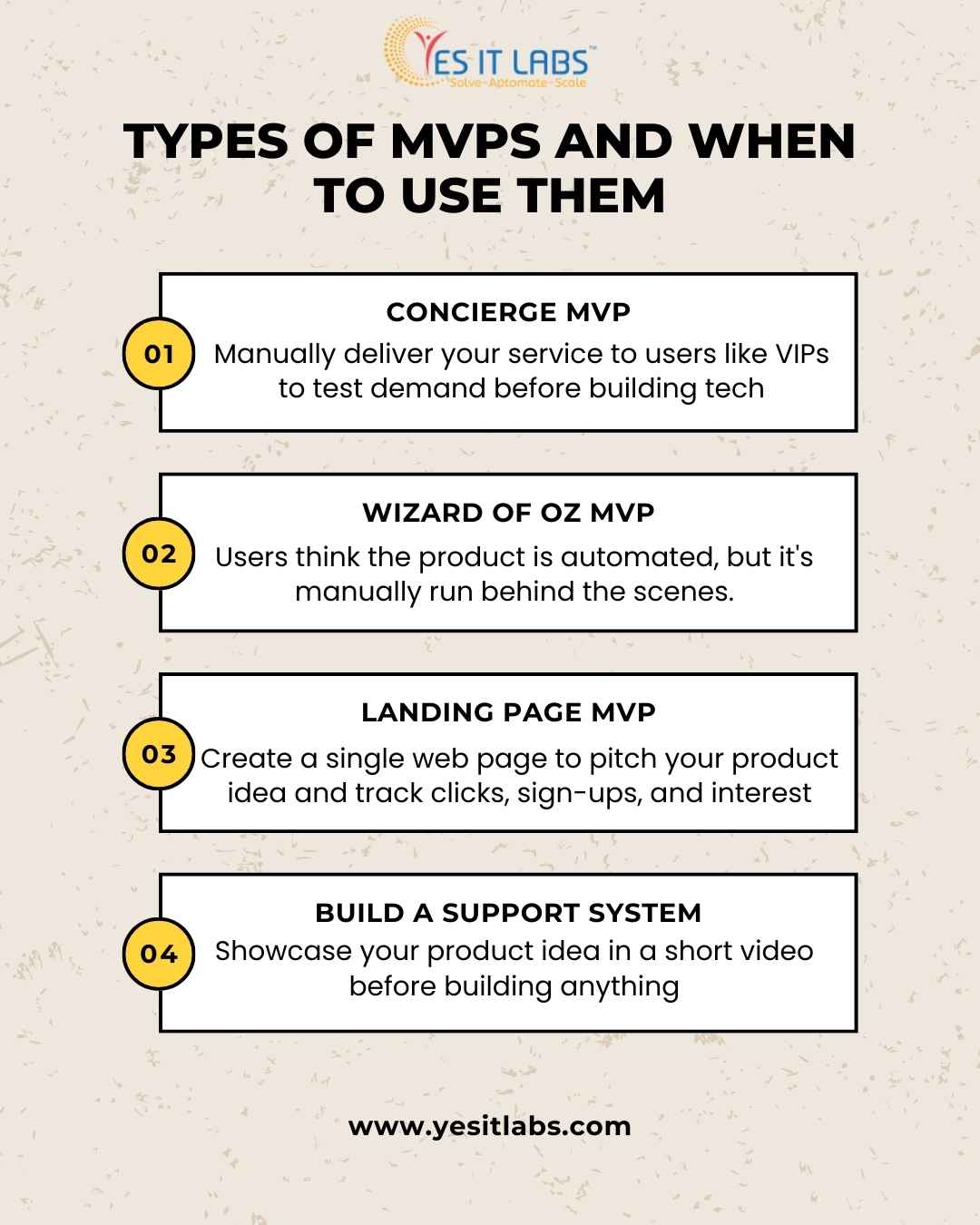
Types of MVPs and When to Use Them

The MVP Development Process: Build, Measure, Learn

The MVP software development process is inherently iterative and deeply rooted in the principles of Lean methodology. Instead of following a traditional linear product roadmap, the MVP approach encourages rapid experimentation, fast learning, and continuous improvement.
The goal is to validate ideas quickly and efficiently, minimizing waste and maximizing value. This process revolves around three core stages:

1) Build

The first step is to define the problem you’re solving, understand your users’ pain points, and identify the core features that must be included to deliver your product’s primary value. This stage involves tight collaboration between stakeholders—product managers, UX/UI designers, and developers—who work together to design a user experience that is intuitive, purposeful, and focused.

Using Agile development methodologies, the MVP is built in short, iterative sprints that allow for constant review and refinement. The emphasis here is on speed and simplicity: building just enough functionality to test your hypothesis while ensuring the product is usable and valuable.

Key Activities:

  • User research & persona creation
  • Defining the Minimum Viable Feature set
  • Designing wireframes or clickable prototypes
  • Agile sprint planning and development
  • QA testing for stability

2) Measure

Once the MVP is live, the next step is to track how users interact with it. This is where data-driven decision-making comes into play. Instead of relying on opinions or assumptions, you gather quantitative and qualitative insights to understand user behavior and validate your product’s core assumptions.

Using tools like Google Analytics 4 (GA4), Mixpanel, Hotjar, or Amplitude, you can monitor key performance indicators (KPIs) such as:

  • User engagement: Are users spending time in the app?
  • Feature usage: Are users interacting with the core functionality?
  • Conversion rate: Are users taking the desired action (e.g., signing up, subscribing)?
  • Retention rate: Do users return after their first visit.

This stage ensures that you are not just collecting data but measuring the right things—data that aligns with your business goals and user experience objectives.

3) Learn

The final and arguably most critical phase is to learn from your findings. Data is only useful if you use it to make smarter decisions. In this phase, you analyze what worked, what didn’t, and why. This is where real learning happens.

You validate whether your assumptions were correct and determine the next steps. Should you pivot (change direction to a new hypothesis), persevere (refine and improve the current version), or scale (invest further in development and marketing)?

The beauty of this loop is its repeatability. Every time you build, measure, and learn, you move one step closer to product-market fit—that sweet spot where your product perfectly meets a real market demand.

Step-by-Step: How to Build an MVP

Identify the Problem & Target Audience

The foundation of every successful MVP lies in clearly identifying the problem you’re solving and understanding your target audience inside and out. Whether you’re addressing an industry inefficiency or tapping into an emerging user need, it’s essential to validate the problem through market research, surveys, interviews, or existing behavioral data.

The more specific your user personas and pain points are, the more focused and impactful your MVP can be. A reliable custom software development company often kicks off MVP projects with discovery workshops to align business goals with user needs, ensuring a problem-solution fit from day one.

Prioritize Core Features

Once the problem and user base are defined, it’s time to narrow the feature set. The key to effective MVP software development is keeping things lean—only building what’s necessary to solve the core problem. A popular technique for this is the MoSCoW method, which helps categorize features into must-haves, should-haves, could-haves, and won’t-haves. This prioritization ensures you avoid feature bloat, save development time, and focus on what truly delivers value.

Choose MVP Type

Not all MVPs require full product builds. Depending on your timeline, goals, and budget, different MVP types can be used to validate ideas with minimal development. For instance, a Concierge MVP manually delivers services to test demand, while a Wizard of Oz MVP simulates automation with a human-powered backend. Landing pages and explainer videos are excellent for gauging interest before coding anything.

Create Wireframes & User Journeys

After deciding what to build, it’s time to visualize how users will interact with your product. Wireframes and user journeys map out the entire flow—from onboarding to task completion—ensuring the MVP is intuitive, accessible, and aligned with user goals. These low-fidelity designs help validate assumptions early and guide developers during the build phase.

Develop the MVP

With design and features finalized, development begins. Choosing a lean, scalable, and modern tech stack is critical. Technologies like React, Node.js, Django, and Flutter are commonly used for MVP builds because they enable rapid iteration and cross-platform support. Agile development methodologies are ideal here, allowing for sprint-based progress, continuous integration, and testing. .

Launch & Collect Feedback

Launching your MVP is not the end—it’s the beginning of a learning journey. With your product in the hands of real users, it’s vital to collect actionable feedback. Integrate tools like GA4, Mixpanel, or Hotjar to track user engagement, behavior patterns, conversion funnels, and friction points. This data will reveal whether users understand your product, find it valuable, and use it as intended.

Iterate or Pivot

Once feedback has been gathered and analyzed, the final step is to act on it. This could mean refining the user experience, adding missing functionality, or, in some cases, pivoting the product entirely. The goal is continuous improvement and alignment with market needs. This iterative approach is what ultimately leads to product-market fit.

If you are interested in knowing more about how to build an MVP software from scratch, try reading our blog on How to Build a Minimum Viable Product (MVP) in Software Development
Custom MVP software


Common Pitfalls in MVP Software Development

Avoid these mistakes that can derail your MVP journey:

Overbuilding:

One of the most common mistakes in MVP development is the temptation to include too many features. This happens when the scope of the project expands beyond the essential functionality required to validate your product idea. While it’s natural to want to impress users with a fully-fledged product, overbuilding is counterproductive.

It delays your time to market, increases development costs, and most importantly, reduces the speed at which you can learn from user feedback. The primary goal of an MVP is to test assumptions and gather insights—not to create a comprehensive solution.

Skipping User Feedback:

Launching your MVP without actively measuring user engagement is a critical mistake that can derail your development process. User feedback is at the heart of MVP software development, providing invaluable insights into how real users are interacting with your product. Without it, you’re left guessing whether your solution is truly addressing user needs.

To avoid this pitfall, ensure you have tools in place from the start to track user behaviors, feedback, and pain points—such as analytics platforms (Google Analytics 4, Mixpanel, etc.), surveys, and user interviews.

No Success Metrics:

Defining clear key performance indicators (KPIs) upfront is essential for tracking your MVP’s success and understanding whether it’s achieving its objectives. Without KPIs, you’ll lack measurable data to assess your MVP’s effectiveness and make informed decisions. Common metrics include user sign-ups, retention rates, conversion rates, and feature engagement.

Low-Quality UX:

While the core focus of an MVP is to test its core functionality, that doesn’t mean user experience (UX) should be neglected. A low-quality UX—such as confusing navigation, slow load times, or unintuitive design—can frustrate users, resulting in high bounce rates and poor engagement.

Even though an MVP is minimal, it’s essential that the product is usable, accessible, and provides a smooth, intuitive interface. A poor user experience can lead to inaccurate feedback and missed opportunities to improve.

Ignoring Scalability:

While MVPs are intentionally minimal, it’s still essential to consider the product’s long-term scalability. Developing an MVP with no regard for scalability can lead to significant technical debt down the road, making it harder and more expensive to scale the product as you gather more users.

While it’s tempting to go with quick-and-dirty solutions in the short term, building on a scalable tech stack (such as cloud-based solutions and flexible architectures) ensures smoother transitions when the MVP evolves into a more robust product.

Choosing technologies that support scalability—like React for frontend or Node.js for backend—gives your MVP the flexibility to grow as your user base increases without needing to rebuild the system from scratch.

Tech Stack for MVP Software Development

Below are some of the most commonly used technologies across different layers of your MVP, along with insights on how each can benefit your project:

Frontend: React, Vue.js, Flutter (Cross-Platform)

The frontend of your MVP is what users interact with, so it must be fast, responsive, and intuitive. React and Vue.js are popular JavaScript frameworks known for their flexibility and component-based architecture. Both offer great performance and a smooth user experience, which is crucial when building an MVP.

If you want to support both iOS and Android with a single codebase, Flutter is an excellent cross-platform choice that significantly reduces development time. If you’re looking to hire Flutter developers, they can create a highly responsive, visually appealing, and performant app that provides seamless user experiences on multiple platforms.

For businesses seeking specialized expertise in front-end development, a React JS development company can provide experienced developers who excel at creating dynamic, single-page applications (SPAs) with React. Whether you’re building a web application or a mobile app, choosing the right framework is critical to your MVP’s success, and React, Vue.js, and Flutter stand out as versatile options.

Backend: Node.js, Ruby on Rails, Django

The backend is the backbone of your MVP, responsible for handling logic, user authentication, and database interactions. Node.js is a fast, scalable JavaScript runtime built on Chrome’s V8 engine, enabling real-time data processing and handling multiple simultaneous connections efficiently.

If your MVP requires rapid prototyping and quick feature implementation, Ruby on Rails is another excellent choice due to its simplicity and rich ecosystem of libraries and tools. Alternatively, Django, a Python-based framework, offers a highly secure, scalable, and fast solution for building web applications.

When you hire Node JS developers or a Node JS development company, they will provide expertise in building fast and scalable server-side applications. The choice between these technologies depends on your specific use case—Node.js excels in handling high-traffic applications, Ruby on Rails is excellent for rapid development, and Django is perfect for projects requiring high security and performance.

Database: PostgreSQL, MongoDB, Firebase

Databases are essential for storing and managing the data your MVP generates. PostgreSQL is a powerful, open-source relational database system known for its scalability and support for complex queries. It’s an ideal choice when your MVP involves a structured schema with transactional consistency.

For flexible, document-oriented storage, MongoDB is an excellent NoSQL option that allows for fast, iterative development, and is well-suited for MVPs that require flexibility in data storage and handling large volumes of unstructured data. For mobile and web applications that require real-time syncing and scalability, Firebase provides a managed solution that’s great for building serverless applications.

Choosing the right database involves balancing flexibility with performance. Whether you’re going for structured data with PostgreSQL or looking for a more flexible, cloud-based solution like Firebase, understanding your MVP’s requirements and future scalability needs will guide this decision.

Cloud & DevOps: AWS, Vercel, Heroku, Docker

Cloud services and DevOps tools play a critical role in ensuring the scalability, availability, and manageability of your MVP. AWS (Amazon Web Services) is a leading cloud platform offering services like computing power, storage, and databases, all of which are critical for hosting scalable MVPs. An AWS freelancer can help you integrate AWS services seamlessly into your MVP architecture, ensuring cost efficiency and optimal performance.

For more straightforward, developer-friendly deployment, Vercel and Heroku are cloud platforms that focus on quick deployment, ease of use, and automatic scaling. These platforms are perfect for MVPs when you need to launch fast without worrying about infrastructure management. Finally, Docker allows you to containerize your application, making it easy to deploy and scale in different environments, whether on your local machine or in production.

4) Analytics: Mixpanel, GA4, Hotjar, Amplitude

Collecting actionable insights from real users is vital for iterating and improving your MVP. Tools like Mixpanel, GA4 (Google Analytics 4), and Amplitude allow you to track user behavior, conversion rates, feature usage, and more.

With GA4, you can gather insights about how users are interacting with your product, which features are most popular, and where users drop off. Mixpanel and Amplitude go a step further by providing deeper analytics focused on user engagement and retention, helping you understand not just what users do but why they do it.

Why Partner with a Specialized MVP Development Company?

Building a successful MVP is a critical step toward bringing your product vision to life, whether you’re a startup founder or managing a product for a large enterprise. However, the development process can be complex, requiring expert knowledge and resources to avoid pitfalls and ensure success.

Partnering with the right development team can make all the difference, offering a strategic advantage and enabling you to achieve your product goals more efficiently.

Here’s how:

  1. Accelerate time to market
  2. Reduce technical debt
  3. Ensure strategic feature prioritization
  4. Offer continuous iteration support
  5. Provide expert UX/UI and scalability advice


Get in touch with our expert MVP software development team today for a free consultation. YES IT Labs specialize in helping businesses validate ideas, test markets, and build scalable products that users love.

Conclusion

MVP software development is a disciplined, strategic approach to launching products efficiently, focusing on speed, core functionality, and minimizing risk. By embracing lean principles, it allows businesses to build the most basic version of a product that delivers core value and enables early user testing in real-world conditions.

Rather than spending significant time and resources on fully-developed products that may not meet market needs, an MVP helps test ideas quickly, gathering valuable user feedback to validate assumptions and avoid costly mistakes. It focuses on solving the most important problems for users, stripping away unnecessary features, and using insights from real user interactions to iterate and improve.

Whether validating a new app idea or adding features to an existing product, MVP development provides the critical link between vision and market reality, enabling businesses to refine their offerings with minimal risk and greater chances of long-term success. Through continuous user engagement and feedback, the MVP process ensures that products evolve in line with actual user needs, helping businesses adapt quickly and build products that resonate with their target audience.


Management Software Solution

In today’s fast-paced, tech-driven world, management software solutions are the backbone of operational efficiency, helping businesses streamline processes, boost productivity, and stay competitive. From automating repetitive tasks to providing real-time data insights, these tools are transforming industries across the board. But which sectors are reaping the most rewards? Let’s explore the top industries benefiting from management software, diving into how they’re leveraging these solutions to thrive, with data-backed insights to make it engaging and informative.

1. Healthcare: Enhancing Patient Care and Operational Efficiency

The healthcare industry faces constant pressure to deliver top-notch care while juggling complex administrative tasks. Healthcare Software Development has revolutionized this space with tools like Electronic Health Record (EHR) systems, practice management platforms, and patient scheduling solutions.

How It Helps:

  • Streamlined Patient Records: EHR systems like Epic or Cerner centralize data, reducing errors and improving care coordination.
  • Appointment Management: Tools like Zocdoc automate scheduling, cutting no-shows by up to 30%, per a 2023 study in the Journal of Medical Internet Research.
  • Billing and Compliance: Software ensures accurate billing and HIPAA compliance, saving hospitals millions in penalties annually.

Insight:

A 2024 Grand View Research report valued the global healthcare IT market at $199 billion, with management software driving significant growth. Hospitals using integrated systems see a 20% drop in administrative costs and a 15% boost in patient satisfaction.

Engaging Tidbit: Imagine nurses spending less time on paperwork and more time with patients—that’s the magic of healthcare management software!

2. Retail: Mastering Inventory and Customer Engagement

Retail thrives on efficiency and customer satisfaction, and management software—such as point-of-sale (POS) systems, inventory tools, and customer relationship management (CRM) platforms—is keeping stores competitive. Many retailers partner with a mobile software development company to create tailored apps that enhance the shopping experience.

How It Helps:

  • Inventory Control: Tools like Shopify or Square track stock in real-time, cutting overstock costs by 25%, per a 2024 Retail Dive study.
  • Personalized Marketing: CRMs like Salesforce analyze customer data to craft targeted promotions, boosting conversions by 10-15%.
  • Unified Operations: Omnichannel platforms integrate online and offline sales for a seamless experience.

Insight:

The global retail management software market is projected to reach $12.4 billion by 2027, per Allied Market Research. Retailers with advanced POS systems report 40% faster checkouts, directly impacting loyalty.

Engaging Tidbit: Ever wonder how your favorite store always has your size? Thank inventory management software for perfectly stocked shelves!

3. Manufacturing: Driving Precision and Productivity

Manufacturing demands precision, and management software like Enterprise Resource Planning (ERP) systems and Manufacturing Execution Systems (MES) is transforming the factory floor. Some manufacturers collaborate with a custom web application development company to build bespoke solutions tailored to unique production needs.

How It Helps:

  • Supply Chain Optimization: ERP platforms like SAP forecast demand, reducing disruptions by 20%, per a 2024 Gartner report.
  • Production Monitoring: MES tools track performance in real-time, cutting downtime by 15%.
  • Quality Control: Software flags defects early, saving millions in recalls.

Insight:

The global ERP market hit $49 billion in 2023, with manufacturing leading adoption. Companies using ERP report 10-20% higher production efficiency and 30% fewer errors.

Engaging Tidbit: Picture a factory where machines sync perfectly to produce flawless goods—that’s management software in action!

4. Construction: Building Smarter and Faster

Construction projects often face delays and budget overruns, but management software like Procore, Autodesk Construction Cloud, and PlanGrid is changing that narrative.

How It Helps:

  • Project Tracking: Tools provide real-time timeline updates, reducing delays by 25%, per a 2024 Construction Executive survey.
  • Budget Management: Software flags cost overruns early, saving 10% on average.
  • Collaboration: Cloud-based platforms align architects, contractors, and clients, cutting miscommunication by 30%.

Insight:

The construction management software market is set to hit $2.7 billion by 2026, per MarketsandMarkets. Firms using these tools complete projects 20% faster than those relying on manual methods.

Engaging Tidbit: Seen a skyscraper rise ahead of schedule? Management software keeps everyone on the same blueprint!

5. Education: Empowering Institutions and Educators

How It Helps:

  • Remote Learning: LMS platforms power online courses, with 80% of U.S. colleges using them, per a 2024 Educause report.
  • Administrative Efficiency: Software automates enrollment and grading, saving educators 10-15 hours weekly.
  • Data-Driven Decisions: Analytics track student performance, boosting graduation rates by 5-10%.

Insight:

The global edtech market reached $123 billion in 2023, with management software adoption growing 18% yearly. Schools using integrated systems cut administrative costs by 25%.

Engaging Tidbit: Imagine teachers inspiring students instead of battling paperwork—management software makes it real!

6. Hospitality: Elevating Guest Experiences

Hotels, restaurants, and event venues rely on management software to deliver stellar guest experiences while keeping operations smooth. Property Management Systems (PMS), booking platforms, and staff scheduling tools are essential.

How It Helps:

  • Guest Management: PMS like Oracle’s Opera personalizes stays, increasing loyalty by 15%, per a 2024 Hospitality Net study.
  • Revenue Optimization: Dynamic pricing tools adjust rates in real-time, boosting revenue by 10-20%.
  • Staff Coordination: Scheduling software cuts labor costs by 12% while ensuring optimal staffing.

Insight:

The hospitality management software market is expected to reach $8.9 billion by 2028, per Fortune Business Insights. Hotels with integrated PMS report 30% faster check-ins, delighting guests.

Engaging Tidbit: Ever checked into a hotel that felt like it knew your needs? That’s management software crafting a five-star stay!

Why Management Software Matters Across Industries

Across these sectors, management software drives efficiency, cuts costs, and enhances outcomes. Here’s why it’s critical:

  • Scalability: From startups to enterprises, software grows with you.
  • Data Insights: Real-time analytics fuel smarter decisions.
  • Automation: Repetitive tasks vanish, freeing teams for high-value work.
  • Customer Focus: Streamlined operations mean better experiences for clients, patients, or guests.

A Quick Stat:

A 2024 Deloitte survey found businesses using management software enjoy a 22% higher ROI than those stuck with manual processes—a clear competitive edge.

Choosing the Right Software: A Tip for Success

Selecting the best management software can feel overwhelming. Here’s a quick guide:

  1. Assess Needs: Pinpoint pain points—inventory? Scheduling?
  2. Prioritize Integration: Choose tools that sync with existing systems.
  3. Consider Scalability: Will it support future growth?
  4. Test Usability: A simple interface saves training time.
  5. Check Support: Reliable customer service is key.

Pro Tip: Free trials are common—test before you invest!


mobile software development company

The Future of Management Software

As AI and machine learning advance, management software is getting smarter. Predictive analytics will forecast trends with precision, and automation will tackle even complex tasks. Industries adopting these tools now will lead tomorrow.

Fun Fact: By 2027, 70% of businesses will use AI-powered management software, per a 2024 IDC forecast. The future is here!

Conclusion: Unlocking Potential with Management Software

Whether it’s a hospital saving lives, a retailer delighting shoppers, or a construction firm building dreams, management software is the silent partner making it happen. By automating the mundane and illuminating the complex, these tools empower industries to focus on what matters—people, progress, and possibilities.

Error-Tracking Software Development

Imagine this: It’s 2025, and your company’s latest app is live. Users are thrilled—until a sneaky bug crashes the party, costing you thousands in lost revenue and a flood of frustrated tweets. Enter error-tracking software, the unsung hero of modern development, swooping in to catch those gremlins before they wreak havoc. But here’s the million-dollar question (sometimes literally): How much does it cost to build error-tracking software in 2025? Buckle up, because we’re diving into the nitty-gritty of budgets, tech trends, and real-world insights to give you the full scoop.

Why Error-Tracking Software Matters in 2025

Before we talk dollars and cents, let’s set the stage. In 2025, software isn’t just a tool—it’s the backbone of businesses worldwide. With cybercrime costs projected to hit $10.5 trillion annually and poor software quality already draining U.S. companies over $2 trillion a year, the stakes are sky-high. Error-tracking software isn’t a luxury; it’s a necessity. It monitors apps in real time, flags crashes, and helps developers squash bugs fast—saving time, money, and your reputation. Whether you’re a startup or an enterprise, building your own custom solution through a reliable software development service could be a game-changer. But what’s the price tag?

Breaking Down the Costs: What Drives the Bill?

Developing error-tracking software isn’t like buying a ready-made tool off the shelf—it’s a bespoke project with costs that vary wildly based on your needs. Here’s what’s cooking in the budget stew:

Error-Tracking Software Development

1. Scope and Features: The Heart of the Price

Think of your software as a superhero. Does it just spot errors, or does it also analyze user behavior, predict crashes, and integrate with your DevOps pipeline? A basic error-tracker with real-time alerts and stack traces might be lean and mean, while a full-blown system with AI-driven insights and cloud compatibility is a heavyweight champ.

  • Basic Version: Alerts, error logs, and simple reporting—think $50,000 to $100,000.
  • Mid-Tier: Adds integrations (Slack, Jira), user experience monitoring, and custom dashboards—$100,000 to $250,000.
  • Enterprise-Grade: AI analytics, multi-platform support (web, mobile, IoT), and scalability for millions of users—$250,000 to $500,000+.

2. Development Team: Who’s Building It?

Your team’s location and expertise are huge cost drivers. In 2025, hourly rates for developers vary by region:

  • North America: $50–$150/hour (top-tier talent, high costs).
  • Western Europe: $40–$100/hour (quality with a moderate price).
  • Eastern Europe: $20–$50/hour (cost-effective, skilled pools).
  • Asia-Pacific: $15–$40/hour (emerging hubs like Vietnam).
  • India (General Offshore): $20–$50/hour (a sweet spot for quality and savings).


Spotlight on Indian Developers: India’s tech scene in 2025 is booming, with cities like Bangalore, Noida and Hyderabad churning out talent. For error-tracking software, Indian developers offer rates as low as $15/hour for junior coders, $25–$40/hour for mid-level pros, and $50–$70/hour for senior devs with niche skills (e.g., AI or cloud). A team of 5—two mid-level devs ($30/hour), a senior lead ($50/hour), a QA engineer ($25/hour), and a project manager ($40/hour)—working 4,000 hours totals $128,000. That’s 20–40% less than a U.S. team for similar output, thanks to India’s cost advantage and growing expertise in scalable software. If your frontend needs a boost, you might even hire React JS developers from India to craft a slick, user-friendly dashboard for your tool.

A small team of 3–5 developers, a QA engineer, and a project manager might take 6–12 months. For a mid-tier solution, that’s roughly 3,000–5,000 hours. At $50/hour (North American rates), you’re looking at $150,000–$250,000 in labor alone—but tap India, and it could drop to $75,000–$150,000.

3. Tech Stack: The Tools of the Trade

The tech you choose shapes both cost and performance. In 2025, cloud-native development (AWS, Azure) is king for scalability, but it comes with ongoing fees. Open-source frameworks like Node.js or Python can cut initial costs, while premium tools (e.g., AI libraries) add heft. Partnering with a Node JS Development Company could streamline backend development, leveraging their expertise for real-time error processing at a competitive rate. Expect:

  • Cloud Infrastructure: $5,000–$20,000/year.
  • Licenses/Tools: $2,000–$10,000 upfront.
  • Custom AI: $50,000+ if you’re predicting errors.

4. Complexity: Simple vs. Scalable

A tool for a single app is cheaper than one handling millions of transactions across platforms. Complexity spikes with:

  • Real-time processing (think 5G-powered apps).
  • Multi-language support (JavaScript, Python, etc.).
  • Security features (encryption, compliance with GDPR).

Add 20–30% to your budget for these bells and whistles.

5. Maintenance: The Long Game

Development isn’t a one-and-done deal. In 2025, expect to spend 15–25% of your initial cost annually on updates, bug fixes, and scaling—say, $20,000–$100,000/year for a $200,000 project.

Ballpark Figures for 2025

Here’s a quick cheat sheet based on 2025 trends:

  • Startup MVP: $50,000–$120,000 (6 months, small team, basic features).
  • Mid-Size Business: $150,000–$300,000 (9–12 months, integrations, moderate scale).
  • Enterprise Solution: $400,000–$1,000,000+ (12–18 months, AI, global reach).

What’s New in 2025? Trends Shaking Up Costs

The tech landscape is evolving, and 2025 brings fresh twists:

  • AI Integration: Machine learning to predict errors is hot, but it’s pricey—add $50,000–$150,000 for smart features.
  • Cloud Dominance: With 5G and IoT booming, cloud-based error-tracking is standard, nudging up infrastructure costs.
  • Low-Code Platforms: Want to slash costs? Low-code tools could trim development time by 30–50%, though customization is limited.
  • Cybersecurity Focus: Post-2020 breaches have made security non-negotiable, adding 10–15% to budgets.

Real-World Example: The Fast-Food Fiasco

Picture a fast-food chain in 2025 with an app generating 5 million errors monthly. A 1% error rate in the checkout process costs $2.5 million in lost orders—per month. Building a custom error-tracker for $200,000 could pay for itself in weeks by catching those bugs early. Compare that to off-the-shelf tools like Sentry ($26–$200/month) or Rollbar ($49–$1,000/month), which might not scale or integrate as seamlessly. Custom wins when stakes are high.

How to Keep Costs in Check

Building error-tracking software doesn’t have to break the bank. Try these hacks:

  • Start with an MVP: Launch with core features, then scale up based on feedback.
  • Outsource Smartly: Tap India or Eastern Europe for quality at lower rates.
  • Leverage Open-Source: Use free frameworks to cut initial costs.
  • Automate Testing: AI-driven testing tools save hours (and dollars).

The Hidden Costs You Can’t Ignore

Don’t get blindsided! Factor in:

  • Training: Your team needs to learn the tool—budget $5,000–$15,000.
  • Downtime: Bugs during development could delay other projects.
  • Reputation: A failed launch due to untracked errors? Priceless (in a bad way).

Is It Worth It?

In 2025, the error-monitoring market is set to hit $560 million, growing at 11.4% annually. Off-the-shelf options are great, but custom software shines for unique needs—think tailored integrations or handling massive scale. If your business loses $10,000 monthly to bugs, a $100,000 tool pays off in under a year. Plus, you own it—no subscription creep.
software development service

Final Thoughts: Plan Smart, Build Smarter

So, how much does error-tracking software development cost in 2025? Anywhere from $50,000 to over $1 million, depending on your vision. With Indian developers, you could shave 20–40% off labor costs without skimping on skill—say, $75,000 instead of $150,000 for a mid-tier build. It’s not just about the price—it’s about the value. A well-built tool can save millions in lost revenue, boost user trust, and keep your developers sane. Start small, think big, and don’t skimp on quality. In a world where every error counts, your investment today could be your lifeline tomorrow.

Got a project in mind? Crunch those numbers, weigh the trade-offs, and let 2025 be the year your software runs like a dream—no crashes allowed!