

Resources

In today’s fast-paced digital landscape, optimizing your Shopify store for mobile devices is crucial for e-commerce success. With over half of online traffic coming from mobile users, a mobile-friendly store can significantly enhance your conversion rates and search engine performance. Below, we outline proven strategies to optimize your Shopify app for mobile users:

1. Choose a Responsive Shopify Theme

A responsive theme is essential for delivering a seamless user experience across devices. It automatically adapts to various screen sizes, ensuring your store looks and functions well on smartphones and tablets. Shopify’s theme store offers numerous responsive options designed for speed and usability. Testing your theme’s performance on multiple devices is critical before launching. Partnering with a reputable Shopify development company can streamline this process and ensure a professional outcome. For additional insights, explore this guide on developing your first Shopify plugin.

2. Simplify Navigation

Simplified navigation is key to keeping mobile users engaged. Limit menu items to the essentials and use straightforward labels for better clarity. A hamburger menu is an excellent choice for mobile, keeping the interface clean while making vital sections like product categories easy to access. Streamlined navigation helps reduce bounce rates and improves the overall shopping experience.

3. Optimize Page Load Times

Fast page loading is critical for retaining mobile users. Slow-loading pages lead to higher abandonment rates. Improve load times by:

  • Compressing images for web optimization.
  • Using a content delivery network (CDN) to distribute assets efficiently.
  • Reducing heavy scripts and unnecessary plugins.
  • Implementing lazy loading for images.

According to studies, even a one-second delay in load time can significantly impact conversions. Tools like Google PageSpeed Insights provide actionable insights to improve performance. To enhance your app further, hire a Shopify developer with expertise in mobile optimization.

4. Use Clear Call-to-Action (CTA) Buttons

CTAs are vital for guiding users toward desired actions. For mobile optimization, ensure your CTAs are:

  • Bold and visually distinct, with high-contrast colors.
  • Large enough to be tapped easily without errors.
  • Strategically positioned, such as above the fold, to capture attention quickly.

5. Optimize Checkout for Mobile

The mobile checkout process should be smooth and intuitive. Achieve this by:

  • Enabling autofill for faster input.
  • Reducing form fields to essentials like name, email, and payment details.
  • Making the checkout button prominent and accessible.
  • Supporting various payment options, including digital wallets like Google Pay and Apple Pay.

Streamlining checkout minimizes cart abandonment and ensures a positive user experience.

6. Prioritize Touch-Friendly Design

Mobile users interact with touchscreens, so your app must accommodate touch-friendly design. Consider these tips:

  • Ensure buttons and links are sufficiently large to be easily tapped by users.
  • Avoid hover effects that don’t function on mobile devices.
  • Space out interactive elements to prevent accidental clicks.

For advanced customization tips, read this blog on professional Shopify customization.


Mobile Optimization for Shopify Apps

7. Test and Analyze

Consistent testing ensures your app performs optimally on various devices. Use tools like:

  • Google’s Mobile-Friendly Test to identify usability issues.
  • Google Analytics for user behavior insights and performance tracking.
  • BrowserStack to test your app on multiple devices and browsers.

Collaborating with a software development company in USA can provide access to cutting-edge tools and expertise for advanced testing and refinement.

8. Avoid Intrusive Pop-Ups

Pop-ups may hinder the user experience, particularly on mobile devices. If you use pop-ups, ensure they:

  • Are easy to close with a visible dismiss button.
  • Don’t cover critical content or block navigation.
  • Serve a clear purpose, like collecting email subscriptions or announcing promotions.

9. Keep Content Readable

Readable content ensures users can quickly grasp your offerings. To enhance readability:

  • Use fonts of at least 16px for body text.
  • Maintain adequate line spacing for better legibility.
  • Choose clean, modern font styles over decorative ones.

10. Stay Updated with Mobile Trends

Staying ahead of mobile trends ensures your app remains competitive. Focus on emerging areas like:

  • Voice search optimization to cater to growing usage.
  • Adapting to mobile-first indexing by search engines.
  • Integrating cutting-edge payment technologies.

Regular updates to your app help you deliver a superior user experience. Leveraging Shopify development services can simplify the process and keep you ahead of the curve.

Additional Insights: Why Mobile Optimization Matters

Mobile optimization is more than just design—it’s about functionality, speed, and user satisfaction. Mobile-friendly stores:

  • Engage users more effectively by providing seamless browsing and shopping experiences.
  • Achieve better SEO rankings due to mobile-first indexing.
  • Build customer loyalty through intuitive and efficient interfaces.

By adopting these practices, you can create a mobile-optimized Shopify app that not only attracts visitors but converts them into loyal customers. Success in e-commerce depends on continuous testing, adaptation, and aligning your store with evolving user expectations.

Augmented Reality (AR) has become a cornerstone of modern technology, revolutionizing the way users interact with digital environments. At the heart of this transformation is Apple’s ARKit, a robust framework for building immersive AR experiences on iOS devices. This article delves into the unique capabilities of ARKit, offering insights into its features, real-world applications, and how developers can harness its potential for crafting innovative iOS applications.

Understanding ARKit

ARKit is Apple’s proprietary framework that combines advanced hardware and software capabilities to enable augmented reality on iOS devices. It leverages the camera, motion sensors, and sophisticated algorithms to seamlessly blend virtual objects with the real world. For companies offering iOS application development services, ARKit is a game-changing tool that simplifies AR app creation while ensuring optimal performance on Apple devices.

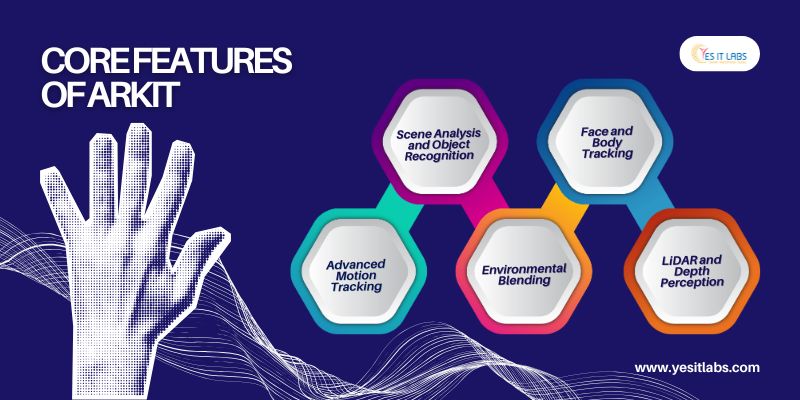
Core Features of ARKit

Augmented Reality for iOS Apps

  1. Advanced Motion Tracking
    ARKit utilizes Visual Inertial Odometry (VIO), combining data from the device’s motion sensors and camera. This ensures virtual objects remain stable and fixed within the environment, even as the user moves around.
  2. Scene Analysis and Object Recognition
    • Plane Detection: ARKit detects flat surfaces like floors and walls, allowing accurate placement of digital elements.
    • Object Recognition: It can identify and respond to specific real-world objects, enabling enhanced interactivity.
  3. Environmental Blending
    With light estimation, ARKit adjusts virtual objects’ brightness and shadows based on real-world lighting conditions, creating a seamless visual blend.
  4. Face and Body Tracking
    Using the TrueDepth camera, ARKit maps facial expressions and tracks up to three faces at once. For fitness and gaming apps, its body tracking capabilities offer full-body pose detection.
  5. LiDAR and Depth Perception
    On LiDAR-equipped devices, ARKit uses precise depth sensing to enhance occlusion and scene understanding, enabling richer AR interactions.

For businesses offering iOS apps development services, these features unlock the potential for creating sophisticated AR applications tailored to diverse industries.

Steps to Build an AR App Using ARKit

  1. Setting Up the Environment
    Start by integrating ARKit and SceneKit frameworks into your Xcode project. Configure the AR session with an appropriate configuration, such as ARWorldTrackingConfiguration, to track device movements and detect planes.
  2. Scene Understanding and Object Placement
    Implement plane detection and anchors to accurately position virtual objects in the environment. Customize object interactions using gestures like taps, rotations, and pinches.
  3. Rendering with RealityKit or SceneKit
    Use RealityKit for its advanced rendering and physics capabilities or SceneKit for easier implementation. For custom rendering, leverage the Metal framework for complete control.

By partnering with a mobile software development company experienced in ARKit, you can ensure your app utilizes these capabilities effectively, delivering a smooth user experience.

Expert Tips for ARKit Development

  1. Optimize Performance for Seamless Experiences
    • Reduce texture sizes and optimize 3D models to enhance rendering speeds.
    • Implement occlusion to avoid rendering objects outside the user’s view.
  2. Utilize Persistent AR Anchors
    Save AR session data using ARWorldMap or ARKit’s collaborative sessions to let users return to their AR setups later.
  3. Leverage LiDAR for Enhanced Accuracy
    For devices with LiDAR, use depth maps to improve object placement and environmental understanding, especially in complex scenes.
  4. Train Custom Models for Object Recognition
    Integrate machine learning models created with CreateML to identify specific objects, enabling advanced AR functionalities tailored to your app’s purpose.
  5. Experiment with Reality Composer
    Reality Composer, a drag-and-drop AR creation tool, simplifies the prototyping and implementation of AR experiences, making it perfect for testing concepts rapidly.

These tips can help businesses hire iOS app developers who are adept at ARKit to build applications that stand out in competitive markets.


Augmented Reality for iOS Apps

Applications of ARKit Across Industries

  1. Retail and E-commerce
    • Virtual Try-Ons: Apps like Warby Parker let users try on glasses virtually, improving shopping experiences.
    • Furniture Placement: IKEA Place enables users to visualize furniture in their space before purchasing.
  2. Gaming and Entertainment
    • Pokémon GO: With ARKit integration, the app places Pokémon in real-world environments for engaging gameplay.
    • Angry Birds AR: Offers interactive gaming by merging virtual elements with the user’s surroundings.
  3. Education and Training
    • Anatomy 4D: Delivers interactive 3D models for medical students to explore human anatomy.
    • Measure: Apple’s built-in app measures real-world dimensions using ARKit.
  4. Industrial and Business Solutions
    ARKit powers simulations, design visualizations, and maintenance guides, showcasing its versatility for enterprise use.

For businesses offering iOS apps development services, these applications illustrate the potential of ARKit to cater to diverse user needs and industries.

Why Choose ARKit for AR Development?

  1. Native Integration
    ARKit is deeply integrated with iOS hardware and software, ensuring consistent performance and a polished user experience.
  2. Comprehensive Development Tools
    Apple provides a wide range of APIs and libraries that streamline the development process, allowing developers to focus on creativity and innovation.
  3. Scalability
    ARKit’s capabilities scale seamlessly across Apple devices, from iPhones to iPads, enabling broad user reach.
  4. Large User Base
    With millions of iOS users worldwide, ARKit apps have immense potential to capture a diverse and engaged audience.

By partnering with a reliable mobile software development company, you can maximize these benefits, ensuring your app is not only functional but also engaging and innovative.

Conclusion

ARKit is a powerful framework that bridges the gap between the real and virtual worlds, enabling developers to craft unique and immersive AR experiences. Whether you’re creating a game, an educational app, or an enterprise solution, ARKit’s advanced features provide endless opportunities for innovation.

For businesses exploring iOS application development services, leveraging ARKit is a strategic choice. By hiring skilled developers or collaborating with experienced teams, you can build AR apps that captivate users and drive success in the competitive iOS market.

In the modern digital landscape, a well-crafted website serves as the cornerstone of your online presence. Acting as your virtual business hub, your website is often the first interaction potential customers have with your brand. Choosing between a custom-built website and a template-based one is a critical decision that impacts your branding, functionality, and long-term growth.

Let’s explore the advantages and limitations of both options, their cost structures, and FAQs to help you make the best choice for your business.

Custom Websites: Tailored Precision

1. Uniqueness and Branding

Custom websites are designed from the ground up, allowing for a distinctive appearance and features that perfectly reflect your brand’s personality. Unlike templates, these sites provide an opportunity to create a digital identity that resonates with your audience and sets you apart in your industry.

  • Real Insight: Businesses in sectors like luxury goods or specialized services can benefit greatly from custom designs that highlight their unique value propositions.

By opting for custom website development, companies can ensure that their online presence aligns with their branding and provides users with a cohesive and professional experience.

2. Scalability and Flexibility

Custom-built websites are engineered to adapt to your business’s evolving needs. Whether you plan to integrate new technologies, introduce advanced features, or expand operations, these sites are prepared to scale without constraints.

  • Example: An e-commerce business that anticipates significant growth can leverage a custom solution to implement features like AI-driven product recommendations or personalized shopping experiences.

Pairing a custom website with a custom software development service enables seamless integration with tools like CRMs or inventory management systems, ensuring streamlined workflows and enhanced operational efficiency.

3. SEO and Performance

Custom websites are designed with performance and search engine optimization (SEO) as a priority. This tailored approach improves visitor engagement by delivering faster page loads, smoother navigation, and optimized content structure, helping your website rank higher in search engine results.

  • Insight: A high-performing custom website not only captures user attention but also drives better conversion rates, making it a key asset in your marketing strategy.

Hiring web developer freelancers can further optimize your site’s technical elements, ensuring it adheres to best practices for SEO while providing a seamless user experience.

4. Cost and Time

Custom websites require a larger upfront investment of time and money, but they deliver a solution uniquely suited to your business’s needs.

  • Cost Structure:
    • Basic Custom Website: $5,000–$10,000
    • Advanced Custom Website: $15,000–$50,000+
    • Development Time: 3–6 months

Template Websites: Quick and Cost-Effective

1. Affordability

Template websites, often built on platforms like WordPress, Wix, or Shopify, provide an affordable solution for businesses looking to establish an online presence quickly. These platforms offer pre-designed templates, reducing the need for extensive development work.

  • Cost Structure:
    • DIY Website (Wix, Squarespace): $10–$50/month
    • Professionally Customized Template: $1,000–$5,000
    • Deployment Time: A few hours to weeks

2. Fast Deployment

Pre-designed templates enable businesses to launch their websites in minimal time, making them ideal for tight deadlines or urgent online launches.

  • Example: A bakery opening a new branch can use a template to quickly create an online ordering system, ensuring no time is lost in engaging customers.

By collaborating with web developer freelancers, businesses can enhance these templates to include unique features, providing a balance between affordability and customization.

3. User-Friendly

Template websites are known for their intuitive interfaces and drag-and-drop editors, making it easy for non-technical users to manage and update their sites independently.

4. Limited Customization and Scalability

The main limitation of template websites is their inflexibility. Adding new functionalities or meeting unique business needs can often lead to performance bottlenecks or require additional third-party tools.

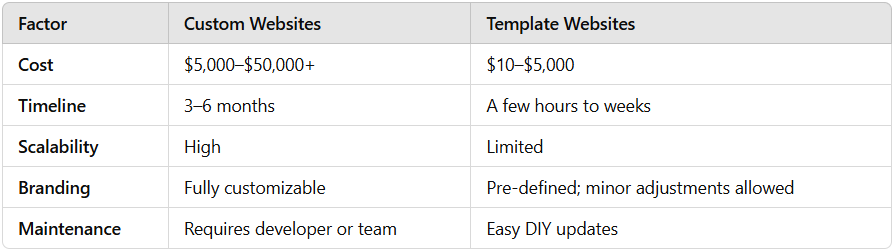
Custom vs. Template: A Quick Comparison

Custom vs Template Websites

Making the Right Choice

Here’s how to decide:

  1. Budget: Limited budget? Choose templates. For a scalable, tailored solution, invest in a custom website.
  2. Timeline: Need a quick solution? Templates are the best bet.
  3. Business Goals: Unique workflows or a strong emphasis on branding call for custom solutions.
  4. Future Growth: If scalability is crucial, a custom site is the way forward.

To make the best choice, consulting with a professional team specializing in custom website development is a smart step. They can assess your requirements and build a site that grows alongside your business.


custom website development services

How YES IT Labs Can Help You

When deciding between a custom website or a template-based solution, having the right partner by your side makes all the difference. YES IT Labs specializes in delivering tailored web solutions that align perfectly with your business needs. Whether you’re looking for custom website development to create a unique digital presence or seeking enhancements for a template-based site, our experienced team of developers and designers ensures a seamless experience. From integrating advanced features to optimizing performance and scalability, we’re committed to helping your business thrive in the digital space. With our expertise in custom software development services and support for startups and enterprises alike, we empower businesses to achieve long-term success with innovative, scalable, and user-friendly web solutions.

FAQs

1. How much does a custom website cost?

Custom websites start at $5,000, but advanced features and integrations can push costs beyond $50,000.

2. Are template websites good for SEO?

Template websites offer basic SEO options, but they lack the depth and flexibility that custom websites provide for advanced optimization.

3. Can I upgrade my template website to a custom one later?

Yes, but transitioning often involves rebuilding the site, which can increase costs and timelines.

4. Do custom websites take longer to build?

Yes, custom sites typically require 3–6 months, depending on complexity and features.

5. Which is better for e-commerce: Custom or Template?

Small-scale stores benefit from templates, while larger businesses often prefer custom sites to handle unique needs like advanced inventory management and personalized shopping experiences.

6. What’s the best platform for a template website?

Platforms like WordPress, Wix, and Shopify are popular for their ease of use and flexibility.

In today’s fast-paced digital era, businesses of all sizes are striving to keep up with the relentless demand for efficiency, productivity, and innovation. This is particularly true for small and medium-sized enterprises (SMEs), which often operate with limited resources but high ambitions. The advent of software automation, integration, bots, and web scraping has provided a powerful toolkit that enables these businesses to transform their operations, enhance their competitive edge, and unlock new growth opportunities.

In this article, we will explore how these technologies are revolutionizing industries and the specific benefits they offer to SMEs across various sectors.

1. Software Automation: Streamlining Operations and Reducing Costs

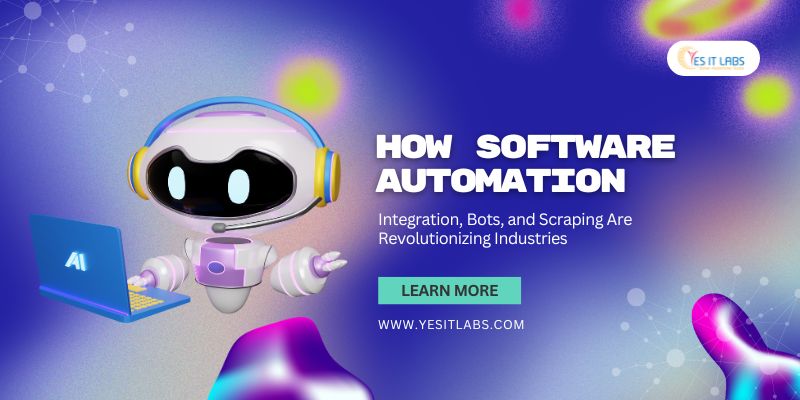
Software Automation in Industries

Software automation leverages cutting-edge tools and technologies to handle repetitive, time-intensive tasks with minimal human involvement. From managing administrative duties to executing complex workflows, automation has become an indispensable asset for businesses looking to enhance efficiency and reduce operational costs.

Automation not only improves accuracy but also allows businesses to allocate human resources to more strategic, high-value tasks. This makes it especially valuable for SMEs, which often operate under tight budget constraints. By integrating automation tools, businesses can scale their operations seamlessly without proportionally increasing their workforce or overhead expenses.

For instance, a custom software development company can provide tailor-made automation solutions, helping businesses address specific challenges efficiently.

Key Benefits:

  • Increased Efficiency: Automation tools can handle repetitive tasks such as data entry, report generation, and customer service, freeing up employees to focus on more strategic activities.
  • Cost Reduction: By automating mundane processes, businesses can significantly reduce labor costs and minimize the risk of human error, leading to cost savings and improved accuracy.
  • Scalability: Automation enables SMEs to scale their operations without the need for proportional increases in workforce, making it easier to manage growth.

Industries Impacted:

  • Manufacturing:
    Automation plays a central role in manufacturing, from robotic assembly lines to quality control systems. It ensures high precision and consistency in production, reduces operational downtime through predictive maintenance, and optimizes inventory with real-time monitoring. Advanced automation in additive manufacturing (e.g., 3D printing) is reshaping product design and prototyping.
  • Retail and E-commerce:
    Automating repetitive processes such as inventory updates, order processing, and customer notifications ensures faster deliveries and reduced errors. Automation tools also facilitate dynamic pricing, restocking predictions, and AI-driven product recommendations to enhance customer satisfaction.
  • Healthcare:
    Medical institutions use automation to handle complex scheduling, ensure compliance with healthcare regulations, and streamline patient management systems. For instance, pharmacy automation systems dispense medications with accuracy, and lab automation speeds up diagnostic processes.
  • Banking and Finance:
    Banks leverage robotic process automation (RPA) to handle high-volume tasks like loan processing, account reconciliation, and fraud detection. Automated customer service bots manage account-related inquiries, while financial forecasting tools improve investment strategies.
  • Energy and Utilities:
    Automation is pivotal in renewable energy management, optimizing solar panel angles, and wind turbine performance. In utilities, it assists in billing processes, consumption pattern analysis, and predictive grid maintenance, ensuring uninterrupted services.
  • Education:
    Learning management systems (LMS) automate content delivery, assessments, and feedback, allowing institutions to scale their offerings. Automation helps in enrollment processes, fee management, and even personalized curriculum recommendations based on student progress.

2. Integration: Connecting Systems for Seamless Workflows

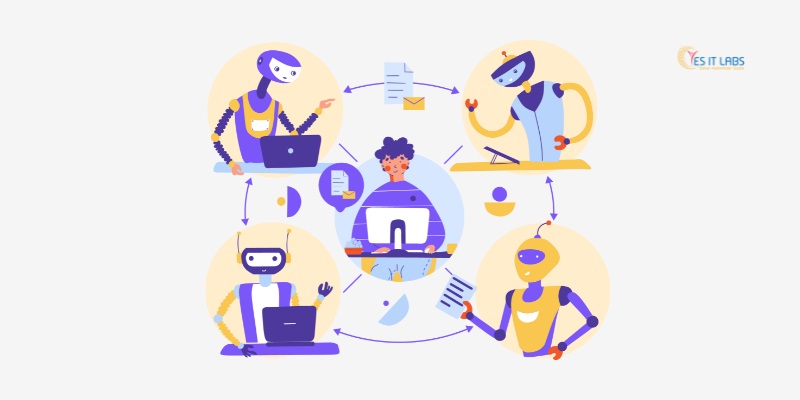
Software integration

System integration involves connecting various software applications, tools, and platforms within an organization to create a unified and cohesive workflow. Instead of managing siloed systems, integration ensures that data flows seamlessly across departments, improving collaboration, reducing redundancies, and fostering better decision-making.

An IT consulting company can play a crucial role in guiding businesses toward effective system integration, ensuring a smooth transition and enhanced operational capabilities.

Key Benefits:

  • Enhanced Collaboration: Integration allows different software systems to communicate and share data seamlessly, fostering collaboration across departments and improving overall workflow efficiency.
  • Data Synchronization: By integrating various business applications, companies can ensure that data is up-to-date and consistent across all platforms, reducing the risk of discrepancies and enhancing decision-making.
  • Improved Customer Experience: Integrated systems provide a holistic view of customer interactions, enabling businesses to deliver personalized and timely services.

Industries Impacted:

  • E-commerce and Retail:
    Integration ensures the smooth functioning of online stores by connecting shopping platforms with inventory, payment gateways, CRM, and shipping systems. This provides real-time stock updates, enhances order accuracy, and improves post-purchase experiences like tracking and returns.
  • Logistics and Supply Chain:
    Integrated systems link warehouse management, transportation tracking, and customer communication tools, enabling end-to-end visibility. Businesses can optimize delivery schedules, automate order fulfillment, and manage cross-border compliance seamlessly.
  • Healthcare:
    Integration bridges the gap between electronic health records (EHR), diagnostic labs, and insurance providers. Patients benefit from quicker diagnosis and claims processing, while doctors gain a comprehensive view of patient histories for better treatment plans.
  • Education:
    Academic institutions integrate LMS with virtual classrooms and administrative platforms, enabling smooth student enrollment, real-time grade tracking, and interactive learning environments.
  • Hospitality:
    Integration connects property management systems (PMS) with booking engines, payment processors, and guest experience tools. This ensures a hassle-free journey from reservation to checkout, along with tailored upselling opportunities like room upgrades and packages.
  • Automotive:
    Automotive manufacturers integrate ERP, design software, and supply chain systems to streamline production. Dealerships leverage integration to connect sales, service, and inventory systems, improving customer interactions and reducing downtime for repairs.

3. Bots: Enhancing Customer Interaction and Operational Efficiency

Software Bots

Bots, powered by artificial intelligence (AI) and machine learning, are reshaping how businesses interact with customers and manage internal processes. These automated programs can perform tasks ranging from answering customer queries to analyzing data and managing workflows.

A mobile application development company can embed AI-powered bots into mobile platforms, enhancing customer engagement and streamlining services.

Key Benefits:

  • 24/7 Customer Support: Chatbots and virtual assistants can provide round-the-clock customer service, addressing common queries and issues without the need for human intervention.
  • Operational Efficiency: Bots can automate various internal processes such as scheduling, data analysis, and employee onboarding, improving overall productivity.
  • Personalization: Advanced bots can analyze customer behavior and preferences, offering personalized recommendations and support.

Industries Impacted:

  • Retail and E-commerce:
    Bots assist in providing personalised product recommendations, handling FAQs, and sending automated post-purchase surveys. Sophisticated AI-powered bots assess customer preferences to craft personalized marketing campaigns.
  • Travel and Hospitality:
    Travel agencies use chatbots to answer inquiries about destinations, book tickets, and recommend personalised travel packages. Hotels employ bots for concierge services, allowing guests to request amenities or resolve issues instantly.
  • Banking and Finance:
    Bots streamline account management, provide spending insights, and offer proactive fraud alerts. In investment banking, robo-advisors analyze financial goals and market conditions to create tailored portfolios for clients.
  • Telecommunications:
    Bots assist customers with troubleshooting internet issues, offering plan upgrades, and managing billing inquiries. AI-driven virtual assistants can predict network problems and suggest preventive actions.
  • Real Estate:
    Bots provide property recommendations based on customer preferences, schedule property tours, and assist with mortgage calculations, ensuring a seamless customer experience.
  • Marketing and Advertising:
    Bots automate the execution of ad campaigns, gather analytics, and suggest optimization strategies. They also monitor customer sentiment in real-time, enabling marketers to adjust campaigns dynamically.

4. Web Scraping: Extracting Valuable Data for Strategic Insights

Software Scraping in Industries

Web scraping refers to the process of extracting data from websites to gather actionable insights. By leveraging web scraping tools, businesses can access large volumes of data without the need for manual research, making it an efficient way to stay competitive in data-driven markets.

Web scraping can be used for various purposes, including market research, competitor analysis, and lead generation. It allows businesses to collect real-time data from diverse sources like e-commerce websites, social media platforms, and industry forums.

For SMEs, web scraping provides a cost-effective way to gain insights into market trends, customer behavior, and emerging opportunities. This enables them to make informed decisions and develop strategies that are tailored to their target audience.

Key Benefits:

  • Market Research:
    Web scraping tools can gather data from competitors’ websites, industry forums, and social media platforms, providing valuable insights for market analysis and strategy development.
  • Lead Generation:
    By scraping business directories and professional networks, companies can build targeted lead lists, enhancing their sales efforts.
  • Content Aggregation:
    Automating the collection of relevant content from various sources helps businesses stay informed about industry trends and customer preferences.

Industries Impacted:

  • Real Estate:
    By scraping property portals, real estate agents gather data on pricing trends, location insights, and market demand. This enables them to provide clients with competitive listings and investment opportunities.
  • Travel and Tourism:
    Travel companies use scraping to compare airfare, hotel rates, and car rental options, ensuring they provide customers with the best deals. Web scraping also helps monitor seasonal demand trends to create attractive packages.
  • Retail and E-commerce:
    Competitor price monitoring, customer review aggregation, and product trend analysis are streamlined through scraping. Companies utilize this data to optimize their pricing strategies and enhance inventory management.
  • Marketing and Advertising:
    Social media scraping helps marketers analyze consumer sentiment, track brand mentions, and identify influencers. These insights drive impactful advertising campaigns and boost audience engagement.
  • Journalism and Media:
    News organisations scrape trending topics, public opinions, and global updates to ensure timely reporting. Automated content curation enhances the efficiency of editorial teams.
  • Education:
    EdTech platforms scrape data from academic research, forums, and learning resources to enrich course content and offer the latest insights to students.
  • Healthcare:
    Pharmaceutical companies use scraping to track drug pricing, availability, and clinical trial data. Hospitals gather reviews and feedback to enhance patient services and reputation management.


Expert Automation Solutions from YES IT Labs

Conclusion

The integration of software automation, integration, bots, and web scraping is fundamentally transforming how industries operate, offering a plethora of benefits that empower SMEs to compete on a larger scale. These technologies not only enhance operational efficiency and reduce costs but also provide valuable insights that drive strategic decision-making.

Industries across the board—from manufacturing and healthcare to retail and logistics—stand to gain significantly from these advancements. For SMEs, adopting these tools is not just a luxury but a necessity for thriving in the modern business landscape.

By embracing these technologies, businesses can streamline processes, innovate services, and unlock new avenues for growth and success, ensuring a brighter future in an increasingly competitive world.

Anthropic, a trailblazer in AI research, is pushing the boundaries of what AI systems can achieve through its cutting-edge Model Context Protocol (MCP). This innovation is reshaping the AI chatbot ecosystem, offering a revolutionary approach to data integration that tackles long-standing issues such as fragmented workflows, information silos, and the complexities of connecting multiple data sources. With MCP, Anthropic is laying the foundation for a new era of intelligent, context-aware AI systems that seamlessly interact with diverse datasets.

For businesses seeking to streamline their operations and elevate customer experiences, this protocol also opens doors to tailored solutions, making it highly relevant to companies offering custom software development services.

Understanding the Model Context Protocol (MCP)

The Model Context Protocol (MCP) is more than just a framework; it’s a paradigm shift in how AI systems manage and utilize data. Traditionally, developers faced significant challenges when integrating AI models with varied data repositories, including compatibility issues, maintenance overhead, and lack of standardization. MCP addresses these pain points by introducing a universal, modular, and open-source protocol that bridges these gaps effortlessly.

At its core, MCP is built on three foundational principles:

  1. Standardization: MCP defines a common set of rules for data integration, ensuring compatibility across platforms, tools, and datasets.
  2. Context Preservation: By maintaining context across interactions, MCP allows AI systems to deliver more accurate and meaningful responses.
  3. Scalability: MCP is designed to evolve alongside AI applications, supporting more complex data environments as needs grow.

Unlike traditional methods requiring custom scripts or API-specific configurations, MCP uses dynamic context engines to interpret and interact with data, enabling AI models to function as adaptive agents rather than static tools.

How MCP Works

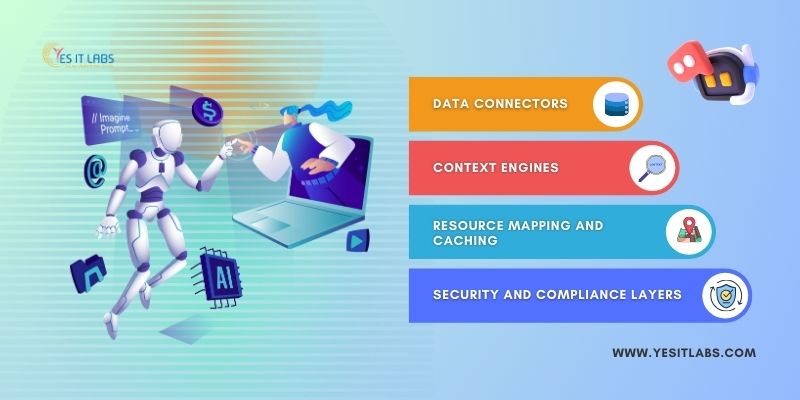
MCP operates through a series of interconnected components:

Anthropic Integration AI Chatbot

1. Data Connectors

These connectors enable MCP to interface with various data sources, including databases, APIs, SaaS platforms, and local files. Each connector is equipped with built-in logic to translate data formats into a standardized schema for AI models.

2. Context Engines

The context engines serve as MCP’s brain, dynamically interpreting the relationship between datasets. By leveraging natural language processing (NLP) and semantic analysis, these engines ensure that AI systems retrieve the most relevant data while maintaining context across tasks.

3. Resource Mapping and Caching

To optimize performance, MCP uses resource mapping to identify critical datasets and pre-loads them into a cache for faster retrieval. This reduces latency, especially in applications requiring real-time data processing.

4. Security and Compliance Layers

MCP incorporates robust security measures, such as role-based access control (RBAC) and data encryption protocols, to protect sensitive information. This ensures compliance with industry standards like GDPR and HIPAA, making MCP suitable for enterprise use.

Key Benefits of MCP

1. Universal Integration

With MCP, developers can integrate their AI models into any ecosystem without extensive reconfiguration. Whether it’s connecting to CRM systems, e-commerce platforms, or IoT devices, MCP acts as a single point of integration, reducing complexity.

2. Real-Time Adaptation

MCP supports adaptive schema mapping, enabling AI systems to adjust to changes in data structure or content on the fly. This is particularly beneficial in dynamic industries like finance or e-commerce, where data is constantly evolving.

3. Multi-System Compatibility

Unlike traditional tools confined to specific ecosystems, MCP’s open architecture ensures compatibility with a broad range of systems, including cloud-based solutions like AWS, Azure, and Google Cloud. This makes MCP a valuable asset for a software development company in USA, where businesses often require robust solutions to integrate modern technologies seamlessly.

4. Enhanced AI Autonomy

By maintaining context across datasets, MCP empowers AI agents to perform tasks autonomously. For example, customer support bots can resolve complex queries by pulling data from multiple systems without requiring human intervention.

5. Cost and Time Efficiency

By eliminating the need for custom integrations, MCP reduces development time and associated costs, making it an attractive solution for startups and enterprises alike.

Real-World Applications

The Model Context Protocol is already gaining traction across various industries, showcasing its versatility and transformative potential.

1. Financial Services

Companies like Block Inc. have integrated MCP to unify transaction data across global markets, enabling real-time fraud detection and personalized financial insights.

2. E-commerce

E-commerce giants use MCP to centralize customer data from platforms like Shopify, Magento, and Salesforce, providing AI systems with a 360-degree view of customer behavior. This enhances product recommendations, inventory management, and personalized marketing campaigns.

3. Developer Tools

Platforms such as Replit, Codeium, and Sourcegraph leverage MCP to power AI-assisted code generation and debugging. MCP’s ability to interact with diverse coding environments ensures developers receive context-aware suggestions, boosting productivity.

4. Healthcare

In healthcare, MCP is being adopted to integrate patient records from multiple systems, enabling AI to assist with diagnostics, treatment recommendations, and administrative tasks while ensuring data security and compliance.

For companies specializing in custom application development, these real-world implementations highlight MCP’s potential to streamline operations and enable next-generation AI solutions.

Technical Features Driving Innovation

MCP’s success stems from several advanced technical features:

1. Semantic Interoperability

MCP uses ontology-based models to ensure that data from different sources is interpreted in a consistent manner, regardless of format or origin.

2. Predictive Context Management

Through machine learning algorithms, MCP can predict future data requirements based on historical usage patterns, ensuring that AI systems always have the data they need.

3. Modular Design

MCP’s modular architecture allows developers to customize and extend its functionality. For instance, industry-specific plugins can be added to tailor MCP for healthcare, finance, or manufacturing.

4. Open Ecosystem

As an open-source initiative, MCP encourages collaboration and innovation. Developers worldwide can contribute to its ecosystem, adding new connectors, features, and optimizations.

The Future of MCP

Anthropic envisions MCP as a foundation for the next generation of context-aware AI applications. The company plans to expand MCP’s capabilities by integrating emerging technologies like federated learning, which allows AI models to learn from distributed datasets without compromising privacy.

Other future developments include:

  • Augmented Reality (AR) Integration: Enabling AI systems to process and provide context-aware insights in real-time AR environments.
  • Autonomous System Collaboration: Allowing multiple AI agents to share context and collaborate on complex tasks, such as supply chain optimization or disaster response.
  • Quantum Compatibility: Preparing MCP for integration with quantum computing systems to tackle data-heavy applications in areas like drug discovery and climate modeling.


software development company in USA

Conclusion

Anthropic’s Model Context Protocol (MCP) is a transformative leap in AI development, addressing the challenges of fragmented data integration with a unified, efficient, and scalable solution. By enabling AI systems to seamlessly access and utilize data across multiple sources, MCP is paving the way for a new era of intelligent, autonomous applications.

With its open-source foundation and forward-thinking design, MCP is not just a tool but a platform for innovation, inviting developers and organizations worldwide to contribute to its evolution. As this technology matures, the possibilities for creating smarter, more context-aware AI systems are boundless.

Anthropic’s commitment to advancing MCP ensures that it will remain at the forefront of AI innovation, driving progress across industries and redefining what’s possible in the world of artificial intelligence.

In the fast-paced world of Android development, tools and libraries continue to evolve, offering developers enhanced capabilities, smoother workflows, and improved productivity. Selecting the right set of tools can be game-changing for development efficiency. Below is a curated list of essential tools and libraries that elevate the Android development process.

For teams offering Android apps development services, utilizing these resources can ensure top-notch quality and performance in mobile applications.

1. Android Studio

Overview: As the official IDE for Android, Android Studio is central to Android development. It combines a powerful code editor, design tools, and a robust set of debugging features.

Key Features:

  • Smart Code Editor: Advanced code suggestions, refactoring options, and syntax highlighting tailored for Kotlin, Java, and XML.
  • Built-In Version Control: Seamless integration with Git, GitHub, and CVS for efficient collaboration.
  • Dynamic Layout Editor: Enables rapid UI design, supporting tools like ConstraintLayout and MotionLayout for complex interfaces.
  • Performance Profiler Suite: Tracks memory, CPU, and network usage to identify performance bottlenecks in real time.

Pro Tip: Explore Android Studio’s “App Inspection” feature to access real-time insights on database content and network calls, streamlining testing and debugging.

2. Gradle

Overview: Gradle is the backbone of Android project builds, handling automation, dependency management, and customized configurations for various build types.

Key Features:

  • Efficient Dependency Management: Centralizes library versions and updates to keep project dependencies streamlined.
  • Flexible Build Configurations: Allows multiple build variants like debug and release modes for easy switching.
  • Comprehensive Plugin Ecosystem: Use plugins to automate tasks like code linting, testing, and resource optimization.

Pro Tip: Utilizing Gradle Build Scans can help pinpoint slow build processes and dependencies, improving build times across complex projects.

3. Kotlin

Overview: Kotlin is the primary language for Android, renowned for its concise syntax and safety features, enabling developers to write cleaner, more reliable code.

Key Features:

  • Concise and Readable Syntax: Reduces code boilerplate, making projects easier to manage and maintain.
  • Null Safety: Helps avoid common NullPointerExceptions, a frequent source of runtime crashes.
  • Coroutines: Ideal for asynchronous programming, making background tasks and UI updates smooth and efficient.
  • Cross-Platform Potential: Kotlin Multiplatform enables code-sharing across Android, iOS, and backend services.

Pro Tip: For managing UI states in ViewModels, Kotlin’s sealed classes offer a clean solution, reducing the need for complex conditionals or enums.

4. Jetpack Compose

Overview: Jetpack Compose brings a modern approach to building native Android UIs with a declarative model, simplifying complex layouts and UI states.

Key Features:

  • Declarative UI Coding: Compose components are written in Kotlin functions, making code more readable and easy to debug.
  • Effortless UI State Management: Automatically updates UI based on data changes with minimal configuration.
  • Reusable Composables: Streamlines layout creation with modular, reusable components.
  • Rich Animation API: Simplifies animations and transitions within UI elements.

Pro Tip: Use Compose’s “Modifier” system to quickly create adaptable, responsive layouts that work seamlessly across different devices.

5. Retrofit

Overview: Retrofit is a powerful HTTP client for Android, perfect for managing API calls with ease and reliability.

Key Features:

  • Annotation-Based Requests: Set up API endpoints, headers, and query parameters directly in code using simple annotations.
  • Supports JSON and XML: Built-in converters for popular data formats simplify data parsing.
  • Extensible with OkHttp: Combine with OkHttp for advanced networking capabilities, such as caching and logging.

Pro Tip: Integrate Retrofit with Kotlin’s Flow for a reactive approach to network data, providing a smooth experience for users in data-intensive apps.

Using Retrofit is a key skill for any mobile app development company, as it ensures efficient and reliable network interactions.

6. Room

Overview: Room is a database library providing a streamlined interface for SQLite, enabling safe, efficient, and easy data storage and retrieval.

Key Features:

  • SQL Query Verification: Compiles SQL at build-time, reducing the chance of runtime errors.
  • Seamless Data Migrations: Built-in support for smooth database migrations, preventing data loss during updates.
  • Reactive Data Updates: Integrates with LiveData and Flow, making it ideal for applications needing real-time data updates.

Pro Tip: Use Room’s @Embedded and @Relation annotations to represent database relationships, allowing for simpler, more maintainable data models.

7. Dagger and Hilt

Overview: Dependency Injection (DI) is essential for scalable apps, and Dagger (with Hilt) is a powerful framework that automates this process in Android.

Key Features:

  • Simplified Component Setup with Hilt: Hilt abstracts Dagger setup, providing built-in components for Android classes.
  • Scoped Injection: Manages the lifecycle of injected objects (e.g., singleton or activity-scoped).
  • Enhanced Testability: Mock objects can be injected, making unit tests easier and more effective.

Pro Tip: Use @ViewModelInject to inject dependencies directly into ViewModels, maintaining separation of concerns and improving code maintainability.

For those looking to hire Android developers, familiarity with Dagger and Hilt is crucial, as it enables modular, well-organized codebases.

Tools and Libraries for Android Developer

8. Glide

Overview: Glide is a powerful library for image loading and caching, designed to minimize memory usage while providing high-quality image rendering.

Key Features:

  • Smart Caching: Automatically caches images, improving performance and reducing load times.
  • Custom Transformations: Easily apply cropping, resizing, or blurring.
  • Extensive Compatibility: Fetches images from multiple sources, including URLs and local storage.

Pro Tip: For fine-grained control over caching, use Glide’s RequestOptions.diskCacheStrategy() method to adjust caching behavior per image type.

9. Firebase

Overview: Firebase is a comprehensive app development platform offering tools for real-time data, analytics, authentication, and more.

Key Features:

  • Realtime Database & Firestore: Supports real-time data syncing, ideal for interactive apps with chat or live updates.
  • Authentication Services: Provides secure login options with providers like Google, Facebook, and custom email sign-ins.
  • Crashlytics: Monitors app crashes and provides actionable insights to enhance stability.
  • Remote Config: Adjust app parameters without needing a new release, ideal for A/B testing or feature rollouts.

Pro Tip: Combine Firebase Crashlytics with Performance Monitoring for an in-depth view of app stability and responsiveness across various conditions.

10. Android Architecture Components

Overview: Android’s Architecture Components in Jetpack provide essential libraries that support clean, maintainable code structure and lifecycle management.

Key Features:

  • LiveData: Reactive data containers that update the UI whenever the data source changes.
  • ViewModel: Manages UI-related data while surviving configuration changes.
  • Navigation Component: Manages app navigation, simplifies deep linking, and handles back stack actions.

Pro Tip: Use the SavedStateHandle in ViewModels to retain data across process restarts, making your app more resilient to unexpected closures.

Conclusion

For Android developers, the right toolkit can make all the difference, enhancing app quality and productivity. From new developers to seasoned professionals, these tools form a core set of resources that streamline development, improve maintainability, and provide scalable solutions. For businesses offering Android apps development services or aiming to create top-performing apps, mastering these tools is a must.

Investing time in understanding and effectively using these tools can transform your Android development process, leading to high-quality, stable, and efficient applications that deliver outstanding user experiences.

In today’s rapidly evolving digital world, speed and efficiency are crucial for successful web development. Next.js, a powerful React-based framework created by Vercel, has become a go-to tool for developers looking to build high-performance web applications with streamlined processes. This article explores how Next.js accelerates web development, simplifies complex tasks, and optimizes performance with unique features that enhance the developer experience.

What is Next.js?

Next.js is a React framework offering developers a robust suite of tools for creating server-rendered and statically generated web applications. By leveraging Next.js, developers can focus on feature development rather than the extensive configurations often associated with standalone React projects. Many companies today seek to hire Next.js developers who are skilled with this framework to drive efficient, high-performing applications.

Key Features of Next.js

  1. Automatic Static Optimization One standout feature of Next.js is its Automatic Static Optimization. This feature assesses which pages can be statically generated, reducing server load times and ensuring quicker page loads without complex configurations. With the rise of freelance Next.js developers, even small teams can take advantage of this optimization to deliver high-speed applications.
  2. Server-Side Rendering (SSR) Next.js simplifies server-side rendering (SSR), allowing pages to be rendered on the server at request time. This results in faster initial page loads and enhanced SEO, as search engines can easily crawl dynamic content. SSR is particularly valuable for applications that need to deliver real-time data efficiently, making it a popular choice for development teams across industries.
  3. Static Site Generation (SSG) Static Site Generation (SSG) allows Next.js to pre-render pages at build time, making it ideal for websites with content that doesn’t change frequently. SSG enables quick load times and smooth user experiences by pre-loading content on a Content Delivery Network (CDN). With frameworks like Laravel and Next.js, developers can take advantage of both static and dynamic content generation for applications that require both speed and adaptability.
  4. Incremental Static Regeneration (ISR) Incremental Static Regeneration (ISR) is a unique feature that allows Next.js to combine the benefits of SSG and SSR. ISR enables applications to update pages incrementally without rebuilding the entire site, which is ideal for large-scale projects like blogs or e-commerce platforms. Many Laravel development companies use ISR in conjunction with Laravel’s backend capabilities to create responsive and scalable web applications.
  5. API Routes Next.js enables you to define API endpoints directly within the project, which reduces the need for a separate backend service. Create API routes by adding endpoint files within the /pages/api directory. API Routes make it easy for small to medium-sized projects to manage front-end and back-end logic in a single codebase, simplifying deployment and improving code maintainability.
  6. File-Based Routing Every file in the /pages directory automatically generates a new route, simplifying the routing configuration process. This also supports dynamic routing for complex paths, making it a favorite among software development service providers.
  7. Image Optimization Next.js includes a built-in next/image component that optimizes images based on the user’s device and viewport, ensuring high-quality images without sacrificing performance. This feature is crucial for media-heavy applications that require responsive and fast-loading visuals.

hire Next JS developer

Benefits of Using Next.js

  1. Improved Performance Next.js is performance-focused, with Automatic Static Optimization, SSR, and SSG ensuring faster load times and smoother user experiences. Incremental Static Regeneration further enhances the ability to serve up-to-date content without impacting performance.
  2. Enhanced SEO With server-side rendering and static generation, Next.js applications are SEO-friendly out of the box. These features help search engines crawl and index your content, improving search visibility and attracting more visitors.
  3. Enhanced Developer Experience Next.js offers a streamlined experience with minimal setup, intuitive routing, and CSS and Sass support. Its thorough documentation and active community make it easy for developers to find resources, share knowledge, and solve issues efficiently.
  4. Flexible Data Fetching Next.js offers flexible data-fetching methods, such as getStaticProps and getServerSideProps, enabling developers to control data retrieval based on specific needs. These options provide the versatility required for various application requirements, which is especially beneficial in Laravel with Next.js environments.
  5. Scalability Next.js offers high scalability, making it ideal for projects of any size, from small personal websites to large, complex applications. With features like Incremental Static Regeneration and optimized API routes, it adapts seamlessly to growing user and content demands.

Getting Started with Next.js

Here’s a quick guide to getting started with Next.js:

1. Set Up a New Project To create a new project, run:

npx create-next-app@latest my-next-app

cd my-next-app

npm run dev

2. Create Pages Add pages to your app by creating files in the /pages directory. Each file represents a new route, simplifying site structure.

3. Use Data Fetching Methods Implement getStaticProps and getServerSideProps to fetch data based on page requirements.

4. Build API Routes Create API routes by adding endpoint files within the /pages/api directory. This provides RESTful API functionality directly within your Next.js app.

5. Optimize Images Use the next/image component to enhance image loading speeds and adapt images for different devices.

6. Deploy Your Application Next.js integrates well with Vercel, offering automatic scaling, global CDN, and performance monitoring. Deployment is seamless, with optimized configurations for production environments.

Conclusion

Next.js is a versatile, high-performance framework that transforms the web development experience. By combining SSR, SSG, ISR, and API routes with a streamlined development environment, Next.js allows developers to create efficient, scalable applications across industries. For companies and teams looking to deliver high-performing web applications, hiring Next.js developers skilled in these advanced features can be invaluable.

Whether you’re a developer building a complex web application development service provider aiming to offer cutting-edge solutions, Next.js is the framework that meets today’s web standards. Dive into Next.js and experience the future of efficient, performance-focused web development!

Building a food delivery app like Fiteats is an exciting opportunity, but understanding the cost and scope is crucial for a successful outcome. Partnering with a mobile application development company ensures you have the expertise needed for a quality product. The costs associated with app development depend on several factors, including the feature set, technology stack, and development team’s experience. Here’s a detailed breakdown of the key stages and associated costs to help you plan effectively:

1. Market Research and Planning

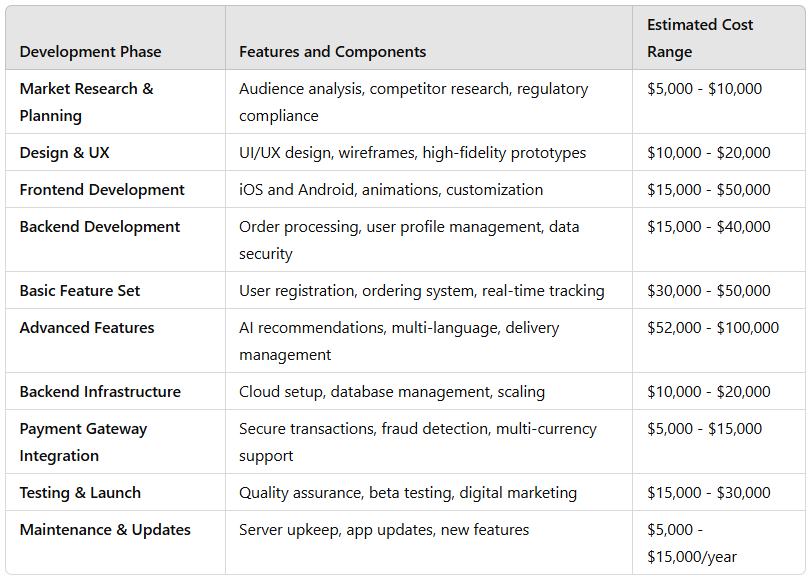
Before starting development, comprehensive market research is vital. This phase involves understanding your target audience, studying competitors, and pinpointing unique features to differentiate your app. It’s also essential to identify local regulations or industry standards that may affect your app’s development. A thorough planning phase can cost between $5,000 and $10,000.

2. App Design and User Experience (UX)

A compelling design and user-friendly experience are essential for attracting and retaining users. Creating an intuitive UI/UX and setting design standards for future updates are critical. Custom web application development services often prioritize well-thought-out UI/UX design to enhance usability and engagement. You’ll need both low-fidelity wireframes and high-fidelity prototypes, which can cost between $10,000 and $20,000. If you include animations or advanced design elements, this may add another $5,000 to $8,000 to the cost.

3. Core App Development (Frontend & Backend)

Development is the most significant cost area, where costs vary widely based on the app’s complexity:

  • Frontend Development: This is where the app’s UI is coded for iOS and Android. Native app development, which ensures optimal performance, can range from $15,000 to $50,000.
  • Backend Development: The backend handles order processing, user profiles, and database management. Costs here range from $15,000 to $40,000.

Here’s a cost breakdown based on features:

Food Delivery App Like Fiteats

Additional features like AI-driven personalization, multi-language support, or delivery partner management can raise costs further.

4. Backend Infrastructure and Database Setup

For scalability, it’s essential to choose a robust backend architecture that can handle peak loads, high volumes of transactions, and large user data. Cloud hosting, server scaling, and data management setups can cost between $10,000 and $20,000. Many businesses turn to an IT consulting company for guidance on creating secure, compliant backend solutions, which can further ensure long-term scalability.

5. Payment Gateway Integration

Integrating secure payment options is crucial. To ensure seamless transactions, multiple payment gateways should be included, with costs generally ranging from $5,000 to $10,000. Additional fees for advanced security measures, fraud detection, or multi-currency support can add $3,000 to $5,000.

6. Marketing, Testing, and Launch

Launching a food delivery app involves both marketing and quality assurance (QA) to ensure a smooth release. Marketing typically costs $10,000 to $30,000, but to make a strong entry, investing in app store optimization (ASO) and digital marketing campaigns is recommended.

Comprehensive testing, including unit testing, regression testing, load testing, and security audits, will add another $5,000 to $15,000. Hiring a mobile application developer with extensive QA experience can be beneficial in ensuring the app’s reliability and functionality. Investing in a beta launch to gather feedback may also add $2,000 to $5,000.

7. Maintenance and Updates

To remain competitive, your app requires consistent updates, feature enhancements, and bug fixes. Maintenance includes server upkeep, database management, and regular software updates, costing between $5,000 and $15,000 annually. This budget may increase as you add more features or upgrade for performance.

YES IT Labs’ Portfolio Spotlight: Fiteats Food Delivery App

YouTube video player

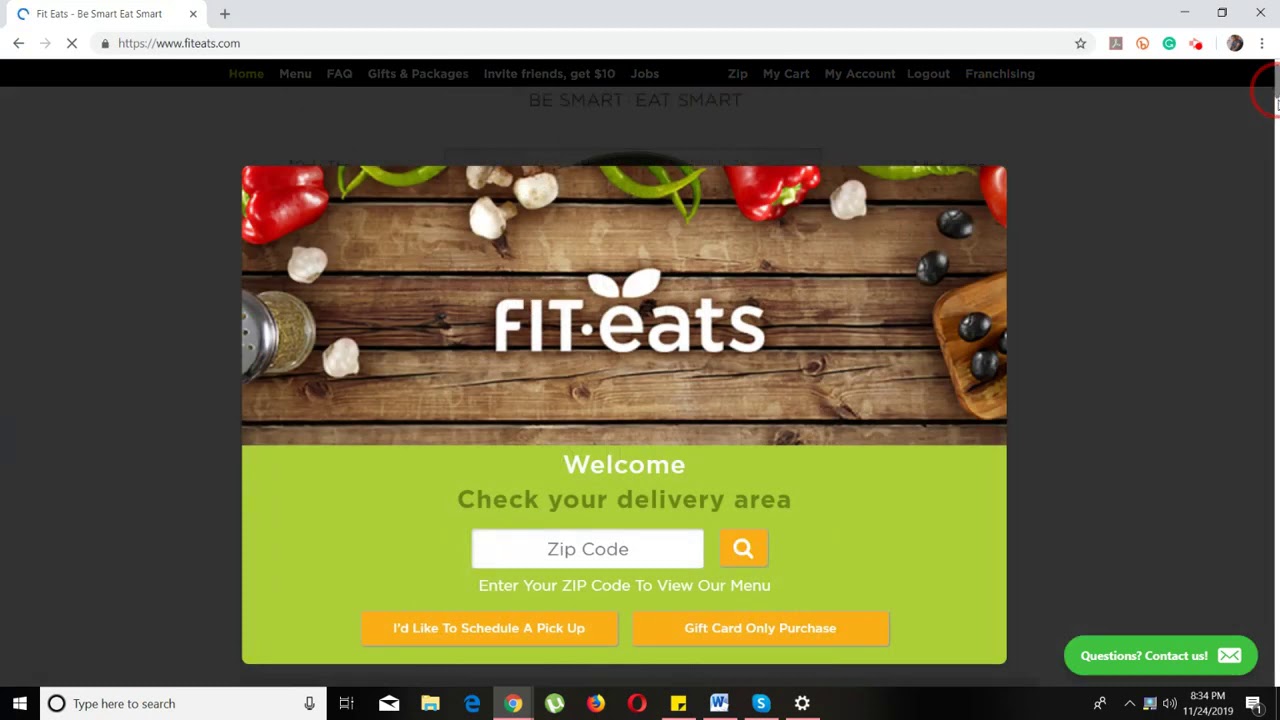
YES IT Labs has extensive experience in developing food delivery apps, as showcased in our portfolio with Fiteats. Our Fiteats portfolio provides a comprehensive look into the development process, including key features such as real-time tracking, an intuitive user interface, and secure payment integration. We understand the unique requirements and competitive nature of the food delivery industry and specialize in crafting scalable, user-centric solutions tailored to your needs. If you’re considering launching a food delivery app, YES IT Labs can bring your vision to life, using insights from our Fiteats experience to build an app that meets market demands and delivers exceptional user experiences.

Detailed Price Chart

Key Features to Include for Success

To build a competitive food delivery app, consider the following essential features:

    1. User Registration and Profile Management: Simple sign-up with social logins and profile customization.
    2. Restaurant Listings: High-quality photos, menus, ratings, and search filters.
    3. Order Processing: Smooth ordering with custom options, order tracking, and notifications.
    4. Real-Time Order Tracking: Accurate GPS tracking for users to monitor delivery status.
    5. Payment Integration: Support for multiple payment methods, including digital wallets.
    6. Customer Support: Chat or call support within the app for real-time assistance.
    7. Push Notifications: Notify users of order status, promotions, or updates.
    8. Admin Panel: A comprehensive dashboard for restaurant management, analytics, and customer service.
    9. Loyalty Programs & Discounts: Incentivize repeat usage with rewards or special offers.


Conclusion

Developing a food delivery app like Fiteats is a significant but rewarding investment. By understanding the cost factors and strategically planning for the must-have features, you can build an app that captures market demand and delivers an excellent user experience. As you progress, flexibility in scaling and refining your app can help you adapt to evolving customer needs and industry trends.

If you’re weighing the pros and cons of Wix vs WordPress, this detailed comparison offers insights into features, pricing, usability, and real-world application considerations for both platforms, helping you choose the best fit for your project.

Features

Wix

Wix is a popular, all-in-one website builder designed for users seeking simplicity and speed without needing coding knowledge. It’s particularly suited for small business owners, personal blogs, and creative portfolios. Here’s what sets Wix apart:

  • Templates: With over 800 professionally-designed templates, Wix covers various industries, from eCommerce to personal sites. These templates are customizable to fit any business style; however, changing templates later may require reworking your content, so choosing the right template from the start is key.
  • Apps and Integrations: The Wix App Market offers a variety of tools, from booking systems to social media integrations. Many apps are free, but premium or third-party apps may come at an additional cost, which can add up for larger sites.
  • Design Flexibility: Wix’s intuitive drag-and-drop editor enables complete control over page layouts and design without coding. While this is a significant benefit for beginners, the limited access to HTML/CSS editing can restrict advanced customizations.
  • Hosting and Domain Services: Wix includes secure hosting and domain services, offering an all-in-one solution for website launch. With a premium plan, users get a custom domain and no Wix ads, but site owners don’t have access to backend configurations, which may limit performance optimization for high-traffic sites.
  • SEO and Marketing Tools: Wix includes built-in SEO tools and an SEO Wiz tool, guiding users through basic optimizations like meta tags and image alt text. While ideal for beginners, users with more advanced SEO needs may find limitations compared to WordPress’s extensive plugin options.

WordPress

WordPress is an open-source CMS, offering unmatched flexibility for users who want full control over their site’s functionality and scalability. Many businesses prefer to hire WordPress developers to create custom solutions, especially when advanced functionality and scalability are needed. It’s ideal for larger businesses, developers, or anyone with some technical experience:

  • Plugins and Add-ons: With over 58,000 plugins, WordPress can handle everything from SEO to eCommerce to performance enhancements. This flexibility does require regular maintenance, as plugins need updates to stay compatible and secure.
  • Themes and Templates: WordPress offers thousands of free and premium themes that are fully customizable. Users can easily switch themes as their business needs evolve, which adds to WordPress’s adaptability.
  • Advanced Customization and Coding Access: For users comfortable with HTML, CSS, and PHP, WordPress provides full access to backend code, allowing for extensive customizations, such as custom page templates and unique functionalities. This is ideal for large, complex websites requiring specialized features.
  • Content Management Capabilities: WordPress excels as a CMS, making it perfect for blogs, magazines, or content-heavy sites. It offers flexible content structuring, version control, and user role customization—options far beyond Wix’s basic setup.
  • Scalability: WordPress scales effortlessly, allowing upgrades in hosting, caching solutions, and even custom servers as your business or content grows—making it suitable for small blogs and enterprise-level sites alike.

Pricing

Wix

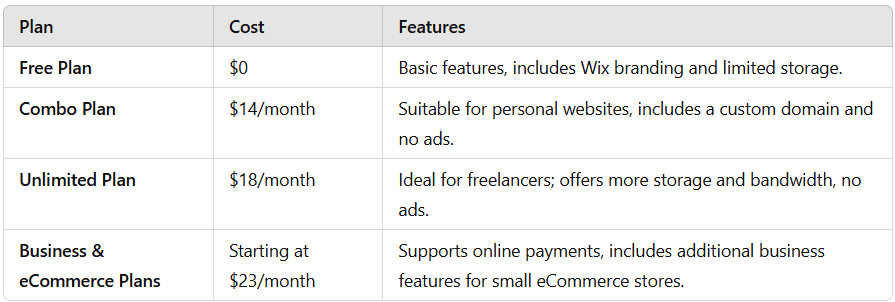
Wix has straightforward, tiered pricing with different plans for personal use, business, and eCommerce. Here’s a breakdown:

Wix vs WordPress

  • Free Plan: Provides basic features with Wix branding and limited storage, suitable for testing but not professional use.
  • Combo Plan: $14/month, includes a custom domain and no ads, making it suitable for personal websites.
  • Unlimited Plan: $18/month, offering more storage and bandwidth, ideal for freelancers or portfolio websites.
  • Business & eCommerce Plans: Starting at $23/month, these plans add online payment options, ideal for small businesses. Premium apps or third-party integrations may raise monthly costs for added functionality.

WordPress

WordPress pricing varies as it’s a self-hosted platform. Many business owners collaborate with a WordPress development company to manage costs while optimizing site performance. Here’s a breakdown of common costs:

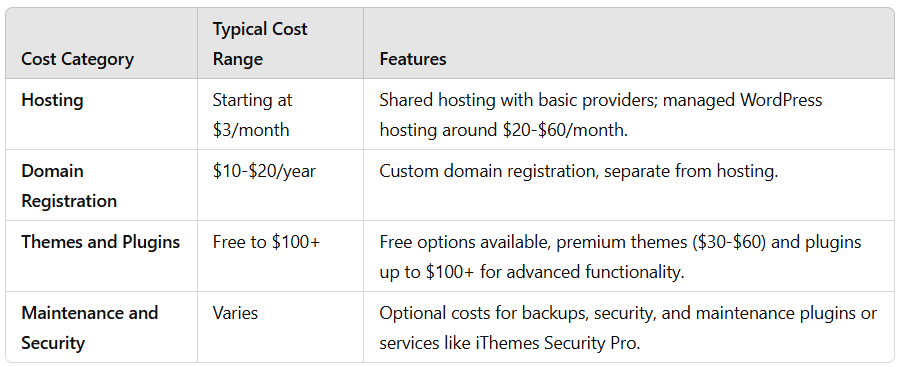
  • Hosting: Basic shared hosting can start around $3/month with providers like Bluehost, while managed WordPress hosting, such as WP Engine, ranges from $20-$60/month. Larger sites may need dedicated hosting starting at $100+ monthly.
  • Domain Registration: Custom domains generally cost $10-$20/year and are separate from hosting.
  • Themes and Plugins: While many themes and plugins are free, premium themes ($30-$60) and plugins (up to $100+ annually) may be required for enhanced functionality. WooCommerce for eCommerce can also involve costs for specialized plugins.
  • Maintenance and Security: WordPress requires regular maintenance, such as updates, backups, and security. Managed hosting plans may cover some of these needs, but plugins or third-party services like Sucuri or iThemes Security Pro can add to the overall cost.

Usability

Wix

Wix is designed with beginners in mind, making it quick and easy to create professional-looking websites. Key usability features include:

  • Drag-and-Drop Editor: Wix’s visual editor is intuitive and highly flexible, allowing users to make custom layouts without technical knowledge.
  • Wix ADI (Artificial Design Intelligence): For users seeking a faster setup, Wix ADI generates a site based on a brief questionnaire, though it offers less design flexibility. For a more advanced setup, some businesses hire Wix developers to enhance site features and functionality to better meet business objectives.

WordPress

WordPress offers greater control but has a steeper learning curve, especially for beginners. Its usability features include:

  • Gutenberg Block Editor: The Gutenberg editor makes WordPress more beginner-friendly by introducing a block-based, visual editing experience. However, advanced customizations still require some coding.
  • Usability vs. Flexibility: WordPress is best for users seeking extensive customization options and control over their website’s backend. While setup takes more time, it offers flexibility Wix can’t match.

SEO and Performance

Both Wix and WordPress provide basic SEO features, but WordPress is often favored by those with advanced SEO requirements:

  • Wix: Offers a simplified SEO setup, which is excellent for beginners but can be limiting for more technical SEO needs.
  • WordPress: With plugins like Yoast and Rank Math, WordPress enables advanced SEO customizations, from keyword targeting to schema markup, making it ideal for SEO-heavy sites. Performance can also be enhanced with custom caching solutions and CDNs, which are vital for high-traffic sites.

Conclusion

Choosing between Wix vs WordPress depends on your website’s goals, long-term scalability needs, and comfort with web development.

  • Wix is ideal for those who need a quick, no-code solution and an all-in-one package with hosting, design, and basic SEO tools. Perfect for personal sites and small businesses, Wix offers convenience and ease but may be restrictive as needs grow.
  • WordPress is the best choice for users seeking full control, scalability, and extensive customization. From small blogs to complex, enterprise-level sites, WordPress supports robust growth and customization, making it ideal for content-driven projects or eCommerce stores. Businesses often partner with a software development company in USA to ensure optimal setup and integration when using WordPress for complex requirements.

In short, Wix provides a user-friendly experience for those prioritizing simplicity, while WordPress offers powerful tools for those needing customization, control, and scalability.


Partner with YES IT Labs for Professional Wix Development

If you’re seeking a skilled Wix developer, partnering with YES IT Labs can elevate your website to new heights. Our team specializes in creating custom, high-performing Wix sites that align with your unique brand and business goals. We provide end-to-end solutions, from stunning design and seamless functionality to optimizing for speed and SEO. Whether you need a professional website, an eCommerce store, or tailored integrations, YES IT Labs offers the expertise and dedicated support to bring your vision to life on the Wix platform.

FAQs

Which is better for SEO, Wix or WordPress?

WordPress generally offers more advanced SEO capabilities through plugins like Yoast and Rank Math, allowing users to optimize metadata, URLs, schema markup, and more. While Wix includes built-in SEO tools suitable for beginners, WordPress is preferred for users who require deeper SEO customizations.

Can I switch from Wix to WordPress later if needed?

Yes, you can switch from Wix to WordPress, but it requires some manual effort, especially when migrating content and design. WordPress offers extensive customization options and scalability, making it a better long-term choice if you anticipate future growth. However, it’s advisable to start with WordPress if scalability is a priority.

Do I need a developer to set up WordPress or Wix?

Wix is designed for ease of use, so most users can set it up without a developer. However, if you need complex customizations or advanced integrations, hiring a Wix developer can enhance functionality. WordPress, while user-friendly, has a learning curve, and many users hire WordPress developers to achieve custom features and optimize for performance.

Creating a mobile app is much like crafting a finely tuned machine—every component must be meticulously planned and implemented for optimal performance and user satisfaction. The development timeline varies greatly depending on factors such as app complexity, platform requirements, and resources. Below, we break down each stage of the process to help demystify the timeline and offer an insider’s view into what each phase entails.

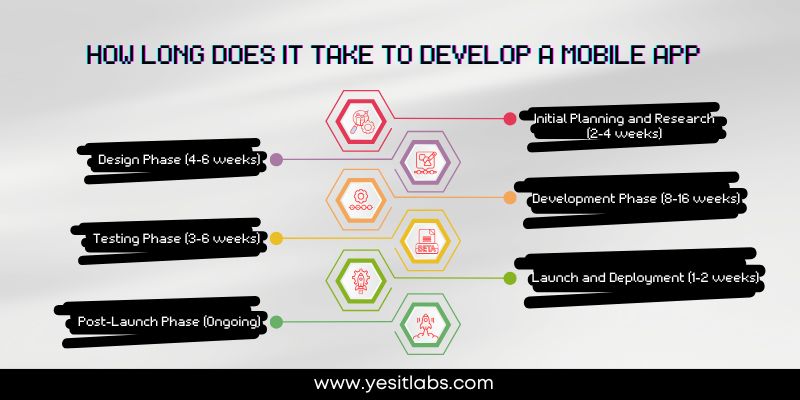
1. Initial Planning and Research (2-4 weeks)

Before any code is written, the foundation for the app needs to be laid out clearly. This phase includes understanding the target audience, conducting market research, defining app goals, and identifying core features. An in-depth competitor analysis is also essential to understand user pain points and industry standards. This stage often involves drafting an initial product requirements document (PRD), developing user personas, and creating a detailed project roadmap. Engaging all stakeholders early on ensures that everyone is aligned on goals, expectations, and success metrics.

Incorporating a technical feasibility analysis early on can save significant time later. Consulting with developers and architects to understand the feasibility of desired features and any technical limitations can affect the timeline and app performance.

If you’re looking to understand how to hire a mobile app developer, make sure to evaluate their experience in relevant technologies, portfolio quality, and previous client feedback.

2. Design Phase (4-6 weeks)

The design phase is crucial as it sets the app’s look, feel, and user flow. Designers create wireframes, prototypes, and user flow diagrams, iterating on the design to match the brand’s vision and ensure usability. This process often involves building both low-fidelity (rough) and high-fidelity (detailed) prototypes, with rounds of user feedback and adjustments to align with users’ needs and preferences. If there are multiple stakeholders, it’s common to present several design mockups and incorporate their feedback to refine the interface and user experience (UI/UX) of the app.

Developers should be involved in the design phase to provide input on technical constraints, as certain design choices can affect development time. Collaboration between designers and developers ensures designs are both aesthetically pleasing and technically viable.

how long does it take to develop a mobile app

3. Development Phase (8-16 weeks)

This is the most intensive stage, where the app’s frontend and backend are developed. The development time varies based on the app’s complexity and platform requirements (iOS, Android, or both). This stage is often broken down into sprints, where core features are prioritized and delivered incrementally. Developers may implement third-party integrations, databases, APIs, and other elements depending on the app’s requirements.

  • Frontend Development: Focuses on the app’s user interface, animations, and responsiveness across devices.
  • Backend Development: Involves setting up servers, databases, and APIs to manage user data, authentication, and other functionalities.

To keep development on track, conducting regular code reviews and continuous integration testing during sprints helps catch issues early and ensures smooth progress. Partnering with a reputable mobile application development company can significantly enhance the development process by providing skilled resources and experience.

4. Testing Phase (3-6 weeks)

After development, rigorous testing is essential to deliver a stable, high-quality app. This phase involves a variety of testing types to ensure the app’s functionality, security, and performance meet user expectations.
  • Unit Testing: Ensures each component of the app works correctly.
  • Integration Testing: Verifies that various components work together as intended.
  • Performance Testing: Verifies that the app operates efficiently across various conditions.
  • User Acceptance Testing (UAT): Gathers real-world feedback to refine the final product.
  • Security Testing: Identifies potential security vulnerabilities, which is crucial if the app handles sensitive data or payments.

Planning for multiple rounds of testing is essential. Bugs may appear once fixes are implemented, so allocating time for regression testing ensures that previous features still function correctly.

5. Launch and Deployment (1-2 weeks)

Once the app is finalized, it’s ready for launch. This phase includes submitting the app to app stores (Apple App Store, Google Play Store) and navigating their review processes, which have unique guidelines and approval times. Preparing marketing materials (screenshots, descriptions, promotional videos) is also essential to increase visibility and downloads.

To streamline the approval process, ensure that all assets and metadata meet each platform’s requirements. Pre-testing the app on multiple devices can help reduce the chances of rejection.

If your project requires specific platform expertise, consider working with an iOS mobile app development company or an Android application development company to ensure the best possible outcomes tailored to each platform’s requirements.

6. Post-Launch Phase (Ongoing)

The app journey doesn’t end at launch. Regular monitoring, updates, and maintenance are critical for app success. The post-launch phase includes gathering user feedback, fixing bugs, releasing updates, and introducing new features as the app scales. Monitoring performance metrics such as crash reports, session lengths, and user retention rates provides insights into improvements that can drive higher engagement and satisfaction.

A/B testing is a valuable post-launch tactic for optimizing features based on real user data. Regularly reviewing analytics data helps identify areas for improvement and prioritize updates.

Factors Affecting the Timeline

  • Complexity: Basic apps with limited features can take 2-4 months. More complex apps involving real-time updates, in-app purchases, or extensive backend integration can take 6-9 months or longer.
  • Team Size and Expertise: A skilled, well-coordinated team can speed up the process, especially if developers and designers work in parallel.
  • Platform: Developing for both iOS and Android typically takes longer than developing for a single platform due to differing requirements.
  • External Dependencies: Integrating third-party services or APIs can add to the development time, especially if dependencies require additional customization or have limited documentation.
  • Compliance and Security: If the app deals with sensitive user data, additional compliance checks (e.g., HIPAA, GDPR) may be necessary, adding to the timeline.

By understanding each stage and factor, you can more accurately estimate timelines for your mobile app project and set realistic expectations. With a dedicated team and thorough planning, even complex projects can progress smoothly and bring a high-quality app to the market.