

Resources

React Native App Development Company

React Native is a widely embraced framework for developing cross-platform mobile applications. It allows information technology (IT) consulting companies to reuse code across different platforms, such as iOS and Android, and create native-like user interfaces with minimal effort. However, developing a React Native app is not without its challenges and pitfalls. In this article, we will discuss some of the best practices and common mistakes that developers should follow and avoid when working with React Native.

Best Practices
Use TypeScript

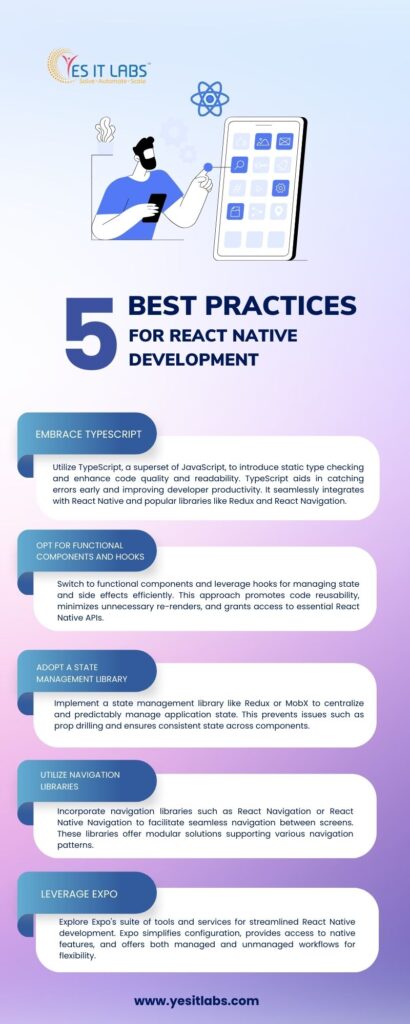
TypeScript extends JavaScript by incorporating static type checking and additional functionalities into the language. It helps developers catch errors and bugs early, improve code quality and readability, and enhance developer productivity and tooling. React Native supports TypeScript out of the box, and popular libraries and frameworks like Redux, React Navigation, and Expo can easily integrate with it.

Use functional components and hooks

Functional components are simpler and more concise than class-based components, and they allow developers to use hooks, which are a new way of managing state and side effects in React. Hooks make it easier to share and reuse logic across components, avoid unnecessary re-rendering, and access the React Native API, such as useEffect, useLayoutEffect, useCallback, useMemo, and useRef.

Use a state management library

State management is one of the most complex and important aspects of any React Native app. It involves keeping track of the data and UI state of the app, and ensuring that they are consistent and synchronized. A state management library, such as Redux, MobX, or Recoil, can help developers manage state in a centralized and predictable way, and avoid prop drilling, unnecessary re-rendering, and state inconsistency.

Use a navigation library

Navigation is another essential feature of any React Native app. It involves moving between different screens and components, and providing feedback and transitions to the user. A navigation library, such as React Navigation, React Native Navigation, or React Router Native, can help developers implement navigation in a declarative and modular way, and support various navigation patterns, such as stack, tab, drawer, and modal.

Use Expo

Expo is a set of tools and services that simplify and accelerate the development and deployment of React Native apps. It provides a managed workflow that handles the configuration and setup of the app, and allows developers to access native features and APIs, such as camera, location, notifications, and sensors, without writing any native code. Expo also provides an unmanaged workflow that gives developers more control and flexibility over the native code, and supports custom native modules and libraries.

Common Mistakes
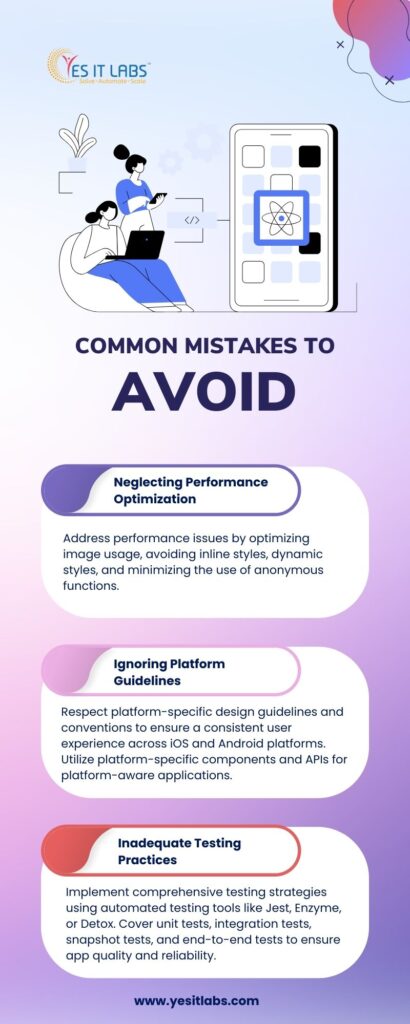
Not optimizing performance.

Performance is a crucial factor for any React Native app development company, as it affects the user experience and satisfaction. However, many developers neglect or overlook performance optimization, and end up with slow and laggy apps. Some of the common performance issues and solutions are:

  • Using too many images or large images: Images are one of the main sources of memory and bandwidth consumption in React Native apps. Developers should use images sparingly, and optimize them for size and quality. They should also use the Image component from React Native, which supports caching, resizing, and lazy loading of images.
  • Using inline styles or dynamic styles: Styles are another source of performance overhead in React Native apps. Developers should avoid using inline styles or dynamic styles, as they cause unnecessary re-rendering and computation of styles. They should use StyleSheet from React Native, which creates optimized and static stylesheets, and supports memoization and inheritance of styles.
  • Using anonymous functions or arrow functions: Functions are also a source of performance degradation in React Native apps. Developers should avoid using anonymous functions or arrow functions, especially in props, as they create new instances of functions on every render, and cause unnecessary re-rendering and memory allocation. They should use named functions or useCallback hook, which create stable and reusable functions, and prevent re-rendering and memory leaks.

Not following the platform guidelines.

React Native allows developers to create cross-platform apps that run on both iOS and Android. However, this does not mean that the apps should look and behave exactly the same on both platforms. Each platform has its own design and user interface guidelines, such as Material Design for Android and Human Interface Guidelines for iOS, and users expect the apps to follow them. Developers should respect the platform differences and conventions, and use platform-specific components and APIs, such as Platform, Platform.OS, Platform.select, and PlatformColor, to create platform-aware and platform-adaptive apps.

Not testing the app properly.

Testing is an essential part of any React Native app development process, as it ensures the quality and reliability of the app. However, many developers skip or ignore testing, and rely on manual testing or debugging tools, such as React Native Debugger or Flipper, to find and fix errors and bugs. This is not enough, as manual testing and debugging are time-consuming, error-prone, and incomplete. Developers should use automated testing tools and frameworks, such as Jest, Enzyme, React Testing Library, or Detox, to write and run unit tests, integration tests, snapshot tests, and end-to-end tests, and cover all the aspects and scenarios of the app.


FAQs.

Q: What is React Native?

React Native is a framework for building cross-platform mobile applications using JavaScript and React.

Q: What are the benefits of using React Native?

A: React Native allows developers to reuse code across different platforms, such as iOS and Android, and create native-like user interfaces with minimal effort.

Q: What are the challenges and pitfalls of using React Native?

A: React Native also has some drawbacks and limitations, such as performance issues, platform differences, and native dependencies.

Q: How can I optimize the performance of my React Native app?

A: Some of the ways to improve the performance of your React Native App Development are using TypeScript, functional components and hooks, state management and navigation libraries, and Expo. You should also avoid using too many images or large images, inline styles or dynamic styles, and anonymous functions or arrow functions.

Q: How can I follow the platform guidelines of iOS and Android?

A: You should respect the platform differences and conventions, and use platform-specific components and APIs, such as Platform, Platform.OS, Platform.select, and PlatformColor, to create platform-aware and platform-adaptive apps.

Q: How can I test my React Native app properly?

A: You should use automated testing tools and frameworks, such as Jest, Enzyme, React Testing Library, or Detox, to write and run unit tests, integration tests, snapshot tests, and end-to-end tests, and cover all the aspects and scenarios of the app.
In today’s fast-paced business landscape, staying competitive means constantly seeking innovative ways to optimize operations and maximize returns on investment (ROI). One strategy that has gained immense popularity is Business Process Outsourcing (BPO). In this blog, we’ll delve into what BPO entails, its myriad advantages, and provide valuable tips and tricks for businesses looking to leverage BPO services effectively.

Understanding Business Process Outsourcing (BPO)

So, what exactly is BPO? Essentially, it involves delegating specific business functions or processes to a third-party provider, often located offshore or domestically. These functions can range from customer service and technical support to accounting, HR, and even digital marketing.

Advantages of BPO:

  1. Cost Savings: Outsourcing certain tasks can significantly reduce operational costs. BPO providers often operate in regions with lower labor costs, allowing businesses to access skilled professionals at a fraction of the cost compared to hiring in-house.
  2. Focus on Core Competencies: By entrusting non-core functions to specialized BPO companies, businesses can redirect their resources and energy towards core activities that drive growth and innovation.
  3. Scalability: BPO services offer scalability, allowing businesses to easily adjust resources according to fluctuations in demand. This agility is especially beneficial for seasonal businesses or those experiencing rapid growth.
  4. Access to Specialized Expertise: BPO providers typically have extensive experience and expertise in their respective domains. Partnering with them grants businesses access to specialized skills and technologies that may not be available in-house.
  5. Enhanced Efficiency: BPO companies often have streamlined processes and advanced technologies, leading to improved efficiency and faster turnaround times.

Tips for Maximizing ROI with BPO

Now that we’ve explored the advantages of BPO, let’s discuss some tips and tricks to ensure businesses derive maximum ROI from their outsourcing endeavors:

1. Define Clear Objectives and Requirements

Before embarking on the outsourcing journey, it’s crucial to clearly define your objectives, identify the specific processes you intend to outsource, and establish key performance indicators (KPIs) to measure success. This clarity will guide your selection of a suitable BPO partner and help streamline the transition process.

2. Choose the Right BPO Partner

Selecting the right BPO company is paramount to the success of your outsourcing venture. Look for providers with a proven track record, relevant industry experience, and a solid reputation for delivering quality services. Consider factors such as expertise, scalability, cultural compatibility, and geographic location when making your decision.

3. Establish Effective Communication Channels

Open and transparent communication is essential for building a strong partnership with your BPO provider. Establish clear channels of communication and ensure regular updates and feedback sessions to address any issues promptly and foster collaboration.

4. Invest in Training and Integration

While BPO providers bring expertise to the table, they may require training and integration into your business processes to ensure seamless operations. Allocate resources for comprehensive training programs and provide necessary documentation and access to internal systems to facilitate integration.

5. Monitor Performance Continuously

Regularly monitor the performance of your BPO partner against established KPIs and benchmarks. Implement performance tracking mechanisms and conduct periodic reviews to identify areas for improvement and make necessary adjustments to optimize efficiency and quality.

6. Embrace Technology and Innovation

Stay abreast of technological advancements and encourage your BPO partner to leverage innovative solutions to enhance productivity and streamline processes. Embracing automation, artificial intelligence, and data analytics can drive significant improvements in efficiency and cost-effectiveness.

7. Foster a Collaborative Culture

View your BPO provider as an extension of your team rather than a separate entity. Foster a collaborative culture built on trust, mutual respect, and shared goals. Encourage knowledge sharing and cross-functional collaboration to maximize synergies and drive innovation.

Frequently Asked Questions (FAQs)

Q1: How can I determine which processes are suitable for outsourcing?

A1: Start by evaluating your business processes based on factors such as complexity, resource requirements, and strategic importance. Identify non-core functions that can be standardized and delegated without compromising quality.

Q2: What are the risks associated with outsourcing, and how can they be mitigated?

A2: Risks of outsourcing include loss of control, security concerns, and quality issues. Mitigate these risks by conducting thorough due diligence when selecting a BPO partner, implementing robust contractual agreements, and maintaining open communication channels.

Q3: What is the difference between onshore, offshore, and nearshore outsourcing?

A3: Onshore outsourcing involves delegating tasks to a third-party provider within the same country, while offshore outsourcing involves partnering with providers in different countries, often characterized by lower labor costs. Nearshore outsourcing refers to partnering with providers in neighboring or nearby countries, offering advantages such as timezone compatibility and cultural affinity.

Conclusion

Business Process Outsourcing presents businesses with a compelling opportunity to optimize operations, drive efficiency, and unlock significant cost savings. By following the tips and best practices outlined in this blog, businesses can harness the full potential of BPO services and maximize their return on investment. Remember, success in outsourcing hinges on strategic planning, effective communication, and building strong partnerships with trusted BPO providers.

Are you ready to take your business to the next level with BPO? Get in touch with a reputable business process outsourcing company today and start reaping the benefits of strategic outsourcing.

salesforce development company

Salesforce is the world’s leading cloud platform for customer relationship management (CRM) and enterprise applications. With Salesforce, you can build powerful, engaging, and secure applications that run on any device and connect to any data source. Whether you want to create a custom app from scratch, extend an existing app, or integrate with other cloud services, Salesforce has the tools and resources you need to succeed.

In this article, we will explore some of the best practices and features that Salesforce offers to help you build scalable and secure applications by collaborating with the salesforce development company.

What are Salesforce Cloud Services?

Salesforce Cloud Services are a collection of cloud-based products and platforms that enable you to create, manage, and deliver applications on the Salesforce platform. Some of the key Salesforce cloud services are:

  • Salesforce Platform: The core platform that provides the infrastructure, tools, and services to build, run, and manage apps on Salesforce. It includes features such as App Builder, Lightning Web Components, Apex, Visualforce, Heroku, Einstein, and more.
  • Sales Cloud: The flagship CRM product that helps you manage your sales processes, pipelines, and forecasts. It includes features such as leads, accounts, contacts, opportunities, quotes, orders, contracts, products, price books, and more.
  • Service Cloud: The customer service and support product that helps you deliver faster, smarter, and more personalised service to your customers. It includes features such as cases, solutions, knowledge, live agents, chatbots, omni-channels, field service, and more.
  • Marketing Cloud: The digital marketing product that helps you create and execute personalised, cross-channel campaigns to reach your customers and prospects. It includes features such as Email Studio, Mobile Studio, Social Studio, Advertising Studio, Journey Builder, Audience Studio, and more.
  • Commerce Cloud: The e-commerce product that helps you create and manage online stores, catalogues, and shopping carts. It includes features such as a storefront, order management, inventory management, product recommendations, and more.
  • Community Cloud: The online community product that helps you create and manage branded, interactive, and engaging communities for your customers, partners, and employees. It includes features such as Experience Builder, Experience Cloud Sites, Chatter, Topics, Reputation, and more.
  • Analytics Cloud: The business intelligence and analytics product that helps you explore, visualize, and share data insights from any source. It includes features such as Tableau CRM, Tableau Desktop, Tableau Server, Tableau Online, and more.
  • Integration Cloud: The integration and API product that helps you connect and orchestrate data and processes across Salesforce and other systems. It includes features such as MuleSoft Anypoint Platform, Salesforce Connect, Platform Events, Change Data Capture, and more.

How to Build Scalable Applications with Salesforce Cloud Services?

Scalability is the ability of an application to handle a growing number of users, requests, and data without compromising performance, reliability, or functionality. Scalability is essential for any application that aims to serve a large and diverse audience, especially in the cloud environment where demand can fluctuate rapidly and unpredictably.

Salesforce Cloud Services provide several features and best practices to help you build scalable applications, such as:

  • Multi-tenant architecture: Salesforce uses a multi-tenant architecture, which means that multiple customers share the same hardware, software, and infrastructure resources, but their data and applications are isolated and secure. This allows Salesforce to optimize the utilization and allocation of resources, and to scale up or down as needed without affecting the performance or availability of individual customers.
  • Elastic computing: Salesforce leverages elastic computing, which means that it can dynamically adjust the computing power and storage capacity based on the real-time demand and workload of the applications. This allows Salesforce to handle peak traffic, seasonal variations, and unexpected spikes without compromising the performance or availability of the applications.
  • Governor limits: Salesforce imposes governor limits, which are runtime limits that enforce the efficient and optimal use of the platform resources. Governor limits prevent any single customer or application from monopolising the shared resources and affecting the performance or availability of other customers or applications. Governor limits also encourage developers to write efficient and scalable code that follows best practices and design patterns.
  • Bulk and asynchronous processing: Salesforce supports bulk and asynchronous processing, which means that it can process large volumes of data or requests in batches or in the background, without blocking the user interface or the main thread of execution. Bulk and asynchronous processing allow the applications to handle complex, long-running, or resource-intensive operations without affecting the performance or availability of the applications.
  • Caching and performance optimization: Salesforce provides caching and performance optimization features, such as Platform Cache, Content Delivery Network (CDN), and Lightning Data Service, that help reduce the latency and bandwidth consumption of the applications. Caching and performance optimization allow the applications to store and retrieve frequently used data or content faster and more efficiently, without making unnecessary or redundant requests to the server or the database.

How to Build Secure Applications with Salesforce Cloud Services?

Security is the protection of an application and its data from unauthorised access, modification, or disclosure. Security is crucial for any application that handles sensitive, confidential, or proprietary data, especially in the cloud environment where the data and the applications are exposed to various threats and risks.

Salesforce Cloud Services provide several features and best practices to help you build secure applications, such as:

  • Trust and compliance: Salesforce is built on trust, which means that it adheres to the highest standards of security, privacy, and compliance in the industry. Salesforce undergoes regular and rigorous audits and certifications from independent third-party organizations, such as ISO, SOC, PCI, HIPAA, and GDPR, to verify and validate its security and compliance posture. Salesforce also publishes its security and compliance status and updates on the Trust website, where customers can monitor and verify the performance and availability of the platform and the services.
  • Identity and access management: Salesforce provides identity and access management features, such as Salesforce Identity, Single Sign-On (SSO), Multi-Factor Authentication (MFA), and OAuth, that help authenticate and authorize the users and the applications that access the platform and the services. Identity and access management allow the applications to verify the identity and the credentials of the users and the applications, and to grant or deny access based on the predefined rules and policies.
  • Data protection and encryption: Salesforce provides data protection and encryption features, such as Shield Platform Encryption, Field Audit Trail, Event Monitoring, and Data Mask, that help protect and encrypt the data that is stored and transmitted on the platform and the services. Data protection and encryption allow the applications to secure the data at rest and in transit, and to prevent data leakage, loss, or corruption.
  • Security testing and monitoring: Salesforce provides security testing and monitoring features, such as Security Scanner, Health Check, and Security Command Center, that help test and monitor the security posture and the vulnerabilities of the applications and the platform. Security testing and monitoring allow the applications to identify and fix the security issues and risks, and to improve the security performance and resilience.

Conclusion

Salesforce Cloud Services are a powerful and versatile solution for building scalable and secure applications on the cloud. By following the best practices and leveraging the features that Salesforce offers, you can hire a web application development company in USA capable of handling any level of demand, complexity, and data sensitivity, thus delivering a superior customer experience.

FAQ:

1. What is the Customer Success Group?

The Customer Success Group comprises experts and advisors dedicated to assisting users in maximizing the benefits of Salesforce Cloud Services through guidance, best practices, training, support, and resources.

2. How do I use Salesforce Identity?

Salesforce Identity enables users to manage identity and access across Salesforce and other cloud services, facilitating user account management, single sign-on (SSO), multi-factor authentication (MFA), and integration with external identity providers.

3. What is Shield Platform Encryption?

Shield Platform Encryption allows users to encrypt sensitive data stored on the Salesforce platform, including standard and custom fields, files, attachments, and chatter posts, using custom encryption keys to comply with data protection regulations.

4. How do I test and monitor application security?

Salesforce provides tools like the Security Scanner, Health Check, and Security Command Center for testing and monitoring application security, enabling users to identify and address security vulnerabilities and maintain compliance.

5. How do I connect and orchestrate data across systems?

Salesforce offers features like MuleSoft Anypoint Platform, Salesforce Connect, Platform Events, and Change Data Capture for connecting and orchestrating data and processes across Salesforce and other systems.

Hey there, fellow developers and web development enthusiasts! Today, we’re diving into the art of streamlining your development workflow to enhance efficiency, meet deadlines, and deliver top-notch results consistently. Whether you’re a seasoned web development company or someone looking to hire web developers, this guide is packed with tips and tools to help you ace your projects.

Understanding the Need for Streamlining

In the fast-paced world of web development, time is of the essence. Clients expect rapid turnaround times without compromising on quality. Streamlining your development workflow ensures you can meet these demands effectively. It involves optimizing every aspect of your process, from project management to deployment, to eliminate bottlenecks and enhance productivity.

Tips for Streamlining Your Development Workflow

1. Define Clear Objectives and Requirements

Before diving into any project, it’s crucial to have a clear understanding of the objectives and requirements. This involves thorough communication with clients or stakeholders to gather detailed specifications. The clearer the requirements, the smoother the development process will be.

2. Embrace Agile Methodologies

Agile methodologies, such as Scrum or Kanban, promote iterative development, frequent collaboration, and adaptability. By breaking down projects into smaller tasks or user stories, teams can focus on delivering incremental updates, ensuring continuous improvement and flexibility in responding to changes.

3. Use Project Management Tools

Utilize project management tools like Jira, Trello, or Asana to organize tasks, assign responsibilities, and track progress effectively. These tools facilitate seamless collaboration among team members, streamline communication, and provide transparency into project timelines and milestones.

4. Automate Repetitive Tasks

Identify repetitive tasks in your workflow and automate them using tools like Jenkins, Travis CI, or GitHub Actions. Automation reduces manual effort, minimizes errors, and accelerates the development process, allowing developers to focus on more critical aspects of the project.

5. Implement Version Control

Version control systems like Git enable developers to manage code changes efficiently, track revisions, and collaborate seamlessly across teams. By implementing branching strategies and code review processes, you can ensure code stability, improve code quality, and prevent conflicts.

6. Foster Communication and Collaboration

Efficient communication forms the cornerstone of every prosperous project. Encourage open communication channels within your team, conduct regular stand-up meetings, and leverage collaboration tools like Slack or Microsoft Teams to facilitate discussions, share updates, and address issues promptly.

7. Prioritize Continuous Testing and Quality Assurance

Integrate automated testing into your development pipeline to identify bugs and issues early in the process. Tools like Selenium for web application testing or Jest for JavaScript testing can help ensure the reliability and functionality of your codebase. Additionally, enforce code review practices to maintain code quality and consistency.

8. Optimize Deployment Processes

Streamline deployment processes using continuous integration and continuous deployment (CI/CD) pipelines. Tools like Docker and Kubernetes enable containerization and orchestration of applications, ensuring consistent deployment across different environments and reducing deployment-related errors.

Tools for Streamlining Development Workflow

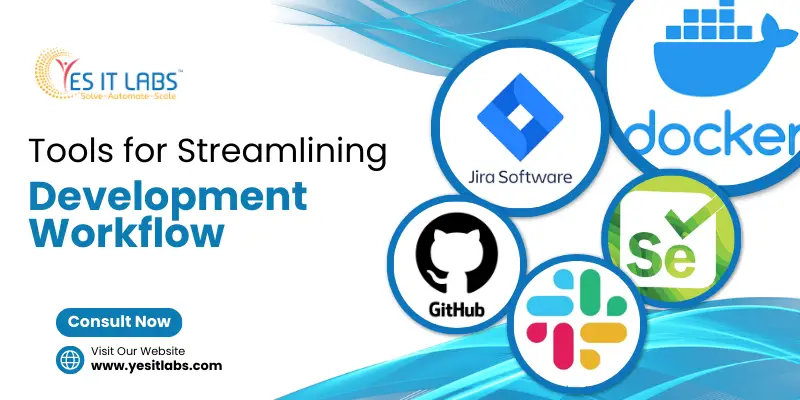
1. Jira -> Jira is a powerful project management tool that allows teams to plan, track, and manage software development projects efficiently. With features like customizable workflows, scrum boards, and real-time reporting, it streamlines project planning and execution.

2. GitHub -> GitHub offers tools for version control and team collaboration, tailored for software development groups. Its intuitive interface, branching capabilities, and pull request workflows simplify code management and facilitate seamless collaboration among developers.

3. Slack -> Slack is a popular communication platform that enables real-time messaging, file sharing, and collaboration within teams. With features like channels, direct messaging, and integrations with other tools, it enhances communication and fosters collaboration among team members.

4. Docker -> Docker is a platform for containerization, enabling developers to bundle applications and dependencies into efficient, lightweight containers. It streamlines the deployment process, ensures consistency across different environments, and improves scalability and resource utilization.

5. Selenium -> Selenium stands as a widely utilized testing framework for web applications. It automates browser interactions and allows developers to perform functional testing, regression testing, and cross-browser testing efficiently, ensuring the reliability and quality of web applications.

Conclusion

Streamlining your development workflow is essential for web development companies and businesses looking to hire web developers. By implementing the tips and tools mentioned above, you can enhance efficiency, collaboration, and quality throughout the development lifecycle, ultimately delivering exceptional results to clients and stakeholders. So, what are you waiting for? Start optimizing your workflow today and take your development projects to the next level!

Hey there, fellow developers! Today, let’s dive into the exciting world of CodeIgniter development and explore some advanced techniques that can truly unlock its potential. Whether you’re a seasoned pro or just dipping your toes into the realm of web development, there’s always something new to learn and discover. So, grab your favorite beverage, get comfy, and let’s embark on this journey together!

Understanding CodeIgniter: A Quick Overview

Before we delve into the advanced techniques, let’s take a moment to understand what CodeIgniter is all about. Within the expansive realm of programming, CodeIgniter emerges as a robust PHP framework distinguished for its swiftness, straightforwardness, and adaptability. It provides developers with a solid foundation for building dynamic web applications with ease.

What is CodeIgniter in programming?

CodeIgniter, a PHP framework, is lightweight and adheres to the MVC (Model-View-Controller) architectural pattern. It offers a rich set of libraries, helpers, and plugins that simplify the development process, allowing developers to focus on writing clean and efficient code.

Now that we have a basic understanding of CodeIgniter, let’s dive into some advanced techniques that can take your development skills to the next level.

Advanced Techniques in CodeIgniter Development

1. Utilizing Libraries and Helpers
One of the key strengths of CodeIgniter lies in its extensive library of built-in classes and helpers. These libraries cover a wide range of functionalities, from database manipulation to form validation and session management. By leveraging these pre-built components, developers can significantly reduce development time and streamline their workflow.

2. Database Optimization
Efficient database management is crucial for the performance of any web application. In CodeIgniter, developers can optimize database operations by utilizing features like database caching, query caching, and indexing. By fine-tuning database queries and minimizing unnecessary overhead, developers can ensure optimal performance even in high-traffic scenarios.

3. Security Best Practices
Security should always be a top priority in web development, and CodeIgniter provides a robust set of tools to help developers secure their applications. From input data validation to implementing CSRF protection and XSS filtering, CodeIgniter offers built-in features that make it easier to write secure code and protect against common vulnerabilities.

4. RESTful API Development
With the rising popularity of web APIs, mastering RESTful API development has become essential for modern web developers. CodeIgniter makes it easy to build RESTful APIs using its lightweight routing system and built-in support for HTTP methods. By following best practices and leveraging CodeIgniter’s features, developers can create scalable and maintainable APIs to power their web applications.

5. Modular Development
CodeIgniter allows developers to organize their code into modules, making it easier to manage complex projects and promote code reusability. By breaking down applications into smaller, self-contained modules, developers can maintain a clean and modular codebase, facilitating collaboration and future scalability.

Tips and Tricks: Maximizing Efficiency and Effectiveness

Now that we’ve explored some of the key features and functions of CodeIgniter, let’s delve into some tips and tricks for maximizing your efficiency and effectiveness as a developer:

  • Embrace CodeIgniter’s MVC Architecture: Leverage the Model-View-Controller (MVC) architectural pattern to separate concerns and maintain code clarity and organization.
  • Utilize Composer for Dependency Management: Integrate Composer, a PHP dependency manager, into your CodeIgniter projects to simplify package installation and management.
  • Harness the Power of CodeIgniter Libraries and Helpers: Take advantage of CodeIgniter’s extensive library and helper ecosystem to expedite common development tasks and enhance code reuse.
  • Stay Updated with the Latest Version: Regularly update your CodeIgniter installation to leverage new features, bug fixes, and security enhancements provided by the framework’s maintainers.
  • Engage with the CodeIgniter Community: Join online forums, discussion groups, and meetups to connect with fellow CodeIgniter developers, share insights, and stay abreast of industry best practices and emerging trends.

Wrapping Up

And there you have it, folks! We’ve barely scratched the surface of the advanced techniques available in CodeIgniter development services. From leveraging libraries and helpers to optimizing database performance and securing your applications, there’s a wealth of knowledge waiting to be explored.

So, whether you’re a seasoned CodeIgniter developer looking to sharpen your skills or a newcomer eager to learn, I hope this journey into the world of advanced techniques has been both informative and inspiring. Remember, the key to mastering CodeIgniter (or any framework, for that matter) lies in continuous learning, experimentation, and a healthy dose of curiosity.

Now, it’s your turn! What are some of your favorite advanced techniques in CodeIgniter development? Share your insights and experiences in the comments below. Let’s continue the conversation and empower each other to push the boundaries of web development with CodeIgniter!

In today’s rapidly evolving digital landscape, businesses are constantly seeking ways to leverage technology to achieve their strategic objectives. However, navigating the complex realm of information technology (IT) can be challenging, especially for organizations without specialized expertise in the field. This is where IT consulting services come into play, serving as the crucial bridge between technology and business goals.

Picture this: You’re a business owner with ambitious growth targets, but you’re unsure how to harness the power of emerging technologies to propel your company forward. That’s where an IT consulting company in the USA can step in to provide invaluable guidance and support.


Understanding IT Consulting Services

First things first, let’s break down what IT consulting services entail. Essentially, IT consulting involves providing expert advice, guidance, and solutions related to information technology to businesses seeking to optimize their operations, streamline processes, and achieve their objectives.

These services can encompass a wide range of areas, including:

  • Strategic Planning: Collaborating with clients to develop comprehensive IT strategies aligned with their business goals.
  • Technology Assessment: Evaluating existing IT infrastructure, systems, and processes to identify strengths, weaknesses, and opportunities for improvement.
  • Solution Design and Implementation: Designing customized IT solutions tailored to address specific business needs and overseeing their implementation and integration.
  • Cybersecurity: Assessing and enhancing the security posture of organizations to mitigate cyber threats and safeguard sensitive data.
  • Cloud Computing: Advising on the adoption of cloud-based technologies to enhance scalability, flexibility, and efficiency.
  • Data Analytics: Leveraging data-driven insights to optimize decision-making processes and drive business growth.


The Role of IT Consulting in Bridging the Gap

Now, let’s delve into how IT consulting serves as a bridge between technology and business goals:

  • Alignment: One of the primary objectives of IT consulting is to ensure alignment between technology initiatives and overarching business objectives. By gaining a deep understanding of a company’s vision, mission, and strategic priorities, IT consultants can develop tailored IT strategies that directly contribute to achieving those goals.
  • Expertise: IT consulting companies bring a wealth of expertise and experience to the table, allowing businesses to tap into specialized knowledge and skills that may not be available in-house. Whether it’s navigating the complexities of emerging technologies, optimizing IT infrastructure, or enhancing cybersecurity measures, consultants provide valuable insights and recommendations based on industry best practices.
  • Innovation: In today’s digital age, innovation is key to staying ahead of the curve and gaining a competitive edge. IT consultants play a vital role in driving innovation within organizations by identifying emerging technologies and trends that have the potential to transform business processes and unlock new opportunities for growth.
  • Risk Management: With the increasing prevalence of cyber threats and data breaches, effective risk management has become a top priority for businesses of all sizes. IT consultants help organizations assess their cybersecurity risks, implement robust security measures, and develop contingency plans to mitigate potential threats and ensure business continuity.
  • Scalability: As businesses grow and evolve, their IT needs inevitably change. IT consulting services provide scalable solutions that can adapt to the evolving needs of organizations, whether it’s expanding IT infrastructure, migrating to the cloud, or integrating new technologies seamlessly.


Choosing the Right IT Consulting Partner

Selecting the right IT consulting company in the USA is crucial to maximizing the value of IT consulting services. Here are some key factors to consider when evaluating potential partners:

  • Reputation and Experience: Look for a reputable IT consulting firm with a proven track record of success and extensive experience working with businesses in your industry. Client testimonials, case studies, and industry certifications can provide valuable insights into a company’s credibility and expertise.
  • Customized Solutions: Seek out a consulting partner that takes a personalized approach to addressing your unique business challenges and objectives. Avoid one-size-fits-all solutions and instead prioritize consultants who are willing to tailor their recommendations to align with your specific needs and goals.
  • Collaborative Approach: Effective communication and collaboration are essential for a successful consulting engagement. Choose a consulting partner that values open dialogue, listens to your input, and works collaboratively with your internal teams to achieve shared objectives.
  • Innovation and Adaptability: Look for consultants who are proactive in identifying emerging technologies and trends that have the potential to drive innovation and growth within your organization. Additionally, prioritize partners who demonstrate agility and flexibility in adapting to changing business requirements and market dynamics.
  • Long-Term Partnership: Building a successful IT strategy requires a long-term commitment and partnership between your organization and your consulting provider. Choose a consulting firm that is invested in your success and dedicated to building a lasting relationship based on trust, transparency, and mutual respect.


What Does an IT Consultant Do?

An IT consultant, also referred to as a technology advisor, aids businesses in maximizing their utilization of information technology. Their duties encompass several key areas:

  • Assessment: They comprehend client objectives, evaluate existing systems, and gather requirements for solution design.
  • Planning: Consultants devise strategic IT plans aligned with client goals, manage budgets, and mitigate risks.
  • Implementation: Customized solutions are designed and managed, including software setups, system integrations, and data migration.
  • Training and Change Management: They provide user training and facilitate organizational change to minimize disruptions.
  • Support and Maintenance: Consultants monitor performance, offer technical support, and provide ongoing advisory services for optimization and innovation.
  • Vendor Management: They assist in selecting vendors, negotiate contracts, and manage vendor relationships.
  • Performance Evaluation: Post-implementation reviews are conducted for continuous improvement and optimization.

In summary, IT consultants act as trusted advisors, aligning technology with business objectives to drive innovation and competitiveness.


What is an IT consulting service?

IT consulting services entail expert guidance and support from IT professionals to businesses, organizations, or individuals seeking strategic advice on their IT infrastructure and operations. These services cover various aspects aimed at optimizing technology usage to meet business objectives and adapt to the digital landscape.


Key Components of IT Consulting Services:

  1. Strategic Planning and Advisory: Consultants align IT strategies with business goals, develop technology roadmaps, and manage risks.
  2. Technology Assessment and Recommendations: They evaluate infrastructure, recommend solutions, and aid in vendor selection.
  3. Implementation and Integration: Consultants design and manage solutions, oversee projects, and facilitate change management.
  4. Training and Support: They provide user training and technical assistance for smooth operations.
  5. Performance Evaluation and Optimization: Consultants conduct post-implementation reviews and recommend improvements.


Benefits of IT Consulting Services:

  • Access to expertise.
  • Cost efficiency.
  • Scalability and flexibility.
  • Strategic guidance for innovation and growth.


Conclusion

In today’s digital-driven business landscape, IT consulting services play a vital role in bridging the gap between technology and business goals. By providing expert advice, guidance, and solutions tailored to the unique needs of each organization, IT consultants help businesses leverage the power of technology to drive innovation, enhance efficiency, and achieve strategic objectives. When selecting an IT consulting partner, businesses should prioritize reputation, expertise, collaboration, innovation, and long-term partnership to ensure a successful and mutually beneficial engagement. With the right consulting partner by their side, businesses can navigate the complexities of IT with confidence and unlock new opportunities for growth and success.

In today’s digital age, having a strong online presence is essential for businesses to thrive. With the ever-growing demand for innovative solutions tailored to specific needs, custom web application development has emerged as a cornerstone of modern business strategy. Whether you’re a startup looking to disrupt the market or an established enterprise seeking to streamline operations, having a custom web application can provide a competitive edge like no other.

At the heart of custom web application development lies the fusion of creativity and technical expertise. It’s about transforming your unique vision into a functional reality that resonates with your target audience. With a tailored approach, businesses can address specific pain points, enhance user experience, and unlock new opportunities for growth.

Here, we delve into the realm of custom web application development services, exploring the benefits, process, and key considerations for businesses embarking on this transformative journey.

Understanding Custom Web Application Development

Custom web application development involves the creation of bespoke software solutions tailored to the specific requirements of a business. Custom web applications are created from the bottom up and offer unmatched flexibility, scalability, and performance in contrast to off-the-shelf options.

Whether it’s a customer relationship management (CRM) system, e-commerce platform, project management tool, or any other type of web application, custom development ensures that every feature aligns perfectly with your business objectives and workflows.

benefits Custom Web Application

The Benefits of Custom Web Application Development

1. Tailored Solutions: Custom web applications are built to address the unique needs and challenges of your business. By incorporating features that are essential to your operations and omitting unnecessary functionalities, you can optimize efficiency and productivity.

2. Scalability: Your business’s technical needs will expand along with it. Custom web applications are designed with scalability in mind, allowing you to seamlessly accommodate increasing user volumes, data loads, and business complexities.

3. Enhanced Security: Security is a top priority in today’s digital landscape. With custom web application development, you have full control over security measures, ensuring that your sensitive data and intellectual property remain protected against evolving cyber threats.

4. Competitive Advantage: By offering unique functionalities and superior user experience, custom web applications set your business apart from competitors. They enable you to deliver value to your customers in ways that off-the-shelf solutions cannot replicate.

5. Cost Efficiency: While the initial investment in custom web application development may seem higher than purchasing off-the-shelf software, the long-term cost benefits are significant. Custom solutions eliminate licensing fees, reduce reliance on third-party vendors, and minimize the need for extensive customization or integration.

The Custom Web Application Development Process

1. Discovery and Planning: The first step involves understanding your business objectives, target audience, and technical requirements. Through collaborative workshops and consultations, developers gain insights into the project scope, timeline, and budget constraints.

2. Design and Prototyping: Based on the gathered requirements, designers create wireframes and prototypes that visualize the user interface and navigation flow. This iterative process allows for feedback and refinement until the final design is approved.

3. Development and Testing: Once the design is finalized, developers begin coding the web application according to best practices and industry standards. Throughout the development phase, rigorous testing is conducted to identify and rectify any bugs or performance issues.

4. Deployment and Maintenance: Upon successful testing, the web application is deployed to a production environment, making it accessible to users. Post-deployment, ongoing maintenance and support ensure that the application remains secure, reliable, and up-to-date with evolving business needs.

Key Considerations for Businesses

1. Clear Objectives: Define clear objectives and success criteria for the custom web application, ensuring alignment with broader business goals.

2. User-Centric Design: Prioritize user experience (UX) and user interface (UI) design to create intuitive, engaging, and accessible web applications that resonate with your target audience.

3. Collaboration and Communication: Establish open lines of communication with the development team, fostering collaboration and transparency throughout the project lifecycle.

4. Future-Proofing: Anticipate future requirements and scalability needs, laying the groundwork for future enhancements and integrations as your business evolves.

5. Compliance and Security: Ensure compliance with relevant regulations (e.g., GDPR, HIPAA) and implement robust security measures to protect sensitive data and mitigate cyber threats.

Conclusion

In an increasingly competitive business landscape, custom web application development offers a strategic advantage by empowering businesses to innovate, differentiate, and thrive. By aligning technology with business objectives and user needs, custom web applications serve as catalysts for growth, efficiency, and customer satisfaction.

At YES IT Labs, we understand the transformative power of custom web application development. With a collaborative approach and a commitment to excellence, we turn your vision into reality, one line of code at a time. Get in touch with us today to embark on your journey towards digital innovation and success.

Hey there, fellow entrepreneurs and e-commerce enthusiasts! Today, we’re diving into a game-changer in the digital marketplace: Shopify app development. If you’re looking to revolutionize your online store and drive business growth, you’re in the right place. Let’s explore how Shopify development services are reshaping the e-commerce landscape and why investing in them might be your ticket to success.

What Exactly is Shopify App Development?

First things first, let’s clarify what Shopify app development entails. Shopify, as many of you might know, is a popular e-commerce platform that allows businesses to create and manage their online stores with ease. Now, Shopify app development takes this a step further by enabling businesses to customize and enhance their Shopify stores through the creation of custom applications, also known as apps.

These apps can range from simple add-ons to complex solutions tailored to specific business needs. Whether it’s streamlining inventory management, improving customer engagement, or optimizing marketing strategies, Shopify app development offers a plethora of possibilities to elevate your online store.


The Power of Customization

One of the most compelling aspects of Shopify app development is the unparalleled level of customization it offers. Unlike off-the-shelf solutions that provide a one-size-fits-all approach, custom Shopify apps can be tailored to meet the unique requirements and goals of your business.

Imagine having the ability to create a seamless integration between your Shopify store and your CRM system, allowing you to automate customer interactions and streamline sales processes. Or perhaps you’re looking to implement a loyalty program that rewards repeat customers and incentivizes new ones – with Shopify app development, the sky’s the limit.


Driving Business Growth

Now, let’s talk about the real game-changer: how Shopify app development can drive business growth. In today’s competitive e-commerce landscape, standing out from the crowd is essential to success. Custom Shopify apps give you the tools to do just that by providing innovative solutions that enhance the overall shopping experience for your customers.

From personalized product recommendations to frictionless checkout processes, these apps can help increase conversion rates, boost customer satisfaction, and ultimately, drive revenue growth. And with the ability to continuously iterate and optimize your apps based on real-time data and feedback, the potential for long-term success is virtually limitless.


The Role of Shopify Development Services

Now, you might be wondering – how do I get started with Shopify app development? This is where Shopify development services come into play. Whether you’re a seasoned developer or a business owner with little to no technical expertise, Shopify development services can help bring your vision to life.

These services typically encompass everything from initial ideation and design to development, testing, and deployment. Whether you’re looking to build a custom app from scratch or integrate existing third-party solutions into your Shopify store, Shopify development services provide the expertise and support you need to succeed.


Answering Your Burning Questions

Before we wrap up, let’s address a couple of common questions about Shopify app development:


Can you build an app with Shopify?

Absolutely! Shopify provides a robust set of tools and resources for building custom apps tailored to your specific business needs. Whether you’re a developer looking to create your own app or a business owner seeking to hire a Shopify development service, building an app with Shopify is both feasible and rewarding.


Is Shopify app development profitable?

Without a doubt! As the e-commerce industry continues to evolve and grow, the demand for innovative solutions to enhance online stores is higher than ever. By investing in Shopify app development, businesses can unlock new revenue streams, attract more customers, and ultimately, drive profitability.


In Conclusion

In conclusion, Shopify app development represents a transformative opportunity for businesses looking to redefine their e-commerce strategy and drive sustainable growth. By leveraging the power of customization, innovation, and Shopify development services, you can create a truly unique and compelling online shopping experience that sets you apart from the competition.


So what are you waiting for? Whether you’re a small business owner or a seasoned e-commerce veteran, now is the time to harness the power of Shopify app development and take your online store to new heights. The future of e-commerce is here – are you ready to seize it?

Are you prepared to advance your knowledge of creating WordPress themes? Whether you’re a seasoned developer or just dipping your toes into the world of WordPress, there’s always room for growth and enhancement. In this guide, we’ll delve into some advanced WordPress theme development techniques that will elevate your projects to new heights. So, grab your favorite beverage, settle into your coding sanctuary, and let’s explore the fascinating realm of WordPress theme development!

Before we dive into the nitty-gritty of advanced techniques, let’s address the essentials. A WordPress development company can be your go-to partner for creating robust, tailor-made solutions for your website. These companies specialize in WordPress development, offering a wide range of services including theme development, plugin development, customization, and maintenance. When embarking on a complex project or seeking expertise beyond your skillset, hiring WordPress developers from reputable firms can save you time, effort, and headaches.

Exploring the Basics: WordPress Development Language & Theme/Frameworks

What programming language is WordPress?

WordPress is primarily built using PHP, a server-side scripting language, and utilizes MySQL for database management. Understanding PHP is crucial for customizing themes, developing plugins, and extending WordPress functionality.

WordPress Theme Development

WordPress themes control the visual presentation of your website. While basic theme development involves creating files like style.css, index.php, and header.php, advanced techniques include utilizing template hierarchy, integrating custom post types and taxonomies, implementing responsive design, and optimizing performance.

WordPress Theme Frameworks: Pros and Cons

Theme frameworks like Genesis, Divi, and Underscores offer a solid foundation for building WordPress themes. They provide standardized code, SEO optimization, and often come with built-in features and customization options. However, they may limit flexibility and require a learning curve. Understanding the pros and cons of using frameworks will help you make informed decisions based on project requirements and preferences.

Mastering Advanced Techniques: Elevating Your WordPress Themes

Now, let’s dive into the exciting realm of advanced WordPress theme development techniques that will set your projects apart:

  • Custom Post Types and Taxonomies: Extend WordPress beyond traditional posts and pages by creating custom post types and taxonomies. This allows you to organize and display content in unique ways, such as portfolios, testimonials, events, or products.
  • Theme Customizer and Options Panels: Empower users to personalize their website’s appearance through the Theme Customizer or custom options panels. Offer settings for colors, fonts, layout options, and more, providing a seamless and intuitive editing experience.
  • Advanced Custom Fields (ACF): Take control of your theme’s content with ACF, a powerful plugin that allows you to add custom fields to posts, pages, and custom post types. Use ACF to create flexible and dynamic templates, making it easier for users to manage complex content structures.
  • Performance Optimization: Ensure your theme is fast and efficient by optimizing code, minimizing HTTP requests, leveraging caching mechanisms, and implementing lazy loading for images and scripts. A fast-loading website not only improves user experience but also boosts SEO rankings.
  • Accessibility and SEO Best Practices: Prioritize accessibility and SEO in your theme development process. Use semantic HTML, provide alternative text for images, ensure keyboard navigation, and optimize meta tags and structured data to enhance usability and visibility in search engines.
  • Security Measures: Protect your theme from vulnerabilities and security threats by following best practices such as escaping output, sanitizing data, validating user inputs, and keeping themes and plugins updated. Incorporate security checks into your development workflow to mitigate risks and safeguard user data.

Creating Custom WordPress Plugins: A Step-by-Step Guide

WordPress Plugin Development:
Plugins extend WordPress functionality by adding new features, modifying existing ones, or integrating with third-party services. To create a custom plugin, start by defining its purpose and functionality, then follow these steps:

  • Set up a development environment with WordPress installed locally or on a staging server.
  • Create a new directory in the wp-content/plugins folder for your plugin.
  • Create a main PHP file with plugin headers and activation/deactivation hooks.
  • Develop the plugin functionality using PHP, JavaScript, and CSS as needed.
  • Test the plugin thoroughly to ensure compatibility, performance, and security.
  • Document your plugin’s features, usage instructions, and support information.

WordPress Plugin Repository:
Consider submitting your plugin to the official WordPress Plugin Repository for distribution to millions of users worldwide. Follow the submission guidelines and best practices to increase visibility, downloads, and user feedback.

Conclusion: Embrace the Journey of Continuous Learning

Congratulations! You’ve embarked on a journey of mastery in WordPress theme development, equipped with advanced techniques and best practices to create exceptional websites. Remember, the world of technology is ever-evolving, so stay curious, keep learning, and embrace new challenges with enthusiasm. Whether you’re a solo developer, a part of a WordPress development company, or looking to hire WordPress developers, the possibilities are endless. So, go ahead, unleash your creativity, and build remarkable experiences that leave a lasting impression on the web!

Introduction:

Welcome aboard as we set sail into the exciting world of website development in 2024! In this journey, we’ll explore the cutting-edge trends shaping the digital landscape, catering to the needs of businesses seeking to hire web developers and partnering with website development companies in the USA. So buckle up and get ready to embark on an informative and engaging voyage!


AI-Powered Personalization:

Ahoy! Let’s kick off our journey with AI-powered personalization, a trend that’s making waves in the realm of website development. Picture this: a website that knows exactly what you want before you even click a button! In 2024, AI is the captain steering websites toward delivering tailor-made experiences to users. Whether it’s dynamically generating content based on browsing behavior or predicting product recommendations, AI enhances user engagement and boosts conversion rates. So, for businesses in the USA looking to hire web developers, setting sail with AI on board ensures smooth sailing toward personalized user experiences.


Voice Search Optimization:

Avast ye! As voice assistants like Siri and Alexa become part of our daily lives, voice search optimization is the treasure map to success in website development. Imagine navigating the vast digital seas with just the sound of your voice! In 2024, websites need to be optimized for voice search to stay afloat in the competitive waters. By understanding natural language patterns and structuring content for conversational queries, businesses can improve their visibility and accessibility to users. So, if you’re seeking a website development company in the USA, make sure they know how to chart a course for voice search optimization.


Progressive Web Apps (PWAs):

Hoist the sails! Progressive Web Apps (PWAs) are the wind in the sails of website development, offering a seamless blend of web and native app experiences. In 2024, PWAs are the treasure trove for businesses seeking fast, reliable, and engaging experiences for their users. With features like offline functionality and push notifications, PWAs provide smooth sailing across devices, regardless of network conditions. So, if you’re hiring web developers or partnering with a website development company in the USA, don’t miss the boat on PWAs!


Inclusive Design and Accessibility:

All hands on deck! Inclusivity and accessibility are the compass guiding website development in 2024. Every sailor, regardless of ability, should be able to navigate the digital seas with ease. By prioritizing inclusive design practices, websites become accessible to all users, fostering a more inclusive online environment. From implementing semantic HTML to optimizing keyboard navigation, businesses hiring web developers can ensure that their websites are a welcoming harbor for everyone.


Blockchain Integration for Security and Trust:

Set a course for security! In 2024, blockchain technology is the anchor that secures websites against the tides of cyber threats. By integrating blockchain solutions, websites enhance security, transparency, and trust in transactions and content authenticity. Whether it’s decentralized authentication mechanisms or blockchain-based digital rights management, businesses in the USA seeking web development services can navigate the turbulent waters of cybersecurity with confidence.


Now, let’s answer some burning questions on the minds of our fellow sailors:


What are 3 types of web development?

  1. Front-end development: This involves creating the visual and interactive elements of a website that users see and interact with.
  2. Back-end development: This involves building the server-side components of a website, including databases and server logic.
  3. Full-stack development: This encompasses both front-end and back-end development, providing end-to-end solutions for building websites and web applications.


How much does website development cost?

Ahoy, matey! The cost of website development can vary greatly depending on factors such as the complexity of the project, the features required, and the expertise of the developers. On average, a simple website can cost anywhere from a few hundred to a few thousand dollars, complex projects like e-commerce websites or web applications may cost anywhere from several thousand to tens of thousands of dollars. It’s essential to discuss your project requirements with potential web developers or development companies to get an accurate estimate tailored to your needs.


Conclusion:

As we wrap up our journey through the key trends in website development for 2024, remember to keep your compass pointed toward innovation and user-centric experiences. Whether you’re navigating the seas solo or partnering with a website development company, embracing these trends ensures smooth sailing toward digital success. So, hoist the anchor, set sail with AI, and chart a course toward personalized, accessible, and secure websites that leave a lasting impression on users in the vast ocean of the internet!