

Resources

Cost to Build an Online Booking System

Building an online booking system can cost anywhere from $300/year for a basic SaaS plan to over $250,000 for a fully custom, enterprise-grade platform. The gap is not arbitrary. It reflects real differences in architecture complexity, integration depth, compliance requirements, and long-term scalability. Whether you are launching a restaurant online ordering app development project or building a full-scale reservation engine, this guide breaks down every cost layer a professional developer or product manager should factor in before making a build-vs-buy decision.

Key Insight for Decision-Makers

  • 68% of businesses that “built cheap” had to re-platform within 2 years , costing 3 to 5 times more than building right the first time.
  • The real TCO (Total Cost of Ownership) of a booking system is typically 2.3x the initial quoted price when hidden fees are included.
  • SaaS monthly fees look small but at scale: $200/month × 5 years = $12,000 , with zero equity and full vendor dependency.

Why Costs Vary So Widely

Four architectural variables drive 90% of the cost variation in booking systems:

  • Solution architecture: SaaS subscription vs. white-label vs. fully custom-coded platform.
  • Feature complexity: Real-time inventory sync, AI-powered upsells, and dynamic pricing are expensive to build and maintain correctly.
  • Compliance burden: Healthcare (HIPAA), payments (PCI-DSS), and EU data residency (GDPR) add $5,000–$30,000+ to custom builds.
  • Integration scope: Every third-party API (CRM, ERP, channel manager, PMS) adds dev hours, maintenance load, and potential failure points.


Professional Insight: The “Integration Tax”

Most developers underestimate integration costs by 40–60%. A hotel PMS integration (e.g., Opera, Mews, or Cloudbeds) alone can take 200 – 400 dev hours. Channel manager integrations (e.g., SiteMinder, RateGain) with live availability sync require robust webhook infrastructure and retry logic , which is easily 3 to 6 months of backend work.

Typical Pricing Breakdown by Solution Type

Solution Type Est. Cost Setup Time Scalability

Best For

Entry SaaS (e.g., Acuity, Calendly) $25–$100/mo 1–3 days Low–Medium Freelancers, small salons, coaches
Mid-tier SaaS (e.g., Booksy, SimplyBook) $100–$500/mo 1–2 weeks Medium Growing clinics, mid-size hotels
Enterprise SaaS (e.g., Cloudbeds, Mews) $500–$3,000/mo 2–6 weeks High Hotel chains, large event venues
Custom Development (MVP) $10K–$30K 2–5 months Very High Startups needing unique workflows
Full Enterprise Custom Build $50K–$250K+ 6–18 months Unlimited Enterprise, global hotel brands, healthcare networks

Custom development costs vary significantly by geography: US/UK developers cost $100 to $200/hr; Eastern Europe $40 to $80/hr; South/Southeast Asia $20 to $45/hr. Hiring a mobile app development company in USA typically costs more upfront but offers stronger IP protections, time-zone alignment, and easier compliance with US data regulations.

Market Insights & Hard Data

73% of travelers now book online (Statista, 2024)

Hotels and tour operators without direct booking see up to 30% higher cancellation rates from OTA bookings vs. direct channels.

10.4% CAGR for the online booking software market through 2030

Driven by healthcare digitization, post-pandemic travel recovery, and demand for headless booking APIs.

15–25% Commission savings with direct booking systems vs. OTAs

OTAs (Booking.com, Expedia) charge 15 to 30% commission. A $500K annual revenue hotel saves $75K to $150K with a direct booking engine, which is enough to fund a full custom build.

$4.2B Global online booking software market value (2024)

Projected to reach $9.3B by 2030. Healthcare scheduling and multi-venue event booking are the fastest-growing sub-segments.

Key Features & Their Real Cost Impact

Core Features (Non-Negotiable Foundation)

  • Real-time availability engine: Requires websocket or polling architecture; database locking strategies to prevent double-bookings.
  • Secure payment processing: PCI-DSS scope, tokenization. Plan for 80–160 dev hours just for payments if building custom.
  • Booking management dashboard: Filtering, exports, refund workflows, and calendar sync.
  • Automated notifications: Email + SMS via SendGrid/Twilio. Typically $0.01–$0.05/notification at scale.

Advanced Features (Cost Drivers, With Real Estimates)

Feature Custom Dev Cost Estimate Developer Note
AI-Powered Recommendations $8,000–$25,000 Requires ML model training, data pipelines, and A/B testing infrastructure
Dynamic Pricing Algorithm $10,000–$35,000 Rule-based is cheaper; true ML-based yield management rivals airline tech stacks
Loyalty & Membership Engine $5,000–$18,000 Points ledger, tiered perks, expiry logic; often underestimated by 50%
Multi-language / Multi-currency $3,000–$12,000 i18n architecture must be built from day one. Retrofitting costs 3x more
Virtual Tours / 3D Previews $5,000–$20,000 CDN costs balloon fast. 360-degree assets need WebGL rendering pipelines
Headless API / White-label SDK $15,000–$50,000 Full API versioning, developer docs, OAuth2 scoping, rate limiting required


Online Ordering App Development Company

The Hidden Cost Layer: What Most Vendors Will Not Tell You

Hidden Cost Category Avg. Annual Impact What Most Vendors Won’t Tell You
Transaction / Booking Fees $1,200–$6,000 0.5%–3% per booking. On $200K annual bookings = up to $6K hidden cost
Payment Gateway Fees $1,500–$4,500 Stripe/PayPal charge 2.9%+$0.30/transaction on top of platform fees
API / Integration Costs $2,000–$15,000 CRM, ERP, or PMS integrations often require custom dev work
SSL + Security Compliance $500–$5,000/yr PCI-DSS compliance audits and pen testing for custom builds
Staff Training $300–$2,000 Often ignored; platform switching increases churn risk by 22%

Valuable Insight:

  1. The Double-Booking Problem Is Harder Than It Look
    Preventing double bookings at scale requires database-level row locking (SELECT FOR UPDATE), idempotency keys on payment intents, and distributed locking (Redis/DynamoDB) in multi-server environments. Many SaaS tools have a 5 to 15 second race condition window, which is acceptable for haircuts but catastrophic for hotel reservations. Budget $8,000–$20,000 to solve this properly in a custom build.
  2. PCI-DSS Scope Can Blow Your Budget
    If your platform touches raw card data at any point, you enter PCI-DSS SAQ-D scope, requiring quarterly network scans, annual penetration tests, and formal audits. The right architecture (using Stripe.js or Braintree hosted fields) keeps you in SAQ-A scope, saving $15,000 to $40,000 per year in compliance costs. Most developers overlook this until it is too late.
  3. SaaS Platforms Have Feature Velocity Limits
    With SaaS, you are at the mercy of the vendor’s roadmap. If a competitor needs a feature the platform doesn’t support, you can’t ship it. Companies that chose SaaS for speed often hit this ceiling at $2M to $5M ARR and face a costly migration. Designing for a hybrid model (SaaS core plus custom extensions via API) is the professional middle ground.
  4. Mobile Conversion Rates Drop 60% Without a Native App
    Web-only booking flows on mobile convert at 1.5 to 2.5%. Native iOS/Android booking apps convert at 4 to 7%. Businesses that invest in professional iOS app development services consistently report higher booking completion rates and better customer retention compared to mobile web alternatives.
    On the Android side, partnering with an experienced Android applications development company ensures your booking flow is optimized for the full range of device sizes and OS versions that dominate global markets. For businesses targeting repeat bookings, budget $15,000 to $50,000 for native app development and expect a 2 to 3x ROI within 18 months.
  5. Webhooks vs. Polling: An Invisible $10,000 Decision
    Many SaaS platforms use polling (checking availability every 30–60 seconds) instead of real-time webhooks. At scale, this causes stale inventory displays and customer complaints. Ask vendors specifically:Do you use webhooks for availability updates, and what is the guaranteed latency SLA?‘ If they can’t answer, it’s polling.
  6. GDPR / Data Residency Can Limit Your Architecture
    For EU customers, booking data (names, payment references, health conditions in medical scheduling) may require EU-based data residency. Leveraging AWS cloud development services through AWS EU-West regions or Azure West Europe hosting adds roughly 12 to 18% to cloud infrastructure costs and may restrict certain third-party analytics tools. Plan for this in your architecture from day one, not as an afterthought.

Choosing the Right Approach by Business Stage

Business Stage Recommended Path

Professional Rationale

Pre-revenue / MVP Entry SaaS ($25–$100/mo) Validate demand before investing. Use Calendly, Acuity, or SimplyBook. Zero infrastructure risk.
$50K–$500K Revenue Mid-tier SaaS + API customization Use platforms with open APIs. Add custom checkout flows, loyalty, and branding without full custom build.
$500K–$2M Revenue Hybrid: SaaS core + custom frontend Build a branded booking engine on top of a headless SaaS backend. Best of both worlds at a $30K to $80K investment.
$2M+ Revenue / Enterprise Full custom development Full control of data, UX, pricing logic, and integrations. ROI is typically positive within 18 to 24 months at this scale.

Bottom Line

The Professional’s Decision Framework

  1. Calculate your annual booking volume × average booking value to estimate OTA commission savings.
  2. If savings > $50K/year, a custom build pays for itself within 2 years. Below $50K, SaaS is almost always smarter.
  3. Never start custom development without API-first architecture. You will need to integrate 5 to 10 external services whether you plan to or not.
  4. Budget 20% of initial build cost annually for maintenance, security updates, and feature iterations.
  5. Factor in developer talent availability: a $30K system nobody on your team can maintain is worth less than a $100/mo SaaS.


The right booking system is not the cheapest or the most feature-rich. It is the one that matches your current scale, integrates with your existing stack, and gives you room to grow without a full re-platform in 18 months. Make the decision based on TCO over 3 years, not the monthly sticker price.
Custom Inventory Management Software

When a business starts growing, inventory quickly becomes one of the biggest operational challenges. In the early days, many companies managed stock with spreadsheets or simple tracking tools. At first, this worked fine. But as orders increase, products expand, and warehouses multiply, those manual systems start to break down.

Suddenly teams are dealing with missing stock, delayed orders, and inaccurate inventory counts. These problems slow down growth and frustrate both employees and customers.

That is why more growing companies are investing in custom inventory management software. Instead of forcing their operations into rigid tools, they build systems designed specifically for how their business actually works.

For businesses planning long term expansion, the right inventory technology is not just helpful. It is essential.

What Inventory Management Software Actually Does

Inventory management software helps businesses monitor and control their products throughout the entire supply chain. From purchasing raw materials to shipping finished goods, the software keeps track of where every item is located and how much stock is available.

Modern systems usually include tools for:

  • Tracking stock levels in real time
  • Managing purchase orders and suppliers
  • Monitoring warehouse movement
  • Forecasting product demand
  • Generating reports for inventory performance


With accurate visibility, businesses can avoid common problems like overstocking slow moving products or running out of popular items during peak demand.

Many growing companies eventually work with an inventory management software development company to create systems tailored specifically to their workflows, inventory types, and operational needs.

Why Custom Inventory Management Software Helps Businesses Scale

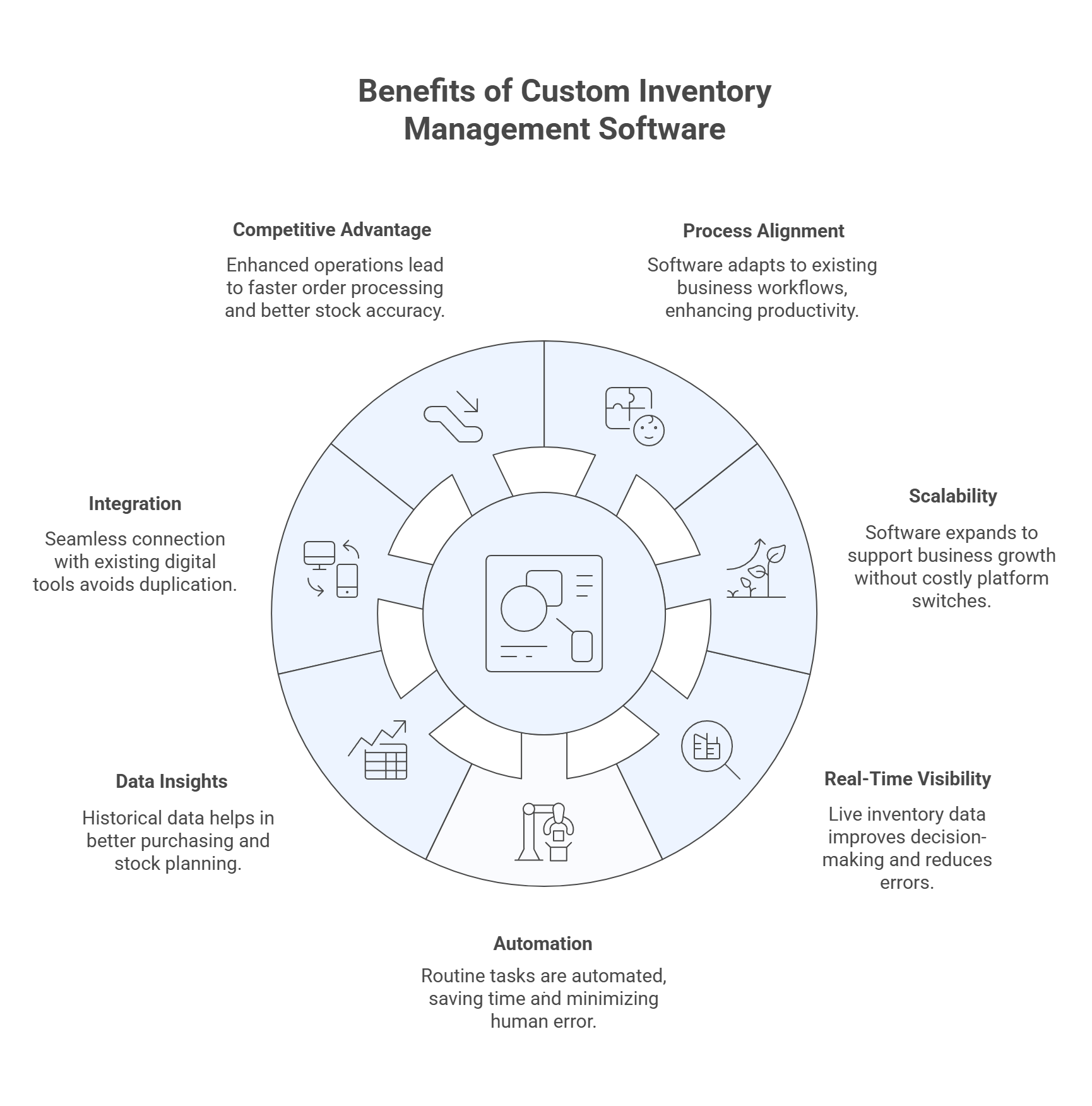
1. It Matches Your Actual Business Processes

No two businesses handle inventory the same way.

A retail brand selling clothing online manages inventory very differently from a manufacturing company producing equipment parts. Off the shelf tools try to serve everyone, which often means they are not perfectly suited for anyone.

Custom inventory software removes that limitation.

Instead of adapting your operations to the software, the software adapts to your operations. That means your system can include:

  • Custom warehouse workflows
  • Product specific tracking methods
  • Specialized inventory categories
  • Unique reporting dashboards


When the technology fits the way your company already works, employees spend less time struggling with tools and more time focusing on productivity.

2. It Grows Alongside Your Business

Growth is great, but it also creates complexity.

A company that once managed a few hundred products might suddenly need to track thousands. New warehouses open. Online sales channels expand. Suppliers multiply.

Without the right system, inventory becomes difficult to manage.

Custom software is designed with scalability in mind. As your company grows, developers can expand the system to support new warehouses, new product lines, or higher transaction volumes.

That flexibility helps businesses avoid the expensive process of switching platforms every few years.

3. Real Time Visibility Improves Decision Making

One of the biggest frustrations for business owners is not knowing the true status of their inventory.

Without real time data, teams often rely on outdated reports or manual checks. That leads to mistakes such as selling products that are already out of stock or ordering items that are already sitting in the warehouse.

Custom inventory systems solve this problem by providing a live view of inventory across all locations.

With accurate information, businesses can:

  • Respond faster to customer orders
  • Reduce stock shortages
  • Avoid unnecessary inventory costs
  • Improve overall operational efficiency


In fast moving industries like ecommerce, this level of visibility makes a huge difference.

Benefits of Custom Inventory Management Software

4. Automation Saves Time and Reduces Errors

Manual inventory management is surprisingly time consuming. Employees often spend hours updating spreadsheets, checking stock levels, or verifying purchase orders.

Even small mistakes can create major problems.

Custom inventory software helps eliminate these issues by automating routine processes such as:

  • Reordering products when stock reaches a minimum level
  • Updating inventory after every sale
  • Tracking shipments from suppliers
  • Generating reports automatically


Automation not only saves time but also reduces the chance of human error.

Over time, these improvements can significantly reduce operational costs.

5. Data Insights Help Businesses Plan Better

Inventory systems are not just about tracking products. They are also powerful sources of business data.

Custom solutions can analyze historical sales, seasonal demand patterns, and product performance. This allows businesses to make more informed decisions about purchasing and stock planning.

For example, companies can quickly identify:

  • Which products sell fastest
  • Which items sit in storage too long
  • When seasonal demand spikes occur
  • Which suppliers perform reliably


With better data, businesses can plan inventory strategies that support growth instead of limiting it.

6. Integration With Your Existing Digital Tools

Most businesses rely on several digital platforms to operate. These may include accounting software, customer management systems, ecommerce platforms, and internal reporting tools.

Inventory systems work best when they connect smoothly with all of these platforms.

For instance, many companies run their websites using content management systems like WordPress. Working with a reliable wordpress development company can help ensure inventory data syncs correctly between the website, backend operations, and other business tools.

When systems communicate with each other properly, teams avoid duplicate work and reduce operational confusion.

7. Competitive Advantage Through Better Operations

Operational efficiency can be a powerful competitive advantage.

Companies with well designed inventory systems can process orders faster, maintain better stock accuracy, and respond quickly to changes in demand.

Custom software also allows businesses to add advanced capabilities such as:

  • Intelligent demand forecasting
  • Automated warehouse management
  • Real time sales tracking
  • Custom fulfillment workflows


These capabilities help companies stay ahead of competitors that rely on outdated inventory processes.

Key Features of Effective Custom Inventory Systems

While every business has unique requirements, most custom inventory platforms include several essential features.

Real Time Inventory Tracking

Businesses can monitor stock levels instantly across warehouses, retail locations, and online stores.

Automated Reordering

The system automatically alerts teams or places orders when inventory falls below predefined thresholds.

Barcode or RFID Integration

Scanning tools simplify product tracking and reduce manual entry errors.

Warehouse Management

Products can be organized and tracked by location, aisle, or storage area.

Reporting and Analytics

Custom dashboards help managers understand inventory performance and operational trends.

Industries That Benefit Most From Custom Inventory Systems

Many industries rely heavily on accurate inventory management, including:

  • Ecommerce retailers
  • Manufacturing companies
  • Wholesale distributors
  • Retail chains
  • Logistics providers
  • Healthcare suppliers


For ecommerce businesses in particular, integrating inventory systems with online stores is critical. Companies that invest in Shopify development services in USA often connect their Shopify platforms directly with custom inventory tools to maintain accurate product availability and avoid overselling.

Custom vs Off the Shelf Inventory Software

Feature Custom Software

Off the Shelf Software

Customization

Fully tailored to business workflows

Limited flexibility

Scalability

Designed to grow with the business

May require switching systems

Integration

Built for seamless integration

Often requires workarounds

Initial Cost

Higher upfront investment

Lower initial cost

Long Term Value

Higher ROI for growing companies

Limited long term scalability

For small startups, off the shelf tools may be enough. But once a company begins expanding rapidly, custom systems usually offer better long term value.

The Future of Inventory Management

Technology continues to reshape how businesses manage inventory. New innovations are already changing supply chains across industries.

Some of the most important trends include:

  • Artificial intelligence for demand forecasting
  • Internet of Things devices for product tracking
  • Cloud based inventory platforms
  • Automated warehouse systems
  • Advanced supply chain analytics


Businesses that adopt flexible and scalable inventory solutions today will be better prepared to take advantage of these technologies in the future.

Conclusion

Growing a business successfully requires more than increasing sales. It requires strong operational systems that can handle increasing complexity.

Inventory management plays a central role in that process. Without accurate stock tracking and efficient workflows, growth can quickly create operational bottlenecks.

Custom inventory management software gives businesses the flexibility, visibility, and automation needed to manage inventory effectively at scale.

Companies that invest in the right inventory technology position themselves for smoother operations, stronger customer experiences, and sustainable long term growth.

PHP-FPM

In today’s digital economy, speed is no longer a technical metric. It is a revenue driver.

Whether you run an eCommerce store, a SaaS platform, a publishing site, or a service-based business, milliseconds directly impact conversions, retention, and search visibility. Yet many businesses overlook one of the most powerful backend performance optimizers available in the PHP ecosystem: PHP-FPM, FastCGI Process Manager.

This article explains what PHP-FPM is, why it matters, and how its performance improvements translate into measurable ROI.

What Is PHP-FPM?

PHP-FPM stands for PHP FastCGI Process Manager. It is an advanced process manager for PHP that handles heavy traffic more efficiently than traditional PHP setups.

Instead of starting and stopping PHP processes for every request, PHP-FPM:

  • Maintains pools of worker processes
  • Reuses processes for incoming requests
  • Controls memory usage and concurrency
  • Manages high-load environments with dynamic scaling


It is commonly used with high-performance web servers like Nginx and can also be configured with Apache via FastCGI.

In simple terms, PHP-FPM allows PHP applications to handle more users, faster, with fewer server resources.

The Direct Link Between Speed and Profit

Before exploring technical advantages, consider the business impact of speed.

Performance Statistics That Matter

  • A 1-second delay in page load time can reduce conversions by up to 7 percent.
  • 53 percent of mobile users abandon a site that takes longer than 3 seconds to load.
  • Faster sites experience higher crawl efficiency and improved SEO performance.
  • Studies show that even 100 milliseconds of latency can impact revenue for high-traffic platforms.


These are not just performance numbers. They are revenue indicators.

When PHP-FPM improves backend response time, it directly influences:

  • Time to First Byte
  • Server response stability under load
  • Checkout completion rates
  • Ad quality scores
  • Organic rankings


Speed is infrastructure-level conversion optimization.

How PHP-FPM Improves Performance

1. Process Pooling and Efficient Resource Management

Traditional PHP setups may spawn new processes per request, which increases CPU and memory overhead.

PHP-FPM uses worker pools that stay active, reuse processes, and handle concurrent requests efficiently.

This reduces server strain and improves response time consistency, especially during traffic spikes.

Business impact: Lower infrastructure costs and fewer slowdowns during campaigns.

2. Better Handling of Traffic Spikes

When running paid ads, launching a product, or publishing viral content, traffic spikes can overwhelm poorly configured PHP environments.

PHP-FPM supports:

  • Dynamic process management
  • Configurable maximum children
  • Controlled scaling behavior


This prevents server crashes and performance degradation.

Business impact: No lost revenue during high-traffic events.

3. Improved Time to First Byte

Time to First Byte, or TTFB, is a critical metric for both user experience and SEO.

Since PHP-FPM processes requests efficiently and maintains active workers, response times drop significantly compared to older CGI-based setups.

Even small TTFB improvements:

  • Increase Core Web Vitals scores
  • Improve crawl efficiency
  • Enhance perceived speed


Business impact: Higher search visibility and improved conversion rates.

Why Implementation Strategy Matters

Deploying PHP-FPM is not just about switching configurations. It requires thoughtful architecture, performance benchmarking, and traffic modeling.

Many organizations partner with a PHP development company in USA to properly configure process pools, optimize memory allocation, and integrate caching layers such as OPcache or Redis. A poorly tuned environment can limit the benefits of PHP-FPM, while a professionally optimized setup can dramatically improve throughput and stability.

Strategic implementation ensures that performance gains are sustainable and measurable.

PHP-FPM and eCommerce: A Revenue Multiplier

For online stores, speed affects:

  • Add-to-cart rates
  • Checkout completion
  • Cart abandonment
  • Mobile conversion


A backend improvement of even 300 to 500 milliseconds can increase revenue significantly over time.

Consider this example:

  • You generate 50,000 dollars per month
  • You improve load speed by 1 second
  • Conversions increase by 5 percent


That results in an additional 2,500 dollars per month, or 30,000 dollars per year, from a server configuration improvement.

That is hidden ROI.

Scaling Teams for Performance Optimization

As businesses grow, technical decisions become more complex. Performance tuning often requires deep expertise in server management, application profiling, and load testing.

Instead of overloading internal teams, many organizations choose to hire PHP developers with hands-on experience in high-traffic architectures. Skilled developers can fine-tune process limits, prevent memory leaks, and optimize code execution paths that directly affect response times.

Performance is not just about hardware. It is about engineering discipline.

SEO Gains: The Compounding Effect

Search engines prioritize performance.

Google’s Core Web Vitals include metrics influenced by backend speed, including server response time

Faster backend response results in:

  • Faster crawling
  • Better indexing frequency
  • Improved ranking potential
  • Lower bounce rates


When speed improves rankings, rankings drive traffic, and traffic drives revenue. The gains compound over time.

For businesses investing heavily in SEO, PHP-FPM is not just infrastructure. It is a strategic growth lever.

Infrastructure Efficiency and Cost Optimization

Efficiency means fewer resources needed per request.

With PHP-FPM:

  • Memory usage becomes predictable
  • CPU spikes reduce
  • Servers handle more concurrent users


Many enterprises combine backend optimization with broader IT consulting services in USA to align infrastructure strategy with business goals. When hosting, security, scalability, and performance are treated as interconnected systems, the cost savings multiply.

Business impact: Better margin per transaction and improved long-term scalability.

PHP-FPM vs Traditional PHP: The ROI Comparison

Factor

Traditional PHP PHP-FPM

Process Management

Per-request spawning

Persistent worker pools

Resource Usage

Higher overhead

Optimized memory control

Traffic Handling

Limited scalability

Handles spikes efficiently

Stability

Crash-prone under load

Controlled scaling

Revenue Impact Indirect

Direct and measurable

Real-World Scenario: SaaS Platform

Imagine a SaaS platform with:

  • 20,000 monthly active users
  • API-heavy backend
  • Peak concurrent traffic during business hours


Without PHP-FPM:

  • CPU spikes
  • Slow API responses
  • Subscription churn


With PHP-FPM properly tuned:

  • Stable performance
  • Lower latency
  • Improved user satisfaction


Even a churn reduction of 2 to 3 percent can dramatically increase customer lifetime value.

Advanced Configuration Equals Maximum ROI

To unlock full ROI, configuration matters.

Key tuning areas include:

  • pm.max_children
  • pm.start_servers
  • pm.min_spare_servers
  • pm.max_spare_servers
  • pm.max_requests


Improper tuning can waste resources or cause bottlenecks. Proper tuning aligns server capacity with traffic patterns.

For high-traffic businesses, performance audits often reveal misconfigured PHP-FPM settings that cost thousands in lost revenue.

The Bigger Picture: Speed as a Growth Strategy

Many businesses focus on acquiring more traffic, running more ads, or publishing more content.

However, optimizing infrastructure can increase revenue without increasing traffic.

If 100,000 visitors convert at 2 percent, improving speed might raise conversion to 2.3 percent. That small percentage difference can equal thousands in additional revenue.

Backend optimization often produces the highest ROI because it multiplies existing traffic rather than acquiring new traffic.

Final Thoughts: Speed Is Financial

PHP-FPM is not just a performance tool. It is a revenue optimization system.

Faster response times:

  • Improve user experience
  • Boost SEO rankings
  • Reduce churn
  • Increase conversions
  • Lower infrastructure costs


When you calculate the long-term impact, the ROI of PHP-FPM is substantial and often underestimated.

In a competitive digital market, backend efficiency creates measurable advantage.

And measurable advantage creates profit.

Frequently Asked Questions (FAQs)

1. What is the main benefit of PHP-FPM for businesses?

The main benefit of PHP-FPM is improved server performance and stability under load. It reduces response time, handles traffic spikes efficiently, and lowers infrastructure strain. These improvements directly increase conversions, improve SEO rankings, and reduce downtime related revenue loss.

2. How does PHP-FPM improve website conversion rates?

PHP-FPM improves Time to First Byte and overall backend speed. Faster loading pages reduce bounce rates and increase user engagement. Since studies show that even a one-second delay can reduce conversions by up to 7 percent, backend speed improvements can significantly impact revenue.

3. Is PHP-FPM necessary for small websites?

For low-traffic websites, the performance difference may not always be dramatic. However, as traffic grows, PHP-FPM becomes increasingly important. It provides scalability, better resource control, and prepares the infrastructure for future growth without major reconfiguration.

4. How do I properly configure PHP-FPM for maximum ROI?

Proper configuration involves tuning process management settings such as pm.max_children and pm.max_requests based on available server memory and expected traffic. Performance testing, monitoring tools, and load simulations help determine optimal values. Incorrect configuration can limit benefits, so professional tuning is recommended for high-traffic environments.

5. Does PHP-FPM help with SEO rankings?

Yes, indirectly. PHP-FPM improves server response time, which affects Core Web Vitals and overall page performance metrics. Faster response times enhance crawl efficiency, reduce bounce rates, and improve user experience, all of which contribute to better search engine visibility over time.

Investing in Full Stack Mobile Apps

If you look at how people interact with brands today, one thing becomes obvious very quickly: mobile is no longer optional. It is where customers browse, compare, buy, book, subscribe, and communicate.

Businesses are not investing in full stack mobile apps simply because it sounds modern or trendy. They are doing it because mobile applications now sit at the center of growth, customer engagement, and operational efficiency.

Let’s break down what is really driving this shift.

Mobile Is Now the Primary Touchpoint

Most customers experience a brand for the first time on their phone. They might discover it through social media, a search result, or a recommendation. If that mobile experience is slow, clunky, or inconsistent, trust disappears almost instantly.

There are now billions of smartphone users globally, and mobile traffic accounts for more than half of total internet usage. That statistic alone explains why companies are prioritizing mobile-first strategies.

This is where many organizations turn to a Custom Mobile App Development Company in USA. They are not just looking for an app. They are looking for a tailored digital ecosystem built around their specific audience and business model.

A template solution might work temporarily. A fully customized app supports long-term growth.

Full Stack Development Means Full Control

When businesses choose full stack development, they are essentially choosing control.

Instead of splitting front-end and back-end work between disconnected teams, hiring full-stack developer brings everything together. The user interface, database, server logic, and APIs are designed to work as one unified system.

From a business perspective, this translates into:

  • Fewer technical misunderstandings
  • Faster troubleshooting
  • More stable updates
  • Stronger long-term maintainability


It also reduces the risk of one team blaming another when something breaks. Everything is built with the full picture in mind.

Platform Performance Still Matters

Even with a full stack strategy, businesses understand that platform optimization cannot be ignored.

For example, working with a specialized Android App Development Company ensures that an app performs smoothly across various Android devices, screen sizes, and operating system versions. Android fragmentation is real, and it requires experience to handle properly.

On the other side, businesses that want premium performance and seamless user experiences often invest in professional iOS App Development Services. Apple users tend to have high expectations for speed, interface polish, and reliability.

A well-built full stack architecture combined with platform expertise creates a balanced, high-performing mobile solution.

Let’s Talk About Cost Honestly

One of the first questions executives ask is about the Full Stack Mobile App Development Cost.

The answer depends on features, integrations, security requirements, and scalability plans. However, what many decision-makers discover is that full stack development often reduces long-term expenses.

Why?

Because you avoid:

  • Duplicate team structures
  • Ongoing coordination inefficiencies
  • Repeated architectural rebuilds
  • Poorly integrated updates


Instead of fixing fragmented systems later, businesses build a strong technical foundation from day one. That proactive approach saves money over time.

Scalability Is No Longer a Luxury

Growth today can happen quickly. A product can go viral. A startup can scale in months. A regional company can suddenly attract national demand.

If the app infrastructure is not designed to handle growth, success becomes a technical burden.

Full stack architecture allows developers to design systems that can:

  • Handle traffic spikes
  • Expand database capacity
  • Integrate new tools
  • Add new features without breaking core functionality


That flexibility gives businesses confidence to scale without hesitation.

Security Is a Business Priority

Customers are more aware of data privacy than ever before. One security breach can damage a brand’s reputation for years.

When development is handled holistically, security measures can be implemented consistently across the application. Authentication systems, encrypted APIs, and secure data storage can all be designed as part of one strategy rather than patched together later.

For industries like fintech, healthcare, SaaS, and e-commerce, that unified approach is not optional. It is essential.

Data, Insights, and Smarter Decisions

Mobile apps generate valuable user data. But data alone does not create value. Proper integration does.

Full stack systems allow businesses to track behavior patterns, analyze engagement, and personalize user experiences in real time. Research consistently shows that customers prefer brands that offer personalized interactions.

When analytics tools are deeply integrated into the architecture, businesses can:

  • Improve retention
  • Increase conversions
  • Reduce churn
  • Refine product decisions


That insight becomes a competitive advantage.

Why This Investment Is Growing

Many enterprises are increasing their mobile development budgets year over year. Full stack expertise is among the most in-demand skills in digital transformation initiatives.

Companies that invest strategically in mobile apps frequently report noticeable improvements in customer engagement metrics. More engagement often leads to higher lifetime value and stronger brand loyalty.

This is not just about technology. It is about positioning the business for long-term digital relevance.

Final Thoughts

Businesses are investing in full stack mobile apps because they want stability, scalability, efficiency, and competitive strength.

A well-built full stack app is not just a digital product. It becomes a core business asset that supports marketing, operations, analytics, and customer relationships.

In a world where mobile interactions shape brand perception, companies that build strong, integrated mobile ecosystems are far better prepared for sustainable growth.

Flutter vs Swift

Choosing the right technology for a new mobile product, or modernizing an existing one, is one of the most important long-term decisions a business or CTO will make. The framework you select affects development cost, speed to market, scalability, hiring strategy, performance, and long-term maintainability.

This guide compares Flutter and Swift across the factors that truly influence investment protection, including performance, ecosystem maturity, cost of ownership, developer availability, and platform longevity. You will find practical insights, real-world considerations, and data-backed insights to support a confident decision.

Understanding the Foundations

Flutter is an open-source UI toolkit created by Google. It allows developers to build applications for iOS, Android, web, and desktop using a single Dart-based codebase.

Swift is Apple’s native programming language for building apps across iOS, macOS, watchOS, and tvOS. It is developed and maintained by Apple and is deeply integrated into Apple’s ecosystem.

In simple terms, this comparison represents cross-platform efficiency versus native iOS precision.

Market Share and Ecosystem Stability

Global mobile operating system distribution provides important context. Data from StatCounter shows Android holding approximately 70 percent of worldwide market share, while iOS maintains around 30 percent. Although Android leads in volume, iOS users consistently demonstrate higher average revenue per user in many high-value markets.

Flutter has expanded rapidly due to its multi-platform capability and strong backing from Google. Swift, meanwhile, continues evolving as Apple enhances its native frameworks and developer tools.

From an ecosystem longevity standpoint, both technologies are stable and strategically supported by major global technology companies.

Development Speed and Cost Efficiency

One of the most significant factors in future-proofing investment is time to market.

Flutter enables a single shared codebase for iOS and Android. This reduces duplication, lowers staffing costs, and simplifies testing cycles. For startups or fast-scaling businesses seeking rapid deployment, investing in Flutter Mobile App Development Services can accelerate MVP launches and shorten product validation cycles.

On the other hand, Swift is ideal for businesses building exclusively within the Apple ecosystem. If Android is also required, a separate native development team becomes necessary, increasing overall operational costs.

For organizations prioritizing multi-platform reach with lean teams, Flutter typically provides stronger early-stage ROI.

Performance and User Experience

Performance remains a key differentiator.

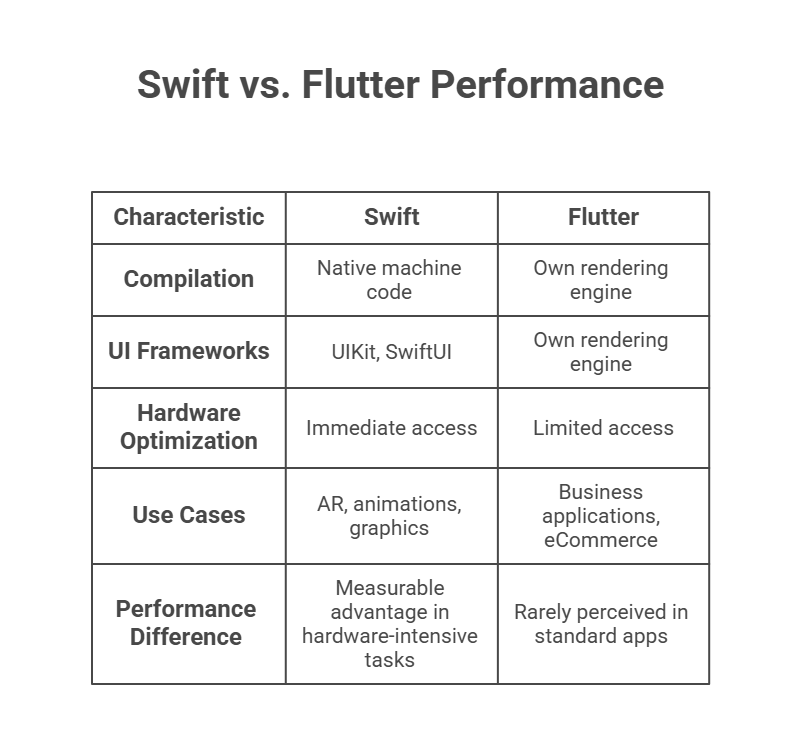
Swift vs Flutter Performance

Swift Performance

Swift compiles directly to native machine code and leverages Apple’s native UI frameworks such as UIKit and SwiftUI. Developers often evaluate architectural decisions through the lens of swiftui vs uikit, especially when determining how to balance declarative UI simplicity with fine-grained performance control.

Native development offers immediate access to Apple’s hardware optimization layers, making it especially suitable for AR applications, high-frame-rate animations, advanced graphics processing, and real-time data systems.

Flutter Performance

Flutter uses its own rendering engine to draw UI components. In most business applications including fintech platforms, booking systems, enterprise dashboards, and eCommerce solutions, performance is smooth and visually consistent.

For standard commercial apps, users rarely perceive performance differences between Flutter and native Swift. However, for extremely hardware-intensive use cases, Swift retains a measurable advantage.

Hiring Strategy and Talent Availability

Technology choice impacts recruitment flexibility and long-term sustainability.

Swift developers remain in high demand, especially in markets with strong iOS adoption. Companies seeking highly specialized Apple ecosystem expertise often prioritize Swift app development services to ensure seamless integration with native APIs and early adoption of new Apple platform features.

Flutter developers, meanwhile, are increasingly attractive for organizations aiming to consolidate iOS and Android skill sets into a single team. This unified hiring strategy can simplify project coordination and reduce overhead.

Ecosystem Integration and Platform Control

Swift offers direct access to every Apple SDK and newly released framework. When Apple introduces new capabilities such as machine learning tools, AR enhancements, or advanced security features, Swift developers can adopt them immediately.

Flutter supports native integrations through plugins and platform channels. Most mainstream functionalities are well supported, but highly specialized or newly released APIs may require custom native modules.

For enterprises investing in long-term Application development services, evaluating how deeply the product depends on platform-specific innovation is critical. If your roadmap depends heavily on immediate adoption of Apple-exclusive features, native Swift provides stronger alignment.

Maintainability and Long-Term Ownership Cost

Maintaining one codebase through Flutter simplifies updates and ensures feature consistency across platforms. Bug fixes can be deployed simultaneously, reducing coordination complexity.

Maintaining separate native codebases increases operational cost but allows each platform to follow its ecosystem’s best practices closely.

If long-term cost optimization and operational efficiency are primary goals, Flutter presents meaningful advantages for multi-platform strategies.

Security and Compliance Considerations

Security standards depend primarily on engineering discipline rather than framework selection.

Swift integrates directly with Apple’s secure APIs and hardware-backed security features. This can be advantageous for industries such as healthcare, finance, or enterprise SaaS platforms.

Flutter applications can achieve equivalent security levels when properly architected, though organizations must carefully vet third-party plugins and native bridges in regulated environments.

Strategic Decision Scenarios

Choose Swift if:

  • You are building a premium iOS-exclusive application
  • You require early access to Apple-native features
  • Your product demands maximum hardware-level performance
  • You already maintain an established iOS codebase

Choose Flutter if:

  • You need both iOS and Android simultaneously
  • You aim to reduce development and maintenance costs
  • You want faster MVP validation
  • You prefer managing a unified development team

Final Perspective

Both Flutter and Swift are mature, enterprise-ready technologies supported by industry leaders.

Swift offers unmatched native optimization and seamless integration within the Apple ecosystem, making it the safest long-term investment for iOS-focused products.

Flutter delivers superior cost efficiency, faster cross-platform expansion, and simplified engineering management, making it a strategic choice for organizations prioritizing scalability and speed.

Future-proofing your investment ultimately depends on aligning your technical foundation with your product roadmap, audience distribution, compliance requirements, and hiring strategy. When technology selection is aligned with business vision, both frameworks can deliver exceptional long-term returns.

B2B Commerce with Salesforce Commerce Cloud

For years, B2B commerce moved at its own pace. Sales reps handled relationships, pricing lived in spreadsheets, and orders came through calls or email threads. That model worked for a long time. It just does not work anymore.

Today’s B2B buyers behave very differently. They research independently. They compare vendors online. They expect transparent pricing, fast reorders, and personalized experiences. In many cases, they would rather not speak to sales at all unless absolutely necessary.

This shift is reshaping the entire B2B ecosystem, and Salesforce Commerce Cloud is playing a major role in that transformation.

B2B Buyers Have Changed More Than We Think

The modern B2B buyer is digitally confident. Procurement teams now expect the same convenience they experience when shopping as consumers. If a website feels outdated, slow, or difficult to navigate, trust erodes quickly.

Recent industry research shows that a large majority of B2B decision-makers prefer remote or self-service purchasing. That alone signals a permanent behavioral shift. This is no longer about adding an online catalog. It is about rebuilding the buying journey.

Businesses that fail to recognize this risk losing deals before they even know they were being considered.

Why Salesforce Commerce Cloud Fits This Moment

Salesforce Commerce Cloud stands out because it does more than power an online store. It connects commerce with sales, service, marketing, and customer data in one environment.

That matters.

B2B organizations often operate in complex structures. Different clients have different pricing agreements. Approval chains vary by order size. Contract terms differ by region. A rigid system simply cannot keep up.

Many enterprises work with a Salesforce development company in USA to tailor Commerce Cloud to these specific operational needs. Custom integrations, pricing logic, and automation workflows ensure that the system reflects real business processes rather than forcing teams to adapt to the software.

When implemented correctly, the platform becomes an operational backbone rather than just a storefront.

Personalization Is No Longer Optional

A common misconception is that personalization only matters in B2C. That is not true anymore.

B2B buyers expect relevant product suggestions, intelligent search results, and pricing that reflects their contract. Salesforce integrates AI capabilities that analyze behavior, purchase history, and browsing patterns to deliver more accurate recommendations.

This is not just about improving user experience. It directly impacts revenue. Personalized product suggestions increase average order value and encourage repeat purchases.

When businesses hire Salesforce developer professionals who understand both AI features and B2B workflows, they unlock the full potential of predictive analytics and automated merchandising.

Handling Complexity Without Slowing Down

B2B commerce is rarely simple. There are bulk discounts, custom catalogs, negotiated pricing tiers, tax variations, and approval workflows that require internal sign-offs.

What makes Salesforce Commerce Cloud powerful is its ability to manage that complexity without overwhelming the buyer. The interface remains clean, while the rules operate quietly in the background.

For example, a distributor might see contract-specific pricing instantly, while another customer sees standard rates. Approval requests can be triggered automatically based on order thresholds. Sales reps can step in when needed, but routine transactions can move forward without manual intervention.

Efficiency increases on both sides.

Headless Commerce and Flexibility for the Future

Technology is evolving quickly. Businesses need flexibility to adapt.

Salesforce Commerce Cloud supports headless architecture, which allows organizations to build customized front-end experiences while keeping the backend stable and secure. This approach provides room for innovation without constant system overhauls.

Mobile optimization is another critical area. Many B2B purchases happen outside traditional office settings. Field managers and procurement officers often place orders from mobile devices. A slow or clunky mobile experience can cost real revenue.

Flexibility is no longer a luxury. It is a requirement.

The Power of a Connected CRM Ecosystem

One of the most overlooked advantages of Salesforce Commerce Cloud is its seamless CRM integration.

When commerce data connects directly with sales and service records, teams gain full visibility into customer history, preferences, and purchasing behavior. That unified data environment improves forecasting, customer support, and retention strategies.

Organizations often collaborate with a CRM software development company to strengthen system integration between CRM, ERP, and commerce platforms. This alignment eliminates data silos and reduces manual reconciliation errors.

The result is smoother operations and better strategic decision-making.


B2B Growth with YES IT Labs

What the Future Likely Looks Like

Looking ahead, B2B commerce will continue moving toward automation and predictive intelligence.

AI-driven pricing adjustments will become more common. Inventory forecasting will rely heavily on behavioral analytics. Customer portals will become increasingly personalized, almost adaptive, based on usage patterns.

We will also see stronger alignment between supply chain systems and commerce platforms. Real-time inventory visibility will become standard, not a competitive advantage.

Companies that embrace these capabilities early will position themselves as industry leaders rather than late adopters.

Final Perspective

The future of B2B commerce is not simply digital. It is connected, intelligent, and customer-driven.

Salesforce Commerce Cloud provides the infrastructure to support that future, but technology alone is not enough. Success depends on thoughtful implementation, strategic customization, and a clear understanding of evolving buyer expectations.

Businesses that treat commerce as part of a larger ecosystem rather than a standalone tool will see the greatest long-term return.

The companies winning in B2B today are not necessarily the biggest. They are the ones that adapt the fastest.

VR Revolution

Virtual reality VR is no longer limited to gaming or entertainment. Today, it is reshaping how businesses operate, how students learn, and how people connect across distances. From immersive corporate training to virtual classrooms and collaborative workspaces, VR development is redefining digital interaction in ways that were unimaginable just a decade ago.

As hardware becomes more affordable and software ecosystems mature, organizations across industries are integrating immersive technology into their workflows. Let’s explore how VR is transforming work, education, and human connection, supported by real insights and practical applications.

The Growth of VR: What the Numbers Say

The global virtual reality market has experienced rapid expansion in recent years. Industry research estimates the VR market will continue growing at a strong compound annual growth rate over the next several years, driven largely by enterprise adoption, healthcare innovation, and remote collaboration tools.

Training and simulation are among the fastest-growing enterprise use cases. Multiple studies suggest immersive learning environments can significantly improve knowledge retention compared to traditional classroom methods. This data is encouraging organizations to move beyond experimentation and toward long-term VR implementation strategies.

VR in the Workplace: From Remote Meetings to Skill-Based Simulation

1. Immersive Collaboration

Remote and hybrid work models have made collaboration tools essential. While video conferencing solves communication challenges, it often lacks engagement and spatial interaction. VR-based meeting spaces allow teams to:

  • Interact with 3D models in real time
  • Use spatial audio for natural conversations
  • Conduct immersive design reviews
  • Create shared digital whiteboards


These environments increase presence and reduce the fatigue associated with traditional video calls.

2. High-Impact Training and Onboarding

Industries such as manufacturing, aviation, retail, and energy use VR simulations to train employees in realistic yet risk-free environments. Workers can practice procedures repeatedly without operational downtime or safety hazards.

Organizations investing in VR app development solutions are seeing measurable improvements in employee preparedness, reduced onboarding time, and greater consistency in training outcomes. Immersive repetition builds muscle memory far more effectively than passive instruction.

3. Productivity and Cost Efficiency

VR training reduces travel costs, minimizes physical infrastructure needs, and allows global teams to learn simultaneously. For companies with distributed teams, immersive workspaces create a more cohesive digital environment.

VR in Education: Higher Engagement and Retention

Education is one of the most powerful applications of VR technology.

Why VR Enhances Learning

  • Experiential Learning: Students can explore historical landmarks, conduct virtual science experiments, or practice medical procedures in simulated environments.
  • Active Participation: Learners engage directly with content rather than passively consuming it.
  • Improved Retention: Research suggests immersive learning can significantly improve memory retention compared to traditional lecture-based approaches.
  • Safe Skill Practice: Students can make mistakes and learn from them without real-world consequences.


In professional education, particularly medical and technical training, immersive simulations have shown promising results in improving practical competence and decision-making under pressure.

VR in Healthcare: Safer Training and Better Outcomes

Healthcare is one of the most transformative sectors for VR technology. Surgeons can practice complex procedures, nurses can simulate emergency scenarios, and therapists can use VR for exposure therapy and rehabilitation.

The integration of immersive platforms within healthcare software development in USA is accelerating innovation in medical training and patient care. Hospitals and medical institutions are leveraging VR to enhance precision training, reduce procedural errors, and improve patient education.

In surgical simulations, performance metrics such as hand movement precision, timing, and procedural accuracy can be tracked and analyzed. This data-driven feedback loop makes training more measurable and personalized.

How VR Is Changing Human Connection

Beyond work and education, VR is redefining social interaction.

Virtual Social Spaces

Social VR platforms allow users to meet in immersive environments where avatars interact in shared 3D spaces. Unlike traditional social media or video calls, VR creates a sense of presence that fosters deeper engagement.

Users can attend concerts, networking events, therapy sessions, and collaborative workshops in fully immersive environments. Spatial presence increases emotional connection compared to flat-screen interactions.

However, challenges such as motion sickness, device comfort, and accessibility still influence long-term adoption.

The Role of AI in the Future of VR

Artificial intelligence is rapidly enhancing immersive environments. AI-driven avatars can respond naturally to user behavior, adaptive learning modules can personalize training, and data analytics can measure performance improvements.

Companies offering AI software development services in USA are integrating machine learning algorithms into immersive platforms to create intelligent simulations. This combination enables:

Key Benefits Organizations Are Reporting

Companies adopting VR development strategies commonly report:

  • Faster employee skill acquisition
  • Reduced training costs
  • Improved knowledge retention
  • Higher engagement levels
  • Enhanced remote collaboration
  • Safer practice environments

In sectors where real-world mistakes are costly or dangerous, VR provides immense value.

Barriers and Considerations

Despite its advantages, VR adoption comes with challenges:

  • Initial hardware investment
  • Content development complexity
  • Integration with existing systems
  • User adaptation and comfort
  • Data security concerns

Successful implementation requires strategic planning, pilot testing, and clear performance measurement.

Practical Steps to Implement VR Successfully

If your organization is considering VR, follow this roadmap:

  1. Define measurable objectives.
  2. Identify high-impact use cases.
  3. Start with a controlled pilot program.
  4. Measure performance metrics before and after implementation.
  5. Gather user feedback for improvement.
  6. Scale gradually based on results.


Hybrid approaches that combine VR with traditional learning or collaboration methods often produce the best outcomes.

The Future of Work, Learning, and Connection

As devices become lighter and more affordable, immersive environments will likely become more integrated into daily workflows. Mixed reality and AI-powered simulations will further blur the line between digital and physical spaces.

VR is not a replacement for all traditional methods, but it excels in situations where presence, spatial awareness, and experiential learning matter most. Organizations that adopt it strategically will gain a competitive advantage in training efficiency, workforce development, and digital engagement.

Final Thoughts

Virtual reality development is transforming how we work, learn, and connect by introducing immersive, data-driven, and highly interactive environments. With measurable improvements in retention, engagement, and operational efficiency, VR is shifting from experimental technology to essential business tool.

As innovation continues, the integration of immersive systems across industries will only accelerate, shaping a future where distance is no longer a barrier to meaningful collaboration or skill development.

Machine Learning vs Traditional Programming

Machine learning and traditional programming both help us build software that solves problems. However, the way they reach solutions is fundamentally different. Understanding how each approach works makes it easier to decide which one fits your project, business model, or long-term technology strategy.

In simple terms, traditional programming relies on clearly written instructions, while machine learning relies on data to discover patterns.

Quick Overview

Traditional Programming
Input + Rules = Output

Machine Learning
Input + Output Data = Learned Rules (Model)

With traditional programming, developers define the logic. With machine learning, the system discovers the logic from examples.

What Is Traditional Programming?

Traditional programming is based on explicit rules written by developers. Every condition, calculation, and instruction is carefully defined in advance.

How It Works

  1. Define the problem clearly.
  2. Write structured rules and logic.
  3. Test outputs against expected results.
  4. Deploy the application.

Example

If you need to calculate sales tax:

if state == "CA":

    tax = price * 0.0725

else:

    tax = price * 0.05

The behavior is predictable. Given the same input, the output will always be the same.

Best Use Cases

  • Accounting systems
  • Payroll software
  • Compliance and regulatory checks
  • Inventory calculations
  • Data validation systems

Strengths

  • High transparency
  • Easy to debug
  • Low computing requirements
  • Deterministic results

Limitations

  • Hard to manage when rules grow complex
  • Limited ability to handle unstructured data
  • Cannot easily adapt to new patterns without rewriting code

What Is Machine Learning?

Machine learning allows computers to learn patterns from data instead of following only predefined rules. Rather than coding every scenario manually, developers train a model using historical examples.

How It Works

  1. Collect and prepare data.
  2. Select an algorithm such as regression, decision tree, or neural network.
  3. Train the model on data.
  4. Validate performance using unseen data.
  5. Deploy and monitor the model.


The model gradually improves as it sees more relevant data.

Best Use Cases

  • Image recognition
  • Voice assistants
  • Fraud detection
  • Product recommendations
  • Predictive maintenance
  • Customer behavior analysis

Strengths

  • Handles complex and large-scale data
  • Adapts over time
  • Identifies patterns humans may overlook
  • Scales effectively with more data

Limitations

  • Requires large volumes of quality data
  • Can be difficult to interpret
  • Needs ongoing monitoring
  • Higher infrastructure cost

Core Differences Explained

Feature Traditional Programming

Machine Learning

Source of Logic

Written by developers

Learned from data

Data Requirement

Low

High

Predictability

Fully predictable

Probabilistic

Maintenance

Update code

Retrain models

Explainability

Clear and direct

Depends on model type

Handling Complexity

Limited

Strong

Traditional programming focuses on logic. Machine learning focuses on patterns.

Real-World Example: Spam Detection

In a rule-based system, developers might define spam using keywords, sender reputation, or link count. That works initially, but spammers constantly change their tactics.

In a machine learning system, a model is trained on millions of labeled emails. It learns writing style patterns, structural cues, and behavioral signals that are not obvious at first glance.

Most modern spam filters combine both approaches. Simple rules filter obvious spam, and machine learning handles more subtle cases.

Industry Growth and Market Insights

Artificial intelligence and machine learning adoption has grown significantly across industries in recent years. Studies show that a majority of medium and large enterprises now integrate AI or ML into at least one operational function. Areas like fraud detection, logistics optimization, and customer analytics have seen measurable efficiency gains.

For organizations that lack in-house expertise, partnering with a specialized machine learning development company can accelerate deployment and reduce costly experimentation. These companies typically provide end-to-end services, from data preparation to model deployment and monitoring.

When Should You Choose Traditional Programming?

Traditional programming is ideal when:

  • The rules are clearly defined.
  • Regulations require full explainability.
  • The system must behave consistently.
  • Data is limited or unreliable.
  • Budget constraints are strict.


Examples include tax calculation software, reporting tools, and structured database management systems.

When Should You Choose Machine Learning?

Machine learning is suitable when:

  • The problem involves pattern recognition.
  • Large datasets are available.
  • Rules are too complex to define manually.
  • Continuous improvement is beneficial.
  • Personalization or prediction is required.


Examples include recommendation engines, speech recognition systems, and predictive analytics platforms.

Maintenance Differences

Traditional software is maintained by updating logic and redeploying code when requirements change.

Machine learning systems require additional lifecycle management:

  • Monitoring for data drift
  • Retraining with new data
  • Performance validation
  • Model version control


This ongoing process is often referred to as MLOps.

Cost Considerations

Traditional programming typically involves development time and standard infrastructure costs.

Machine learning adds:

  • Data collection and labeling expenses
  • Specialized expertise such as data scientists
  • Training infrastructure, sometimes including GPUs
  • Ongoing monitoring systems


Although the initial investment is higher, the long-term returns can be substantial if the solution drives automation or predictive accuracy improvements.

Across industries, organizations increasingly treat data as a long-term strategic asset. Instead of relying solely on static systems, companies are building scalable AI-driven platforms designed to evolve with real-world conditions. Many enterprises partner with providers offering AI software development services in USA to implement solutions that meet strict regulatory and performance requirements, particularly in healthcare, finance, and e-commerce.

This broader shift reflects how businesses now view machine learning not as an experiment, but as a core capability for extracting measurable value from data.

The Hybrid Reality

In practice, most modern systems combine both approaches.

A financial application might use rule-based eligibility checks first, followed by a machine learning model that predicts risk probability. Human reviewers may then evaluate edge cases.

This layered approach balances control with adaptability.

Final Thoughts

Machine learning and traditional programming are complementary methods rather than competing technologies.

Traditional programming provides precision, clarity, and direct control. Machine learning offers adaptability, scalability, and advanced pattern recognition.

The right choice depends on the nature of the problem, the availability of data, regulatory requirements, and long-term business objectives.

Understanding the differences helps organizations build smarter, more efficient, and future-ready systems.

ChatGPT Ads-Ai Monetization

Artificial intelligence assistants have rapidly evolved from experimental tools into essential digital infrastructure. With massive user adoption and growing operational costs, companies behind conversational AI are now exploring sustainable monetization models. Advertising is one of the most discussed and debated options.

This article explains how ads in AI systems like ChatGPT may function, why companies are moving in this direction, the ethical challenges involved, and what users, businesses, and regulators should consider going forward.

Key Numbers Shaping the Discussion

The scale of conversational AI adoption explains why monetization is such a pressing issue.

  • ChatGPT-scale platforms serve hundreds of millions of users each week, with estimates ranging between 400 million and 800 million active users globally during 2024 and early 2025.
  • ChatGPT-related products reportedly generated around $2.7 billion in revenue in 2024, largely from subscriptions and enterprise use.
  • Global digital advertising spend is expected to surpass $700 billion, reinforcing why AI interfaces are attracting interest from advertisers.

For many traditional players, including a Social media marketing company in USA, conversational AI represents a new high-intent channel rather than just another placement option.

How Advertising in AI Assistants typically works

Advertising inside AI assistants differs significantly from banners or social feeds. Instead of competing for attention, ads appear during active conversations where users are already seeking answers.

Common formats include:

  • Sponsored responses, clearly labeled and shown only when queries are commercial in nature
  • Product or service recommendation cards, often with pricing and comparison details
  • Interface-level placements, where ads appear around the response rather than inside it
  • Context-aware suggestions, based on the current topic instead of long-term user profiling


This approach resembles how an Online Ads Service Company targets search intent, but the conversational setting raises higher expectations around neutrality and trust.

Why AI Companies are Exploring Advertising

Several structural factors are pushing AI platforms toward ad-based monetization.

First, subscription models alone may not sustain free access for hundreds of millions of users. Second, infrastructure and computing costs continue to rise as models grow more advanced. Third, competition among AI platforms is increasing, making diversified revenue streams essential.

For providers of Ai software development services in USA, this shift highlights how monetization decisions now directly influence system architecture, privacy design, and user experience from the earliest stages.

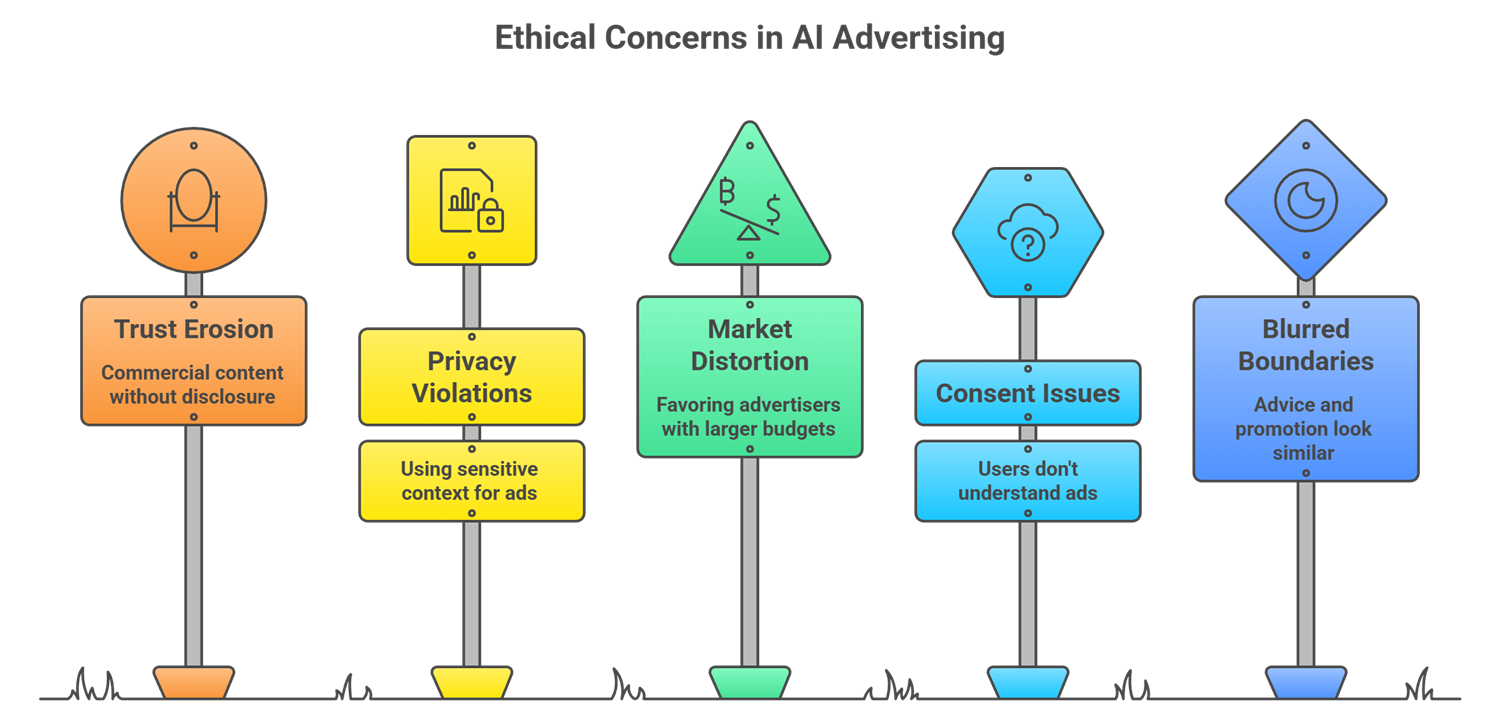
Core Ethical Concerns Surrounding AI Advertising

Core Ethical Concerns Surrounding AI Advertising

Trust and Perceived Manipulation

Users often assume AI responses are impartial. When commercial content blends into answers without clear disclosure, trust can erode quickly.

Privacy and Sensitive Context

AI conversations may involve health, finances, or emotional situations. Using such context for advertising raises serious concerns around consent and data protection.

Bias and Market Distortion

Paid placements risk favoring advertisers with larger budgets, potentially limiting fair visibility for smaller or independent providers.

User Consent and Autonomy

Ethical monetization requires that users understand when they are seeing ads and can easily control or disable them.

Blurred Boundaries Between Advice and Promotion

When factual guidance and sponsored messaging look similar, users may struggle to distinguish objective information from paid influence.

What Research and User Behavior Indicate

User surveys consistently show cautious acceptance of AI-driven advertising. Many users are open to AI-assisted shopping or recommendations, but comfort drops sharply when ads are not clearly labeled.

Trust improves when platforms explain:

  • Why a recommendation appears
  • Whether it is sponsored
  • How personalization works
  • How users can opt out

Transparency remains the strongest predictor of user acceptance.

Principles for Ethical AI advertising

Responsible implementation requires clear safeguards. Commonly recommended principles include:

  • Clear and consistent labeling of sponsored content
  • Restrictions on advertising in sensitive topics such as healthcare or legal advice
  • Minimal data use with preference for contextual relevance
  • Simple and accessible ad and privacy controls
  • No deceptive formatting that mimics neutral responses
  • Public transparency reports on ad practices
  • Independent ethical oversight

These measures help balance revenue needs with user trust.

Regulatory Outlook

Regulators are increasingly focused on AI transparency, consumer protection, and data privacy. As AI assistants become primary gateways to information, scrutiny around advertising disclosures and data usage is expected to increase.

Future regulations are likely to define how sponsored AI content must be labeled and which data can be used for monetization.

What this means for Advertisers and Brands

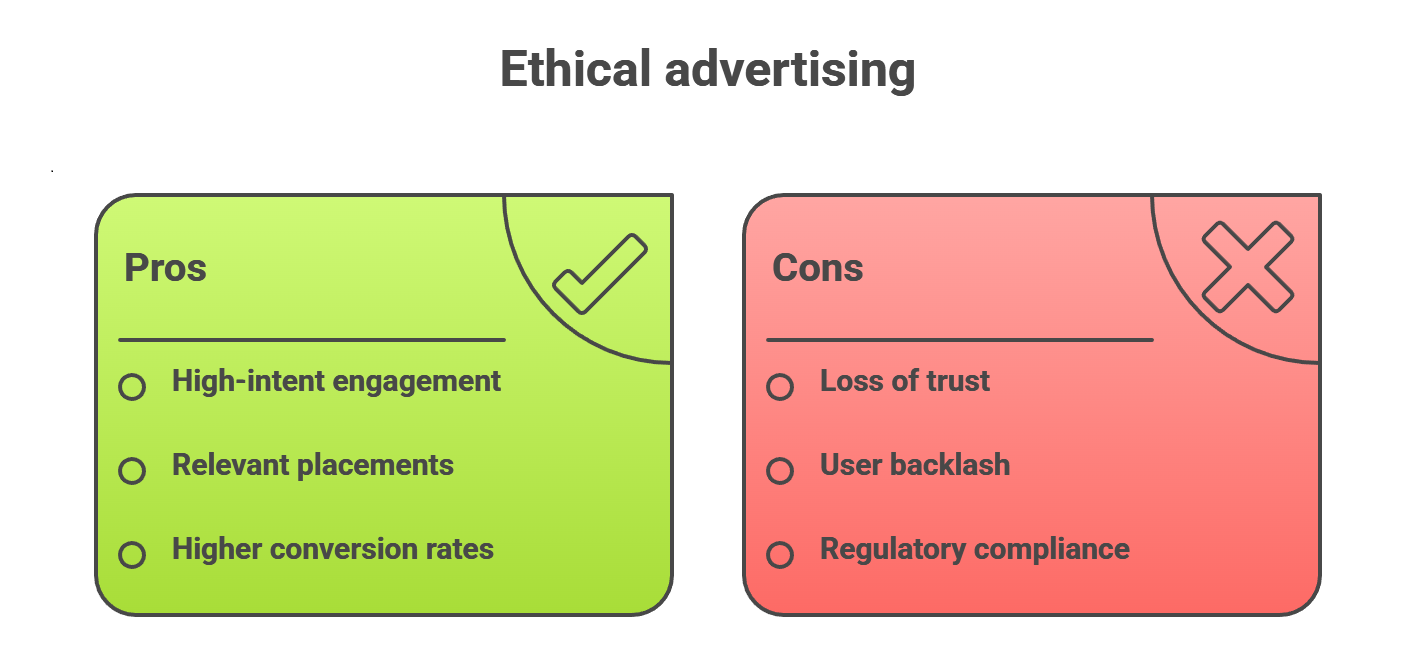
Ethics of AI Monetization

Opportunities

  • High-intent engagement
  • More relevant placements
  • Potentially higher conversion rates

Risks

  • Loss of brand trust if ads feel deceptive
  • User backlash against intrusive placements
  • Increased regulatory compliance requirements

Brands that prioritize clarity and ethical alignment will be better positioned for long-term success.

What users can do

Users can take practical steps to protect themselves:

  • Review ad and privacy settings in AI tools
  • Opt out of personalization where available
  • Treat recommendations as starting points, not final advice
  • Provide feedback when ads feel inappropriate

User behavior and feedback directly influence how platforms evolve.

Final thoughts

Advertising and ethics can coexist in AI systems, but only with thoughtful design and strong guardrails. Monetization is necessary to sustain accessible AI, yet conversational assistants carry a higher expectation of trust than traditional platforms.

The future of AI monetization will be defined by transparency, user choice, and respect for context. Companies that prioritize ethical implementation will be best positioned to earn long-term trust in an AI-driven digital economy.

Java SE Development Kit

When Oracle released Java SE 8 in 2014, few predicted it would still power a significant share of production systems more than a decade later. Yet here we are in 2026, and the Java Standard Edition Development Kit (JDK) remains the backbone of everything from mobile banking platforms to global streaming services serving billions of users every day.

Java’s longevity is not accidental. It is the result of deliberate engineering choices, a conservative evolution model, and a platform that prioritizes reliability, performance, and long-term maintainability over short-lived trends.

What Exactly Is the Java SE Development Kit?

The Java SE Development Kit is far more than a compiler. It is a complete production-grade platform for building, running, monitoring, and securing Java applications.

Modern JDK distributions include:

  • Development tools such as javac, javadoc, jdb, and advanced monitoring utilities
  • The Java Virtual Machine (JVM)
  • A comprehensive set of standard class libraries covering networking, concurrency, cryptography, and input and output


Since Java 11, the standalone Java Runtime Environment has been discontinued. Today, everything ships as a JDK, and production runtimes are typically custom-built using jlink, allowing teams to assemble minimal runtime images containing only the modules an application actually needs. This reduces memory usage, startup time, container size, and attack surface, which is a major advantage in cloud-native environments.

This modular delivery model is one reason enterprises investing in Oracle development services continue to favor Java for long-term, mission-critical platforms.

The Architecture That Changed Software Development

Java’s well-known “write once, run anywhere” promise is grounded in a rigorously engineered architecture.

Java source code is compiled into platform-independent bytecode, not native machine instructions. That bytecode runs on the JVM, which abstracts away operating system and hardware differences. Whether the target is Windows, Linux, macOS, ARM-based cloud instances, or embedded systems, the same compiled application runs unchanged.

This eliminated the historical need for multiple platform-specific codebases. Enterprises that once maintained separate builds for different operating systems could consolidate into a single, portable system. Industry studies consistently show that this portability reduces long-term maintenance costs by 30 to 40 percent compared to platform-specific stacks.

The Module System and Long-Term Maintainability

A major architectural evolution arrived with Java 9 in the form of the Java Platform Module System.

This system introduced strong encapsulation, explicit dependency declarations, and reliable configuration at compile time and runtime. For large organizations maintaining millions of lines of Java code, this solved the long-standing problem of classpath conflicts.

Modules enforce boundaries, prevent accidental dependency leaks, and make refactoring large systems safer, which is critical for software expected to live for decades. This is one reason enterprises evaluating a Java development company in USA often prioritize deep JVM modularity expertise rather than surface-level framework knowledge.

Real-World Impact Across Industries

Real-World Impact Across Industries

Java’s dominance is best illustrated by where it is trusted with mission-critical workloads.

  • Netflix runs large portions of its recommendation and streaming infrastructure on Java, processing massive datasets for over 230 million subscribers.
  • Spotify delivers music to hundreds of millions of users through JVM-based systems, with Java and Kotlin powering core services.
  • LinkedIn relies heavily on Java to serve nearly a billion professionals worldwide.


In finance, Java’s reliability is unmatched. The LMAX Exchange processes millions of orders per second on a heavily optimized Java stack with microsecond-level latency. Global banks process trillions of dollars daily through Java-based systems because the JDK provides predictable performance, strong security guarantees, and operational stability.

Also Read: Integrating AI with the Java Development Kit

Modern Language Features That Matter

Java’s evolution over the last decade has significantly improved developer productivity.

Java 17 and Java 21, both Long-Term Support releases, introduced records for concise immutable data carriers, pattern matching for cleaner control flow, sealed classes to model restricted hierarchies, and production-ready virtual threads through Project Loom.

Records alone reduced common data-model boilerplate from dozens of lines to a single declaration. Virtual threads fundamentally change how Java handles concurrency, allowing applications to scale to millions of concurrent tasks without the complexity and overhead of traditional thread management.

JVM Performance and Adaptive Optimization

A persistent myth claims Java is slow. In reality, modern JVM performance often matches or exceeds C++ in real-world workloads.

The JVM employs tiered compilation, combining interpretation with multiple levels of Just-In-Time compilation. As applications run, the JVM continuously profiles behavior, identifies hot paths, and recompiles them with increasingly aggressive optimizations.

This feedback-driven optimization allows Java applications to adapt dynamically to real workloads, which is something static ahead-of-time compilation cannot do.

Predictable Garbage Collection at Scale

Modern garbage collectors such as ZGC and Shenandoah focus not just on speed, but on predictability.

They can manage multi-terabyte heaps with pause times typically under 10 milliseconds, even under heavy load. For latency-sensitive systems like trading platforms, online gaming, and real-time analytics, consistent response times matter more than raw throughput.

Java’s garbage collection technology has matured into one of its strongest competitive advantages.

Security by Design

Security is deeply embedded in the Java platform.

The JVM enforces strict type safety, performs bytecode verification, and isolates memory access. Regular security updates are released on a predictable cadence, allowing enterprises to patch vulnerabilities quickly.

Although the legacy Security Manager is being phased out, modern Java security relies on strong runtime isolation, container and operating system level sandboxing, and cryptography APIs refined through decades of real-world use. This security-first posture is a key reason regulated industries continue to rely on Java-based platforms built by large-scale Software development company in USA providers.

The Ecosystem Advantage

The JDK’s real strength lies in the ecosystem it enables.

Frameworks like Spring Boot dominate enterprise development. Maven Central serves hundreds of billions of dependency requests annually. JVM-based technologies such as Apache Kafka, Spark, and Elasticsearch have become industry standards.

Developers rarely start from scratch. Whether building REST APIs, processing massive datasets, or integrating with legacy systems, the Java ecosystem provides mature and battle-tested solutions.

How YES IT Labs Helps Businesses Succeed with Java

At YES IT Labs, we help businesses turn the power of the Java SE Development Kit into scalable, secure, and future-ready solutions. We design and modernize Java platforms using modular JDK architectures, cloud-native deployment strategies, and performance-focused JVM tuning. Our team supports organizations across the full development lifecycle, from legacy system modernization and microservices migration to high-performance backend development and long-term platform support. By aligning Java’s technical strengths with real business goals, we help reduce operational risk, improve system reliability, and build software that is ready to scale with demand.

Cloud-Native and Container-Ready Java

Java has evolved alongside the cloud.

Modern JDKs are container-aware, respect memory and CPU limits, and start faster with reduced footprints. Technologies like GraalVM enable ahead-of-time compilation into native executables for ultra-fast startup times. Project CRaC introduces checkpoint and restore capabilities that reduce startup latency to milliseconds.

These innovations make Java competitive even in serverless and ephemeral compute environments.

Observability and Production Diagnostics

Java is one of the most observable production platforms available.

Built-in tools such as Java Flight Recorder and Java Mission Control provide deep, low-overhead insights into live systems. Integration with OpenTelemetry and modern logging frameworks allows teams to trace requests, diagnose bottlenecks, and identify memory issues without taking systems offline.

This operational transparency is a major reason Java remains favored in large-scale production environments.

Vendor Neutrality and Long-Term Stability

Modern Java is no longer tied to a single vendor. Enterprises commonly deploy vendor-neutral JDK distributions such as Eclipse Temurin, Amazon Corretto, or Azul Zulu.

This competitive ecosystem ensures long-term security updates, predictable licensing, and freedom from vendor lock-in. Combined with Java’s strict backward compatibility guarantees, this makes Java uniquely suited for systems expected to run for decades.

Looking Forward

Java’s future remains strong.

Project Loom simplifies concurrency. Project Valhalla introduces value types for improved memory efficiency. Enhancements to the Foreign Function and Memory API make native integration safer and cleaner. The six-month release cadence ensures steady innovation without destabilizing the platform.

Despite the rise of newer languages, Java continues to dominate high-value and mission-critical systems.

Final Thoughts

The Java SE Development Kit endures because it solves real problems reliably, securely, and at scale. Its combination of performance, portability, observability, and ecosystem depth is unmatched.

While newer languages attract attention with novelty, Java’s disciplined evolution, backward compatibility, and enterprise-grade engineering keep it essential. From smartphones to financial markets to cloud infrastructure, the JDK quietly powers the modern digital world.